
Key restaurant POS features include order entry, menu and modifier management, kitchen communication, open checks, flexible payments, staff permissions, and sales reporting. Full-service restaurants also need table and course management, while quick-service restaurants, cafés, and takeaway operations often prioritize fast ordering, preparation queues, and pickup coordination.
A restaurant POS system should support how employees take orders, prepare food, serve customers, and settle bills. An incorrect modifier, a missing kitchen ticket, or a poorly handled split payment can interrupt service even when the checkout screen works correctly.
What Features Should a Restaurant POS System Have?
Modern restaurant point-of-sale software combines checkout functionality with order management, kitchen operations, and transaction controls.
The required capabilities vary by service model. Table management may be essential for a full-service restaurant but unnecessary for a small takeaway counter. A delivery-focused kitchen may prioritize incoming orders and preparation status over dining-room floor plans.
A restaurant POS system connects ordering, preparation, service, and payment. The features supporting those activities must match how the restaurant operates, including its menu structure, ordering channels, payment requirements, and kitchen setup.
15 Restaurant POS Features to Evaluate
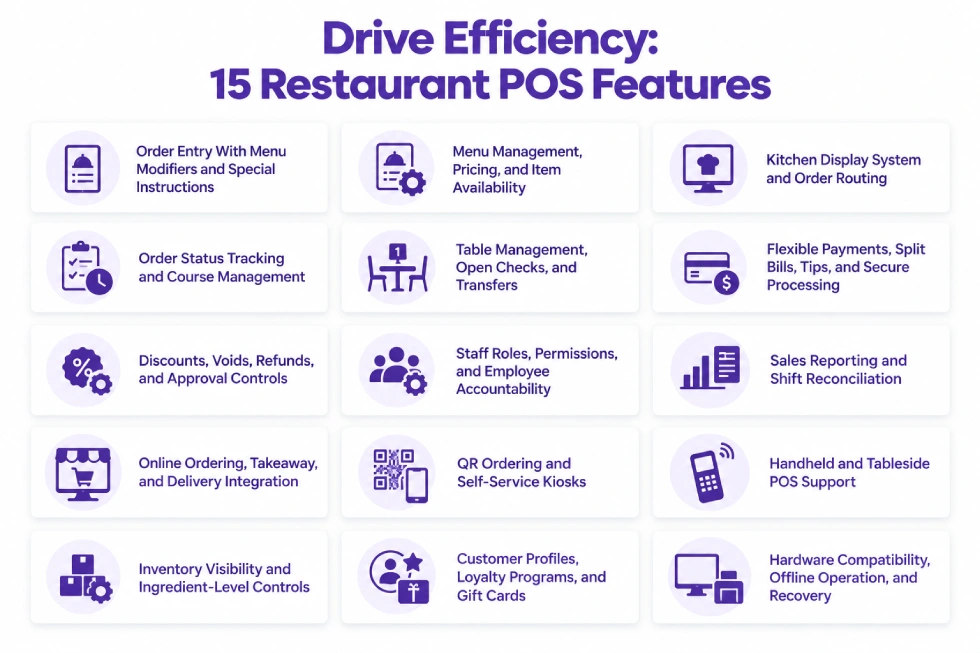
1. Order Entry With Menu Modifiers and Special Instructions
Restaurant POS software must capture what the customer actually ordered, including quantities, substitutions, additions, and preparation instructions.
A customer ordering a burger might remove onions, add cheese, select a side, and request a specific cooking preference. Each selection needs to remain attached to the correct order item.
A properly configured system distinguishes between modifiers that change the price and instructions that only affect preparation.
For example, extra cheese may increase the price, while removing onions may not. Both instructions still need to reach the kitchen.
Useful capabilities include item-level notes, quantity adjustments, combo meals, required selections, and configurable modifier groups.
Employees should be able to enter common orders without relying on free-text notes for every substitution. The system should also enforce mandatory choices, such as selecting a side with a meal, when required by the menu configuration.
Allergy-related instructions require a clear communication process and staff verification. A POS note alone cannot guarantee allergen safety.
2. Menu Management, Pricing, and Item Availability
A restaurant POS should allow authorized employees to maintain menus without repeatedly editing individual orders.
Menu management includes product names, categories, prices, modifiers, meal combinations, taxes, and item availability.
Restaurants may need different menus or pricing rules for breakfast, lunch, dinner, dine-in, takeaway, or delivery. Some also require temporary promotions or location-specific pricing.
Item availability becomes particularly important when the kitchen runs out of an ingredient or menu item.
If a popular dish sells out, employees should be able to prevent new orders for that item through the relevant ordering channels.
Marking an item unavailable at the register does not necessarily update the restaurant’s website or connected delivery platforms. The behavior depends on the available integrations and how menu information is synchronized.
Menu controls should also restrict who can modify prices, taxes, discounts, and availability settings.
3. Kitchen Display System and Order Routing
Kitchen communication is one of the most important restaurant POS capabilities.
A POS can send ordered items to preparation printers or a kitchen display system (KDS), reducing dependence on handwritten tickets and verbal instructions.
Configured routing determines which preparation station receives each item. Food may go to the main kitchen, drinks to the bar, and desserts to another station.
A kitchen display can show order numbers, items, modifiers, special instructions, and preparation stages.
For example, a single customer order containing two entrées, a cocktail, and a dessert may need to reach several preparation areas without being entered separately.
The system must route items according to preparation responsibilities rather than simply sending every item to every station.
Order changes require additional attention. If a customer removes an item after the kitchen has received it, employees need a reliable way to communicate the cancellation or replacement.
Kitchen routing accuracy depends on menu configuration, preparation-station assignments, and employee procedures, not simply the presence of a display.
4. Order Status Tracking and Course Management
Restaurants need to distinguish between orders that have been entered, sent for preparation, prepared, served, and paid.
Those events do not necessarily happen at the same time.
Order status tracking helps front-of-house employees understand whether food is waiting, being prepared, or ready for pickup.
Full-service restaurants may also need course management.
A server can enter appetizers, main courses, and desserts during the same service interaction while controlling when each course is released to the kitchen.
Without that control, the kitchen may begin preparing dishes before the table is ready for them.
For example, appetizers might be served while main courses remain on hold. The server releases the next course when the appropriate stage of service is reached.
Counter-service operations may prioritize preparation queues and pickup statuses rather than formal course management.
Preparation status must also remain separate from payment status. An order can be ready for service while its check remains open.
5. Table Management, Open Checks, and Transfers
Full-service restaurants need to manage tables and customer checks throughout a meal.
Restaurant POS table management may include floor plans, table assignments, occupancy status, server assignments, and open checks.
An open check allows employees to add items over time instead of creating unrelated transactions whenever a guest orders something else.
For example, four guests may order drinks first, add appetizers, and request main courses later. Their orders remain associated with the same table and check until settlement.
Transfers and merges matter when guests change tables or employees need to combine service records.
If guests move from a bar to a dining table, the POS may need to transfer an open check while retaining the ordered items and payment information.
A system should preserve the transaction when staff change tables, transfer responsibility between servers, or split a check into separate payments.
Bars may need named tabs rather than table-based checks. Small quick-service restaurants may not need floor-plan management at all.
6. Flexible Payments, Split Bills, Tips, and Secure Processing
Restaurant payment requirements extend beyond accepting a card at checkout.
Depending on the business, employees may need to collect cash, process supported card payments, divide bills, accept tips, issue refunds, or settle a check using multiple payment methods.
Bill splitting may involve dividing the total equally, assigning individual items to different guests, or accepting separate payment amounts.
A table of six might request three different bills, with one guest paying cash and the others using cards.
The POS must preserve the relationship between each payment and the original transaction.
Tip handling also needs to match the restaurant’s service and payment process.
Payment security is equally important. Restaurants accepting payment cards have applicable PCI DSS responsibilities, even when a third-party payment processor handles card transactions.
Compatible payment terminals, secure integrations, access controls, and appropriate handling of payment information are part of a reliable payment setup.
The restaurant should confirm which payment data the POS environment handles, what responsibilities remain with the merchant, and which security controls the provider supports.
Payment functionality varies by processor, terminal, software version, and configuration. Split payments, partial settlement, and tips should be tested using realistic restaurant transactions rather than assumed to work across every integration.
7. Discounts, Voids, Refunds, and Approval Controls
Restaurant employees frequently need to correct transactions.
A guest may receive the wrong item, a manager may authorize a discount, or an employee may need to remove an item entered by mistake.
The POS should distinguish between discounts, voids, refunds, and cancellations because each has a different financial and operational effect.
A voided item may have already reached the kitchen. Removing it from the bill does not necessarily stop preparation.
Manager approval rules can restrict sensitive actions such as unusually large discounts, refund processing, or voiding completed items.
Transaction records should identify the adjustment, the employee responsible, and the reason where supported.
For example, an employee may be allowed to correct an order before kitchen submission but require manager approval for a refund after payment.
Clear permissions and audit records help restaurants investigate discrepancies without relying only on shift-end explanations.
8. Staff Roles, Permissions, and Employee Accountability
Restaurant POS software is used by employees with different responsibilities.
Servers may need order-entry permissions, cashiers may handle settlements, and managers may require broader control over refunds, pricing, reports, and register operations.
Role-based access can limit sensitive actions while allowing employees to complete normal service tasks.
Individual logins or employee identification help associate transactions, adjustments, and other activities with the people who performed them.
For example, a server may be allowed to add items to a table but require manager approval to void an item after it has been sent to preparation.
Permissions may also determine who can open or close registers, view sales reports, adjust prices, or access customer information.
POS employee controls are not automatically equivalent to complete staff scheduling, payroll, or labor management. Those functions may require additional applications.
9. Sales Reporting and Shift Reconciliation
Restaurant managers need transaction records that explain what was sold, how customers paid, and what adjustments occurred during service.
Useful restaurant POS reporting may include sales by period, menu item, payment method, employee, and location where applicable.
Discounts, refunds, voids, and tips may also require separate visibility.
At shift close, the restaurant should be able to compare recorded cash payments with the actual cash drawer balance and investigate differences.
For example, a register may show expected cash based on completed transactions, while the employee counts the amount physically present.
Managers should be able to distinguish gross sales, discounts, refunds, taxes, tips, and payment totals rather than relying on one combined sales figure.
Reports may also help identify frequently sold items, busy periods, and transaction adjustments.
POS sales reporting supports day-to-day operations, but it does not automatically replace financial accounting, food-cost analysis, or profit reporting.
10. Online Ordering, Takeaway, and Delivery Integration
Restaurants accepting orders beyond the dining room need a reliable way to bring those transactions into preparation and fulfillment.
Orders may originate from the restaurant’s website, a QR ordering interface, a delivery platform, or another connected channel.
Supported integrations can reduce manual entry and send relevant order details to the kitchen.
The system may need to capture the order source, requested fulfillment time, customer information, item modifiers, packaging instructions, and payment status.
A takeaway order may require a pickup reference, while a delivery order may need handoff instructions.
Changes and cancellations can create problems when the ordering platform and restaurant POS maintain different transaction states.
For example, a customer may cancel an order through a delivery platform after the kitchen has already started preparation. The restaurant needs to know whether that cancellation reaches its POS and preparation workflow.
Receiving an order successfully does not guarantee that subsequent availability, modification, or cancellation updates synchronize correctly.
11. QR Ordering and Self-Service Kiosks
Customer-operated ordering can be useful for restaurants that want guests to browse menus and submit orders without requiring employees to enter every item.
QR ordering allows customers to access a menu using their own devices. Depending on the implementation, it may also support order placement and payment.
A self-service kiosk POS provides a dedicated ordering interface, commonly used in quick-service restaurants and other structured service environments.
These capabilities require accurate menu information, modifier controls, and a reliable connection to preparation.
For example, a customer may use a kiosk to choose a meal, select a drink, customize the order, and pay before receiving a pickup number.
The POS must associate that order with the correct preparation instructions and fulfillment reference.
Restaurants also need procedures for customers who cannot complete an order independently or need assistance with special requests.
Self-ordering is not mandatory for every restaurant. Full-service dining may benefit more from employee-assisted ordering and table service.
12. Handheld and Tableside POS Support
Handheld ordering devices allow employees to enter orders closer to where customers are served.
In a full-service restaurant, a server may record items at the table and send them to preparation without returning to a fixed register.
Some configurations also support tableside checkout, allowing customers to pay without leaving their seats.
This is an application of mobile POS, which uses portable devices for checkout and transaction-related activities.
Handheld devices should support the restaurant’s existing order and check workflows.
For example, a server may need to reopen an existing check, add items with modifiers, send the additions to preparation, and later collect payment using the same or another compatible device.
Battery life, device durability, Wi-Fi coverage, and payment hardware compatibility affect how reliably handheld POS works during service.
A handheld interface is useful only when employees can access the order functions they need without creating disconnected records.
13. Inventory Visibility and Ingredient-Level Controls
Restaurant POS software can record sales of prepared menu items, but inventory requirements often extend beyond the finished product.
A restaurant may need to track ingredients, purchasing, supplier deliveries, spoilage, and food usage.
Selling a burger does not necessarily mean the POS automatically deducts one bun, a defined quantity of meat, cheese, and sauce from ingredient inventory.
That process requires appropriate recipes, ingredient definitions, stock movements, and inventory configuration.
Where those functions are supported, sales can contribute to ingredient consumption records and purchasing decisions.
The restaurant should distinguish between tracking the number of menu items sold and tracking the quantities of ingredients remaining in stock.
For restaurants with more advanced inventory requirements, Odoo Inventory may form part of the broader business environment.
POS inventory visibility should not be confused with complete restaurant purchasing, recipe costing, or waste management.
14. Customer Profiles, Loyalty Programs, and Gift Cards
Restaurants with repeat customers may benefit from customer identification, purchase history, rewards, gift cards, and promotional capabilities.
A loyalty program may award points, apply eligible discounts, or allow customers to redeem rewards according to configured rules.
Customer profiles can help the business recognize returning customers where that information has been collected appropriately.
For example, a café may offer rewards tied to qualifying purchases, while a full-service restaurant may use customer records for repeat-visit promotions.
Gift-card functionality may also be relevant for restaurants that sell prepaid cards or digital gift balances.
A supported gift-card system may allow issuance, redemption, balance checks, and partial redemption according to its configuration.
Restaurants using several ordering channels or locations should confirm where gift cards and rewards can be redeemed and how balances remain consistent.
Customer data collection must follow applicable privacy requirements and the restaurant’s customer-data policies.
Loyalty and gift-card features can support customer engagement, but they are not substitutes for accurate ordering, preparation, and payment functions.
15. Hardware Compatibility, Offline Operation, and Recovery
Restaurant POS software depends on compatible hardware and reliable communication between devices.
A restaurant may use touchscreen registers, payment terminals, kitchen printers, preparation displays, cash drawers, and handheld devices.
Compatibility needs to be verified for the software version, operating environment, hardware model, and payment provider.
Restaurants must also establish what happens when the internet connection, local network, printer, or payment terminal becomes unavailable.
Some POS systems support limited offline operation, but offline capabilities vary considerably.
Depending on the architecture and configuration:
- Order entry: Employees may be able to continue entering orders using locally available menu data.
- Kitchen communication: Local printing or displays may continue if the required devices and network remain operational, but this should not be assumed.
- Card payments: Offline card authorization or deferred processing may be unavailable or subject to provider restrictions and financial risk.
- Synchronization: Locally recorded transactions may need to synchronize after connectivity returns.
- Recovery: Staff may need to reconcile transactions, payment states, and kitchen records to identify duplicates or incomplete operations.
For example, a restaurant might continue recording cash orders during an internet outage while integrated card processing and online-order intake remain unavailable.
When the connection returns, the POS must reconcile the activity recorded during the disruption according to its supported recovery process.
The POS terminal and other devices should support the restaurant’s actual service environment, including its connectivity and recovery requirements.
Which Restaurant POS Features Matter Most for Different Restaurant Types?
Restaurant service models determine which POS capabilities are necessary for daily operations.
| Restaurant Type | Highest-Priority Capabilities |
| Full-service restaurant | Floor plans, open checks, kitchen routing, course management, split bills, tableside ordering |
| Quick-service restaurant | Fast order entry, menu modifiers, payment processing, preparation queues, pickup tracking |
| Café or coffee shop | Modifier groups, efficient checkout, preparation tickets, loyalty, pickup identification |
| Bar or brewery | Open tabs, additional orders, tips, split payments, staff permissions |
| Takeaway restaurant | Order accuracy, pickup details, kitchen communication, menu availability |
| Delivery-focused kitchen | Online-order integration, preparation status, cancellations, order-source identification |
| Multi-location restaurant business | Consistent menus, location-level permissions, reporting, and centralized operational controls |
A full-service restaurant needs to maintain table and check relationships over an extended meal. A quick-service operation usually emphasizes high-volume order entry, payment, and preparation.
A café may depend on modifier groups for drinks and food combinations, while a delivery-focused operation needs reliable order intake and communication with fulfillment channels.
Restaurants operating multiple branches may also need multi-location POS software to coordinate shared settings and location-specific operations.
Restaurant POS Features That May Require Additional Software
Restaurant POS systems can record sales, send preparation instructions, and support transaction reporting. Broader restaurant operations may require additional applications.
Examples include:
- Ingredient inventory and purchasing: Recipes, stock consumption, supplier orders, and replenishment.
- Accounting: Financial journals, bank reconciliation, payables, and financial statements.
- Employee management: Scheduling, attendance, payroll, and labor-cost analysis.
- Reservations: Booking management, waitlists, and guest communications where not included in the POS.
- Delivery management: Third-party marketplace connectivity, dispatch, and fulfillment status.
Some restaurant platforms include several of these capabilities. Others rely on integrations or additional modules.
A restaurant POS and restaurant management system can have overlapping capabilities without performing exactly the same role.
For example, a POS may record that a customer purchased a meal, while inventory or restaurant management applications handle ingredient consumption, supplier replenishment, and food-cost analysis.
How Odoo POS Supports Restaurant Features
Odoo POS provides restaurant-specific functionality within the broader Odoo application environment. Restaurants can configure supported features around their ordering, preparation, payment, and operational requirements.
Restaurant Ordering and Table Management
Odoo POS supports floor plans, table assignments, open orders, order transfers, and restaurant billing functions.
It can also manage order details and modifiers according to the configured products and menus.
Restaurants offering table service can use these functions to maintain orders throughout the dining experience rather than closing every transaction immediately after an item is entered.
Kitchen Preparation and Course Management
Odoo supports kitchen or bar preparation through configured printers and preparation displays.
Preparation displays can present orders in different stages, while restaurant course functionality can control when selected items are released for preparation.
The configuration determines which items reach each preparation station and how employees interact with the order.
Payments, Self-Ordering, and Connected Applications
Odoo POS supports configured payment methods, bill splitting, and tips. Supported payment terminals and processing options depend on the relevant provider and deployment configuration.
Odoo also supports QR-based self-ordering and kiosk workflows where enabled.
For restaurants requiring broader operations, Odoo POS can work alongside other Odoo applications.
Inventory, purchasing, and accounting processes must be configured according to the business’s actual requirements rather than assumed to happen automatically after every POS sale.
Adatasol helps businesses define those requirements, configure standard Odoo functionality, and identify where supported integrations or targeted customization are necessary.
A full-service restaurant may need floor plans, open checks, and course management, while a counter-service café may prioritize quick order entry, modifiers, preparation routing, and efficient payment handling.
Wrapping Up
The most important restaurant POS features are those that keep orders accurate, communicate preparation instructions, manage checks, process payments, and maintain reliable transaction records.
Table management, course handling, handheld ordering, kiosks, online integrations, ingredient inventory, loyalty programs, and gift cards become more important according to the restaurant’s service model.
A restaurant with strong checkout functionality but unreliable kitchen communication can still struggle during service. Likewise, extensive reporting cannot compensate for incorrect order modifiers or poorly controlled refunds.
Adatasol can help you determine which restaurant POS capabilities fit your operations and how Odoo POS should be configured to support ordering, preparation, payments, and connected business processes.
Schedule an Odoo consultation to discuss your restaurant POS requirements and the features your operation needs.

