
To choose a restaurant POS system, document how your restaurant handles orders, kitchen preparation, payments, and daily closing. Compare systems against those requirements, test real service scenarios, calculate the total cost of ownership, and review payment restrictions, support, and contract terms before committing.
The best restaurant POS system is not necessarily the one with the most features or the lowest advertised subscription. It is the one that supports your restaurant’s daily operations, remains reliable during service, and can be maintained as the business changes.
1. Identify Your Restaurant’s Operating Requirements
Restaurant POS selection should begin with how customers order, how employees prepare and serve items, and when payments are collected.
A full-service restaurant needs different checkout and service workflows from a quick-service restaurant or delivery-focused kitchen.
| Restaurant Type | Operational Requirements to Prioritize |
| Full-service restaurant | Table assignments, open checks, course timing, kitchen communication, split bills |
| Quick-service restaurant | Fast order entry, payment processing, kitchen queues, pickup identification |
| Café or coffee shop | Menu modifiers, efficient checkout, preparation tickets, takeaway orders |
| Bar or brewery | Open tabs, additional orders, payment authorization where supported, tips |
| Takeaway or delivery operation | Order-source identification, preparation status, pickup or delivery coordination |
| Multi-location restaurant | Shared menus, location-level controls, centralized reporting, consistent transaction processes |
A restaurant operating several service models may need to support more than one workflow within the same POS environment.
For example, a restaurant offering dine-in, takeaway, and delivery may need table-based checks for seated guests while processing prepaid pickup orders through a separate fulfillment process.
Before comparing vendors, document the existing operation:
- Number of locations, registers, and employees using the POS.
- Ordering channels, including counter, table, QR, website, and delivery platforms.
- Menu structure, modifiers, combinations, and special instructions.
- Kitchen and bar preparation stations.
- Payment methods, tips, refunds, and bill-splitting requirements.
- Current hardware, accounting software, inventory tools, and other integrations.
- Known problems with the existing system, including outages, duplicate entry, or inaccurate records.
A restaurant replacing an established POS should also identify which processes already work well. Switching systems does not automatically justify redesigning every ordering or payment workflow.
2. Separate Must-Have Requirements From Optional Features
Restaurant POS vendors often offer similar feature categories. The difference appears when those capabilities are tested against actual operations.
A restaurant should classify its requirements into three groups.
Must-Have Requirements
These are capabilities without which the restaurant cannot operate acceptably.
Examples include:
- Sending menu items and modifiers to the correct kitchen stations.
- Maintaining open checks for table service.
- Processing the restaurant’s required payment methods.
- Producing accurate receipts, taxes, and transaction records.
- Supporting necessary hardware and ordering channels.
If a candidate system cannot satisfy a genuine must-have requirement, additional reporting or marketing features do not compensate for that failure.
Important but Flexible Requirements
These capabilities provide meaningful value, but the restaurant can accept different implementation approaches.
For example, an existing printer-based kitchen workflow may be acceptable even if the restaurant eventually wants preparation displays.
Similarly, a restaurant might prefer handheld ordering but still operate with fixed registers during an initial rollout.
Optional Requirements
Customer loyalty programs, self-service kiosks, advanced marketing, reservations, or other applications may be optional depending on the service model.
Adding every available module increases costs and can complicate employee training.
The restaurant POS features that deserve priority are those supporting current operational requirements or a clearly planned business change.
3. Compare Restaurant POS System Types
Restaurant POS products differ in their architecture, scope, and relationship with other business applications.
| POS Approach | Potential Advantage | What to Investigate |
| Specialized restaurant POS platform | Restaurant-specific ordering, kitchen, and payment workflows in one offering | Payment restrictions, add-on charges, integrations, and data portability |
| General POS platform with restaurant capabilities | Familiar checkout functionality with configurable industry features | Whether restaurant workflows are supported in sufficient depth |
| POS within a broader business platform | Potential connections to inventory, purchasing, accounting, and other operations | Implementation scope, user licensing, configuration, and maintenance responsibility |
A restaurant requiring basic checkout may find that a focused POS offering meets its needs with limited configuration.
A growing business using several disconnected applications may value a platform that connects POS transactions with wider business processes.
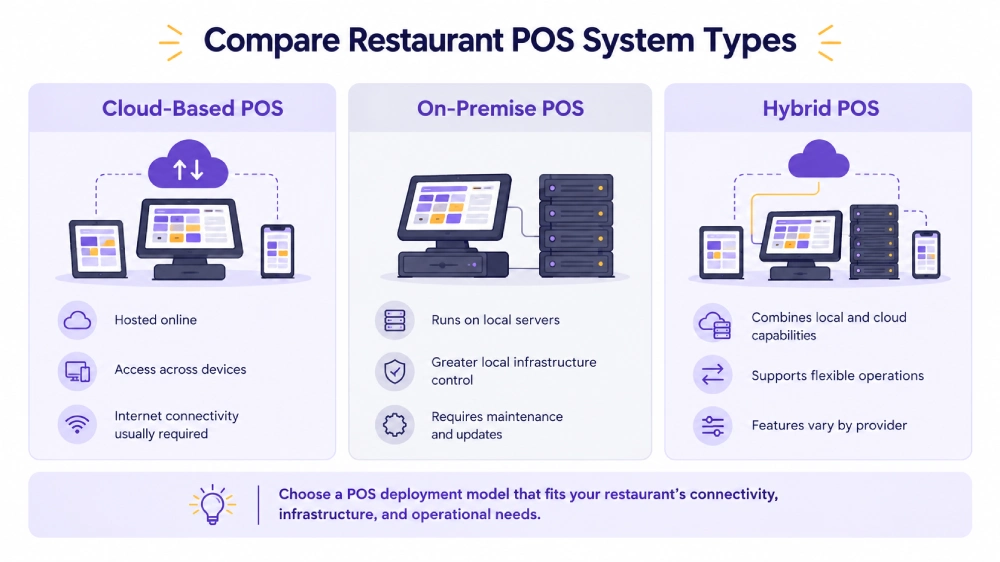
Cloud-hosted systems can support centralized administration and remote access to relevant business data, but internet outages, payment authorization, and local device communication still need to be considered.
Locally operated systems introduce different infrastructure, update, and support responsibilities.
Restaurants comparing deployment models should examine cloud POS vs on-premise POS based on their connectivity, internal technical resources, and operational requirements.
4. Test Restaurant POS Systems With Real Service Scenarios
A vendor demonstration should reproduce the activities employees perform during actual service.
Watching a representative create a straightforward sale does not establish whether the system can manage table transfers, kitchen changes, split payments, or failed transactions.
Ask shortlisted vendors to demonstrate the workflow using representative menu items, modifiers, payment arrangements, and devices.
Restaurant POS Demo Checklist
| Test Scenario | What the System Must Demonstrate |
| Complex order entry | Record required modifiers, substitutions, quantities, and special instructions against the correct items |
| Kitchen and bar routing | Send food and drink items to their assigned preparation stations without duplicate entry |
| Order change after submission | Communicate a cancelled or changed item after the original instruction has reached preparation |
| Open check and table transfer | Add items over time, move a check, and retain the associated transaction information |
| Split payment | Divide items or amounts, accept supported payment methods, and record settlement correctly |
| Refund or void | Apply the appropriate approval and preserve an identifiable transaction record |
| Online or delivery order | Receive an order and handle applicable changes, cancellations, or unavailable items |
| Connectivity interruption | Demonstrate supported offline activities and subsequent recovery in a controlled test |
| Shift closing | Reconcile payment totals, cash records, discounts, refunds, and relevant adjustments |
Test the Exception, Not Just the Normal Transaction
Consider a full-service restaurant with four guests.
The server enters appetizers and main courses. The kitchen receives the appetizers while the main courses remain on hold.
After preparation begins, one guest changes an item. The group later moves tables and requests separate bills.
A suitable system must preserve the order and its related records as those changes occur.
A change to the customer bill does not necessarily cancel an item already being prepared. The kitchen needs the correct instruction as well.
For delivery operations, test what happens when an order is cancelled after the kitchen receives it or when an item becomes unavailable after the order enters the system.
Employees should participate in the demonstration. A system that works for a trained vendor representative may still require too many steps for a cashier or server working during a busy shift.
5. Verify Payment Processing and Hardware Restrictions
Payment processing and hardware arrangements can substantially affect the cost and flexibility of a restaurant POS.
Payment Processor Compatibility
Determine whether the POS requires a particular payment processor or supports alternative providers.
A required processor is not automatically a problem, but the restaurant should understand the processing rates, contractual obligations, and available payment methods.
Confirm support for the restaurant’s actual transactions, including:
- In-person card payments.
- Cash handling.
- Tips and gratuities.
- Split and partial payments.
- Refunds and payment adjustments.
- Online or card-not-present payments where needed.
- Open-tab authorization where supported.
Some features depend on the payment integration rather than the POS software alone.
For example, a system may support split bills while a particular payment-terminal integration has different limitations.
The complete transaction should be demonstrated using compatible devices.
Hardware Compatibility
A restaurant may already own terminals, tablets, printers, cash drawers, or kitchen screens.
Ask whether those exact devices are supported by the proposed POS version and configuration.
Compatibility should be confirmed by model and connection method, not only by broad device category.
Also establish whether hardware must be purchased, rented, or financed through the POS provider.
A proprietary device arrangement may be reasonable for some restaurants, but equipment ownership, replacement, support, and contract terms should be documented.
6. Check Reliability, Offline Operation, and Security
Restaurant operations cannot depend on every external system remaining available at all times.
The POS selection process should establish what happens when internet connectivity, the local network, a kitchen printer, or a payment terminal becomes unavailable.
Test Offline Behavior
Offline support is not one universal capability.
A system may allow employees to record orders without internet access while requiring connectivity for card authorization, online-order intake, or certain kitchen devices.
During a controlled demonstration, verify:
- Whether employees can access menus and enter new orders.
- Whether existing open checks remain available.
- Whether kitchen printers or displays continue working.
- Which payment methods can be accepted.
- How transactions synchronize after reconnection.
- How duplicate or incomplete records are identified and corrected.
A vendor’s claim that a system works offline does not establish that every ordering and payment function will continue.
Review Security Responsibilities
Restaurants accepting payment cards have applicable PCI DSS responsibilities, even when a third-party processor handles card transactions.
Ask how the proposed environment protects payment data, controls employee access, manages updates, and supports secure terminal integration.
Refunds, voids, discounts, and other sensitive actions should also have appropriate permissions and transaction records.
For a multi-location business, permissions may need to restrict employees to their assigned locations while allowing authorized managers broader visibility.
7. Evaluate Integrations and Data Ownership
Restaurant POS transactions frequently affect systems beyond checkout.
A restaurant may need to exchange information with online ordering, delivery, accounting, inventory, reservations, or reporting applications.
Before selecting a provider, establish which system owns each important record.
Confirm How Information Moves Between Applications
For example, an online order may originate on a restaurant website, enter the POS, and appear on a kitchen display.
A cancellation must also reach the relevant systems.
The integration needs to define what happens when an order fails to synchronize, a menu item becomes unavailable, or the same transaction is received twice.
Restaurants with ingredient-level inventory requirements should confirm whether POS sales can feed the appropriate stock or recipe processes.
Recording that a burger was sold does not automatically establish the inventory consumption of its individual ingredients.
Verify Data Export and Portability
Ask the vendor what information the restaurant can export and in which formats.
Relevant records may include:
- Menu items and modifiers.
- Customer information, subject to privacy requirements.
- Completed transactions.
- Payment references and settlement data.
- Sales reports.
- Relevant historical records.
Not every record may be portable between systems. Some data can be retained only through reports or historical access.
A restaurant should know whether it can retrieve its information if it changes providers and whether export access remains available after termination.
This is particularly important when the POS also holds several years of operational history.
8. Compare the Total Cost of Ownership
The lowest monthly subscription is not necessarily the least expensive restaurant POS.
Software subscriptions, payment-processing charges, hardware purchases, additional applications, implementation, and ongoing support can all affect the total expense.
The restaurant POS system cost should be calculated using the restaurant’s expected payment volume, transaction count, number of locations, required devices, and selected applications.
For a meaningful comparison, request written estimates covering:
- First-year software and hardware expenses.
- Processing rates and applicable transaction fees.
- Installation, migration, and training charges.
- Required third-party applications.
- Ongoing support and maintenance.
- Subscription renewal rates.
- Contractual commitments and termination conditions.
Compare costs over the expected period of use, not just the introductory subscription.
If two vendors offer different payment-processing arrangements, use the same card-payment volume and transaction mix when calculating each option.
A lower subscription can be offset by higher processing charges, device fees, or additional applications.
9. Evaluate Support, Contracts, and Implementation Responsibilities
A restaurant POS must remain usable after the original setup team has finished.
Support availability matters when a terminal stops responding during dinner service, payments fail, or orders stop reaching the kitchen.
Technical Support and Escalation
Determine which provider handles each category of problem.
The restaurant may have separate contacts for:
- POS software issues.
- Payment-processing failures.
- Terminal or printer problems.
- Delivery-platform integrations.
- Networking and connectivity.
- Custom applications or extensions.
Ask what support coverage is included, which incidents are treated as urgent, and whether on-site assistance is available when required.
A response-time promise should be supported by written service terms where applicable.
Contract and Renewal Conditions
Before signing, confirm the minimum contract term, renewal provisions, cancellation charges, and any obligations connected to financed or bundled hardware.
Some POS agreements also link software access with a particular payment-processing arrangement.
The restaurant should understand whether changing processors, adding another location, or leaving the provider creates additional costs.
Implementation and Training
The provider’s responsibilities should be documented.
Implementation may include menu setup, taxes, preparation stations, payment terminals, floor plans, data migration, integrations, testing, and employee training.
If some activities are excluded from the quote, identify who will perform them.
Restaurant staff should be able to complete common orders, corrections, refunds, and shift closing before the system goes live.
10. Use a Scored Comparison Matrix
Once essential requirements have been confirmed, restaurant owners can compare shortlisted systems using consistent criteria.
The following weighting is an illustrative decision framework. Adjust the weights to reflect the restaurant’s priorities.
| Evaluation Area | Suggested Weight | Evidence to Review |
| Restaurant workflow fit | 25% | Completed ordering, kitchen, check, and payment demonstrations |
| Employee usability | 15% | Hands-on testing by servers, cashiers, and managers |
| Payments and hardware | 15% | Supported devices, processing terms, and successful payment tests |
| Reliability and recovery | 15% | Offline testing, transaction recovery, and support arrangements |
| Integrations and data control | 10% | Verified connections, data exports, and synchronization behavior |
| Implementation and support | 10% | Written implementation scope, training plan, and service coverage |
| Total cost of ownership | 10% | Comparable written estimates and renewal conditions |
| Total | 100% |
Score each category from 1 to 5, where 1 represents poor fit and 5 represents strong demonstrated fit.
Calculate each category’s contribution as:
Weighted score = (Category score ÷ 5) × Category weight
For example, a system scoring 4 out of 5 for restaurant workflow fit earns 20 points from the 25 available for that category.
The maximum overall score is 100 points.
Score only verified capabilities. Mark untested capabilities as unverified rather than awarding them points. Any failed must-have requirement disqualifies a candidate, regardless of its weighted total.
11. Plan the Migration Before Making the Final Decision
Replacing a restaurant POS can affect menus, employee workflows, payment arrangements, customer information, and historical records.
The selected provider should explain how the restaurant will move from its current environment without losing necessary transaction or operational information.
Prepare the Data
Identify which records will be migrated, retained separately, or archived.
Common considerations include menu items, modifier groups, customer records, taxes, employee access, and reporting history.
Historical transaction records may not transfer directly into the new POS. The restaurant may need to preserve access to the former system or retain exports for reporting and recordkeeping.
Test Before Going Live
A non-production test should confirm that the new system can handle the restaurant’s actual menu, ordering process, kitchen routing, and payment requirements.
The restaurant should also test refunds, voids, order transfers, and shift closing.
Payment terminals and connected applications need their own verification.
Define the Cutover Procedure
The restaurant should determine when the new POS will become the active system and how incomplete transactions will be handled.
Open checks, unsettled payments, unfulfilled orders, and end-of-day records require particular attention.
A cutover during a quieter operating period may reduce disruption, but staffing, training, and contingency procedures still need to be ready.
The provider and restaurant should agree on who will resolve issues during the initial operating period.
12. Watch for Restaurant POS Vendor Red Flags
Several warning signs justify further investigation before signing an agreement.
- Only basic checkout is demonstrated. The vendor avoids kitchen changes, open checks, refunds, or other workflows the restaurant actually needs.
- Payment-processing restrictions are unclear. The restaurant cannot establish which processor is required or how fees will be calculated.
- Hardware compatibility is assumed. The proposed system has not been tested with the exact devices or models being used.
- Offline capability is described vaguely. The vendor cannot demonstrate which operations continue during an interruption.
- Important integrations remain unverified. A proposed connection is described as possible without confirming how orders, payments, or stock information will move.
- Total costs are incomplete. Required applications, training, devices, implementation, or renewal charges are missing from the written estimate.
- Data portability is uncertain. The restaurant cannot establish how to retrieve its operational information when leaving the platform.
- Customization is promised without an upgrade plan. Critical workflows depend on modifications whose ongoing maintenance has not been addressed.
A documented workaround may be acceptable for a lower-priority requirement. A critical workflow that depends on an untested future development commitment creates a different level of risk.
How to Evaluate Odoo POS for Your Restaurant
Odoo POS is an option for restaurants that need point-of-sale functionality and may also want to connect checkout with inventory, accounting, purchasing, or other Odoo applications.
The evaluation should begin with the restaurant’s service model and the Odoo configuration required to support it.
Verify Restaurant Ordering and Kitchen Workflows
Odoo supports restaurant floor plans, table management, order transfers, bill splitting, and tips.
It also supports preparation printers and displays, as well as course-management functionality for restaurant service.
During an Odoo POS demonstration, a full-service restaurant should test how an open check behaves when employees add orders, send items to preparation, transfer tables, and split the bill.
A counter-service café may place greater emphasis on modifier entry, kitchen routing, checkout, and pickup coordination.
These activities should be verified in the intended Odoo version and configuration rather than assumed from a general feature description.
Establish Payment, Device, and Deployment Requirements
Odoo POS supports configured payment methods and integrations with supported payment terminals.
Payment-provider availability, hardware compatibility, and the deployment environment need to be confirmed for the restaurant’s requirements.
The business should also determine which employees need full application access, which POS-specific access arrangements are suitable, and what the selected subscription and architecture will require.
Those decisions affect both licensing and implementation scope.
Evaluate Connected Business Processes
Restaurants using several disconnected systems may benefit from evaluating POS alongside other Odoo applications.
For example, sales information may need to connect with inventory, purchasing, or accounting workflows.
A POS transaction alone does not automatically establish ingredient-level consumption, supplier replenishment, or complete financial reporting.
Each process requires appropriate configuration and clear data ownership.
Adatasol can assess order changes after kitchen submission, preparation-station routing, open checks, payment-terminal workflows, and the required data connections to accounting or inventory before defining any extension or customization scope.
Standard Odoo functionality and configuration come first. Custom development should address a demonstrated operational gap, with its maintenance and upgrade requirements established before implementation.
Wrapping Up
Choosing a restaurant POS system requires more than comparing features or subscription prices.
The strongest candidate is one that handles the restaurant’s actual orders, kitchen communication, payments, corrections, and shift closing without unnecessary manual work.
Realistic demonstrations, written cost comparisons, verified hardware and payment compatibility, reliable support, and a clear migration plan provide stronger evidence than feature claims alone.
For restaurants considering Odoo, Adatasol can help assess service workflows, identify appropriate POS and connected-application requirements, and define a practical configuration and implementation approach.
Schedule an Odoo consultation to discuss your restaurant POS requirements and evaluate how Odoo fits your operations.

