
Restaurant POS software is a point-of-sale system that manages food and drink orders, kitchen preparation, table service, payments, and sales records. Unlike a basic checkout system, it coordinates the restaurant transaction from the moment a customer places an order until the food is served, the bill is settled, and the sale is recorded.
An order can reach the kitchen before the customer pays. Guests may add items throughout a meal, change their orders, split a bill, or keep a tab open. Restaurant POS software connects these activities so employees can manage service without creating disconnected transactions.
What Is Restaurant POS Software?
Restaurant POS software is an application designed to manage orders, transactions, and service workflows in restaurants, cafés, bars, and other food-service businesses.
Like other POS software, it records sales and supports payment processing. Its restaurant-specific role is connecting order entry with kitchen preparation, service, and payment.
A restaurant POS system typically combines software with compatible hardware such as touchscreen registers, handheld ordering devices, payment terminals, receipt printers, and kitchen displays. The components of a modern POS system depend on the restaurant’s ordering, preparation, and service workflows.
Restaurant POS software commonly handles:
- Order entry: Recording menu items, quantities, modifiers, and special instructions.
- Kitchen communication: Directing food and drink orders to the appropriate preparation stations.
- Table and check management: Keeping orders open, adding items, transferring checks, and managing table service.
- Payment handling: Processing supported payment methods, tips, refunds, and split bills.
- Sales records: Maintaining transaction information for reconciliation, reporting, and connected business processes.
A restaurant order and a completed payment are not necessarily the same event.
A guest may order drinks, add appetizers, request another item later, and pay only after the meal. The POS preserves the order throughout that process while preparation and service continue.
The restaurant POS features required for this workflow vary between counter-service restaurants, full-service dining, cafés, bars, takeaway operations, and delivery-focused kitchens.
How Does a Restaurant POS System Work?
A restaurant POS connects order entry, preparation, service, and payment through a transaction that employees can update throughout the dining experience.
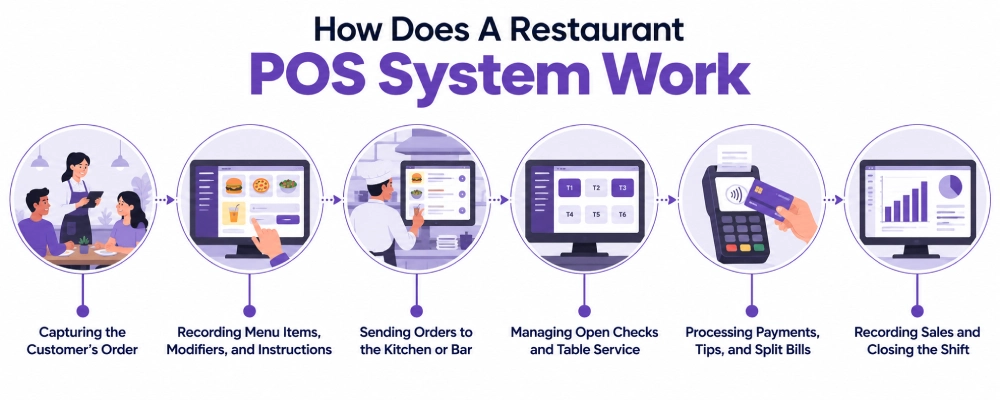
Restaurant workflows generally involve six stages.
| Stage | What Happens in the Restaurant POS |
| 1. Order entry | An employee or customer creates an order through a supported ordering channel |
| 2. Menu and modifiers | Items, quantities, options, and preparation instructions are recorded |
| 3. Kitchen routing | Relevant items are sent to the appropriate preparation stations |
| 4. Order management | Staff track, update, and serve the order while the check remains open where applicable |
| 5. Payment | The customer settles the check using supported payment methods |
| 6. Sales recording | The transaction becomes part of sales and payment records |
1. Capturing the Customer’s Order
The workflow begins when a customer places an order.
In a full-service restaurant, a server may enter it using a countertop terminal or handheld device. In a quick-service restaurant, a cashier commonly enters the order at the counter.
Restaurants can also accept orders through QR codes, websites, delivery channels, or a self-service kiosk POS.
Each channel may require different information.
A dine-in order can include a table number and server assignment. Takeaway may require a customer name or pickup reference. Delivery orders may need a delivery address, requested time, and fulfillment instructions.
The POS stores those details with the transaction so staff can identify and fulfill the order without repeatedly entering the same information.
2. Recording Menu Items, Modifiers, and Instructions
Restaurant orders often contain preparation details beyond the item name.
A customer might order a burger without onions, add cheese, choose a side, and request a particular preparation preference.
The POS records those choices using configured modifiers, product options, notes, or other menu structures.
Modifiers may affect pricing, preparation, or both.
Adding avocado might increase the item price. Removing onions changes the kitchen instruction without necessarily changing the price. A preparation preference may require no price adjustment but must still reach the employee preparing the food.
Restaurants may also configure different rules for dine-in, takeaway, and delivery, including applicable taxes, packaging, service options, or prices.
Allergy-related instructions require appropriate communication and food-safety procedures. Entering a note into the POS does not replace staff verification.
3. Sending Orders to the Kitchen or Bar
After an order is submitted, the POS can direct items to the preparation stations responsible for them.
Food may go to the kitchen, drinks to the bar, and desserts to a separate station.
Depending on the restaurant’s setup, preparation instructions appear on a kitchen display system (KDS) or print as kitchen order tickets.
A kitchen display may contain the order number, table, items, modifiers, special instructions, and preparation status.
Staff can move orders through configured stages such as waiting, preparing, and ready.
Full-service restaurants may also organize orders into courses, allowing appetizers, main dishes, and desserts to be sent for preparation at different points during the meal.
An order being entered, sent to preparation, marked ready, and paid are separate events even when they belong to the same customer check.
4. Managing Open Checks and Table Service
Full-service restaurants often keep checks open while guests continue ordering.
A server may begin with drinks, add appetizers, enter main courses, and later include dessert or additional beverages.
Those additions remain associated with the same check.
Depending on the system, employees may also assign tables, transfer orders, combine checks, split bills, or move guests between tables.
Consider four guests sharing a table.
Two customers want separate bills, while the other two want to pay together. The POS must identify the appropriate items or amounts for each payment arrangement without losing the original order information.
Table occupancy, preparation progress, and payment status also remain distinct. A table can still be occupied when the kitchen has completed its work but the bill remains unpaid.
5. Processing Payments, Tips, and Split Bills
Restaurants collect payments at different points in the service process.
Quick-service restaurants commonly collect payment before food preparation. Full-service restaurants typically collect it after the meal. Bars may maintain open tabs through several rounds of orders.
Restaurant POS software can support configured payment methods, tip collection, split payments, partial settlement, refunds, and other payment workflows.
When servers bring checkout directly to guests, mobile POS can support tableside payment without requiring customers to visit a fixed register.
Payment functionality depends on the POS platform, payment provider, compatible hardware, and configuration.
Payment status must remain accurate throughout the transaction. Sending an order to the kitchen does not mean it has been paid, and an unsuccessful payment attempt must not be recorded as a completed settlement.
6. Recording Sales and Closing the Shift
Once a transaction is settled, the POS records the sale.
Restaurant managers can review sales totals, payment methods, discounts, refunds, voids, and other transaction activity.
At shift close, staff may compare expected cash with the actual cash drawer balance, review payment totals, and investigate discrepancies.
The POS supports reconciliation, while employee procedures govern cash handling, void approvals, refunds, and corrections.
Where accounting, inventory, or reporting systems are connected, relevant transaction information may also flow into those applications according to the integration and configuration.
What Happens When a Restaurant Order Changes?
Restaurant service does not always follow a straightforward order-to-payment sequence.
Suppose a server sends an order for two burgers and fries to the kitchen. A few minutes later, one guest asks to replace the fries with a salad.
Updating the customer check does not automatically update food already being prepared.
The kitchen must also receive the revised instruction.
Depending on the POS and preparation setup, the employee may send an updated ticket, enter a replacement item, cancel the earlier instruction, or communicate the change directly to kitchen staff.
Removing an item from the bill does not necessarily stop its preparation.
Similar situations occur when:
- A menu item becomes unavailable after an order has been placed.
- A guest moves to another table.
- An order is transferred or combined with another check.
- An employee voids an item already in preparation.
- A delivery order is cancelled after kitchen preparation begins.
Changes can affect both the financial record and the preparation workflow.
For example, a voided item may need employee approval, while kitchen staff need confirmation that the item should no longer be prepared.
Order accuracy depends on what reaches the kitchen, not only what appears on the final receipt.
How Restaurant POS Workflows Differ by Service Type
Restaurant POS systems support different transaction sequences depending on when customers order, when they pay, and how food is delivered.
| Restaurant Type | Typical POS Workflow |
| Full-service restaurant | Table assigned → order taken → courses prepared → additional items added → bill settled |
| Quick-service restaurant | Order entered → payment collected → kitchen prepares → customer receives food |
| Café or coffee shop | Items and modifiers entered → payment collected → preparation → pickup |
| Bar | Drinks entered → tab remains open → additional orders added → tab settled |
| Takeaway restaurant | Order recorded → preparation → customer identified → pickup completed |
| Delivery-focused kitchen | Order received → preparation → packaging → delivery handoff |
Full-Service Restaurants
Full-service dining depends on table management, open checks, course timing, and communication between servers and preparation staff.
Guests may place several orders during the meal rather than completing one transaction at the beginning.
The POS needs to maintain the relationship between the table, server, ordered items, preparation status, and eventual payment.
Bill splitting, table transfers, and course management become particularly relevant when service continues over an extended period.
For example, a server may release appetizers before the main courses, add another round of drinks, and settle the bill only when the guests finish dining.
Quick-Service Restaurants and Cafés
Quick-service restaurants and cafés usually prioritize efficient order entry, payment collection, and preparation handoff.
Customers commonly pay before receiving their orders.
The POS can associate the transaction with an order number, customer name, or pickup reference so staff can identify the correct order when it is ready.
Menu modifiers are especially relevant for cafés, where customers may choose sizes, milk alternatives, flavors, preparation preferences, or additional ingredients.
Some operations also use customer-facing kiosks or collection screens to separate ordering from fulfillment.
Bars and Restaurants With Open Tabs
Bars often need to keep a transaction open while customers place multiple orders.
A tab may begin with one drink, remain active through several rounds, and be settled at the end of the visit.
The POS may support tab identification, additional orders, tip handling, and final settlement.
Depending on the payment provider and system configuration, some environments also support payment preauthorization or other controls associated with open tabs.
Employees need to distinguish an open tab from a settled check while maintaining accurate records of everything added during the visit.
Takeaway and Delivery Operations
Takeaway and delivery introduce fulfillment requirements beyond the dining room.
A takeaway order may require a customer name, requested pickup time, packaging instructions, and an order-status reference.
Delivery orders can arrive through the restaurant’s own ordering channel or a connected third-party platform.
The POS or connected ordering environment must provide the kitchen with enough information to prepare the correct items and manage the intended handoff.
Changes and cancellations require attention. An order received from a delivery platform may need subsequent availability, modification, or cancellation updates communicated between systems.
A successfully received order does not automatically mean every later change has synchronized correctly.
How Is Restaurant POS Different From a Regular POS System?
A general POS system records and completes sales. Restaurant POS software also supports the preparation and service activities that take place around those transactions.
Retail checkout commonly involves identifying products, collecting payment, and completing the sale.
Restaurant service can involve multiple preparation stations, course timing, modifiers, table assignments, open checks, and several rounds of ordering before payment.
A restaurant therefore often needs more than a standard cash register.
Restaurant POS software is not necessarily a completely separate technology category. Many POS platforms can be configured for multiple industries.
A restaurant needs a system that supports ordering, preparation, service, and settlement without requiring employees to reconstruct the transaction manually between stages.
What Are the Benefits of Restaurant POS Software?
Restaurant POS software can improve coordination across front-of-house service, kitchen preparation, payment, and transaction management.
The results depend on software configuration, employee procedures, and the restaurant’s workflow.
1. Better Order Accuracy
Menu modifiers, quantities, and special instructions can be recorded directly with the order instead of being repeatedly communicated verbally.
This reduces opportunities for information to be lost between order entry and preparation.
Accuracy still depends on correct menu configuration and employee verification, particularly for allergy-related requests.
2. Clearer Kitchen Communication
Configured order routing helps kitchen and bar staff receive relevant items and instructions through kitchen displays or preparation tickets.
Employees can identify which orders are waiting, being prepared, or ready according to the supported workflow.
This reduces dependence on handwritten instructions and repeated verbal handoffs.
3. Faster Service Coordination
Order entry, preparation, and payment can move through connected workflows instead of requiring employees to transfer information manually.
For example, a server can submit additional items without leaving the dining area when supported handheld ordering is available.
Fewer manual handoffs can reduce duplicate work between teams, particularly during busy service periods.
4. More Consistent Table and Check Management
Open checks allow employees to add items throughout a meal while maintaining one transaction record.
Table transfers, check splitting, and server assignments can help staff manage changing service requirements.
These capabilities are particularly valuable in full-service restaurants where guests may remain at a table through several ordering stages.
5. More Flexible Payment Handling
Restaurants may need cash and card payments, tips, split bills, refunds, or partial settlements.
A configured restaurant POS can maintain the relationship between those payments and the original check.
Customers can receive payment options suited to the service model without employees manually rebuilding the transaction at checkout.
6. Better Sales and Transaction Visibility
Restaurant managers can review recorded sales, payment methods, discounts, refunds, and voids.
These records can support shift reconciliation and help identify unusual transaction activity.
Reliable reporting still depends on consistent employee procedures and correct transaction data.
7. Support for Multiple Ordering Channels
Restaurants may accept orders at the counter, at tables, through kiosks, or from supported online and delivery channels.
A connected POS environment can bring relevant orders into established preparation and fulfillment workflows.
Supported integrations can reduce manual order entry, although staff still need procedures for failed synchronization, cancellations, and unavailable items.
8. Less Duplicate Data Entry
A restaurant transaction may need to be referenced by servers, kitchen staff, cashiers, and managers.
A shared order record reduces the need to recreate the same information at each stage.
Where other applications are connected, relevant transaction data can also support downstream processes without requiring every sales detail to be entered again.
What Restaurant POS Software Does Not Automatically Handle
Restaurant POS software does not automatically replace purchasing, inventory control, employee management, and accounting.
For example, selling a burger can create a POS sales record without deducting the exact quantities of buns, meat, cheese, sauces, and other ingredients from stock.
Ingredient-level inventory tracking may require recipe structures, bills of materials, stock movements, or additional applications.
A restaurant POS may include some purchasing, reporting, or staff-management capabilities. A restaurant management system may also cover supplier purchasing, recipe costing, labor management, and broader financial operations.
Some platforms combine these functions in one environment, while others use connected applications. Each required process needs a defined system and reliable data flow.
How Odoo POS Fits Restaurant Operations
For restaurants that need ordering, kitchen coordination, payments, and related business processes within an Odoo environment, Odoo POS provides point-of-sale functionality that can be configured around different service models.
Odoo’s restaurant capabilities include several relevant workflows.
Floor Plans, Tables, and Open Orders
Odoo POS supports restaurant floor plans and table management.
Employees can associate orders with tables, manage open orders, and transfer or merge orders according to the configured workflow.
These capabilities support dine-in operations where several ordering and payment events may belong to one table.
Kitchen and Bar Preparation
Odoo supports sending restaurant orders to kitchen or bar preparation through configured preparation printers or displays.
Preparation displays can organize orders into stages and direct relevant items according to configured POS categories.
Restaurants can also use course-management functionality where supported and configured, helping staff control when different parts of a meal are sent for preparation.
Bills, Payments, and Tips
Odoo’s restaurant functionality supports bill handling, including bill splitting and tip collection.
Available payment methods depend on supported payment providers, hardware, and system configuration.
A full-service restaurant may require open checks and split payments, while a counter-service café may use a simpler order-and-payment flow.
Connections With Other Odoo Applications
Odoo POS can operate alongside other Odoo applications when a restaurant needs processes beyond checkout.
Inventory, accounting, purchasing, and related functions should be configured around the business’s requirements and the capabilities of the relevant applications.
A POS sale alone does not establish every ingredient-level inventory or accounting workflow. Those processes require appropriate configuration and, where necessary, connected modules or extensions.
Adatasol begins with how your restaurant operates: where orders originate, how items reach preparation, when guests pay, and which transaction data other teams need.
We prioritize standard Odoo functionality and use configuration, supported extensions, or customization when a specific operational requirement cannot be met through the standard workflow.
Wrapping Up
Restaurant POS software connects customer ordering with kitchen preparation, table service, payment, and sales records.
Preparation may begin before payment, checks can remain open, customers can add or change items, and several employees may interact with the same transaction.
The right setup depends on whether your business operates a quick-service restaurant, café, full-service dining room, bar, takeaway operation, or delivery-focused kitchen.
Adatasol can help you evaluate those requirements and determine how Odoo POS should support your restaurant’s ordering, preparation, payment, and connected operational processes without unnecessary customization.
Schedule an Odoo consultation to discuss your restaurant POS requirements and service workflow.

