
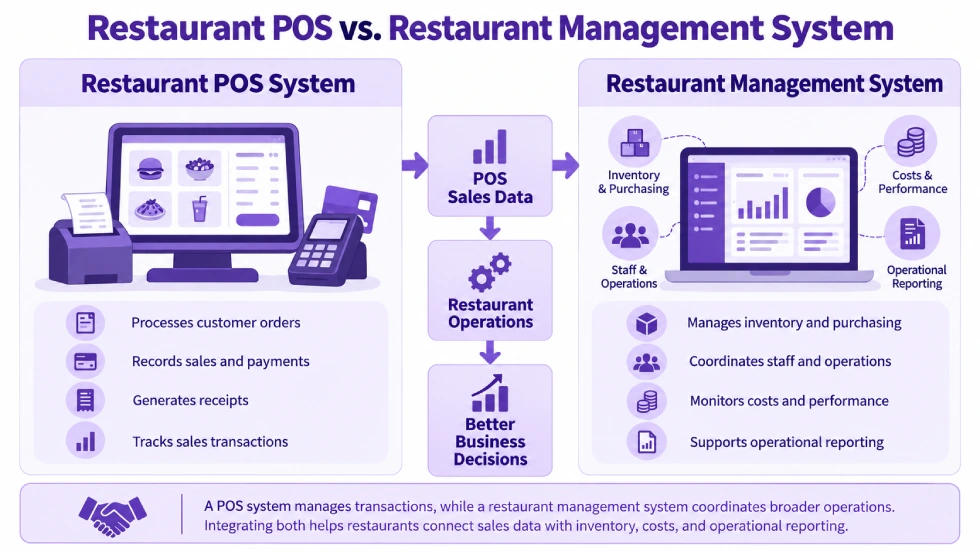
A restaurant POS system manages customer orders, kitchen communication, payments, and sales transactions. A restaurant management system (RMS) covers broader business operations, which may include ingredient inventory, purchasing, recipe costing, employee scheduling, accounting, and management reporting. The main difference is operational scope, although modern restaurant POS platforms can include some management functions.
Restaurants do not always need two separate systems. Some platforms combine POS and management capabilities, while others connect specialized applications. A small café may need only basic POS and administrative tools, while a restaurant group may require integrated purchasing, inventory, labor, and financial management.
Restaurant POS vs Restaurant Management System: Key Differences
Restaurant POS software primarily manages customer transactions and service activities. Restaurant management software coordinates the wider processes involved in running the business.
| Comparison Factor | Restaurant POS System | Restaurant Management System |
| Primary purpose | Manage customer orders, service transactions, and payments | Coordinate restaurant operations, resources, and business performance |
| Typical users | Cashiers, servers, bartenders, kitchen staff, and shift managers | Owners, operations managers, purchasing teams, finance staff, and department managers |
| Order management | Records orders, modifiers, open checks, and payments | May include POS ordering or receive transaction data from a connected POS |
| Kitchen operations | Sends orders to preparation stations and may track order status | May add preparation planning, production controls, or operational reporting |
| Inventory | May track menu items, products sold, or basic stock availability | May manage ingredient quantities, stock movements, waste, and replenishment |
| Purchasing | May provide basic stock or purchasing functionality | May manage suppliers, purchase orders, deliveries, and replenishment |
| Recipe costing | Depends on the platform and additional applications | May calculate theoretical ingredient usage and recipe costs |
| Employee management | Logins, permissions, transaction accountability, and sometimes time tracking | May include scheduling, attendance, labor-cost reporting, and payroll connections |
| Financial management | Sales totals, payment records, taxes, discounts, and refunds | May include accounting, expenses, purchasing costs, and financial analysis |
| Reporting | Transaction and service performance | Broader operational, cost, labor, inventory, and financial reporting |
| Implementation | Focused on checkout, preparation, payments, and devices | May require several applications, data integrations, and operational configurations |
Restaurant management systems vary in scope. Some include POS, inventory, labor, and accounting functions, while others manage selected back-office processes and connect to a separate POS.
What Does a Restaurant POS System Manage?
A restaurant point-of-sale system records and manages the transactions associated with serving customers.
Its core responsibilities include order entry, menu modifiers, kitchen or bar instructions, open checks, payment collection, refunds, and sales records.
For example, a server enters two appetizers, three main courses, and drinks for a table. The POS records the items, sends preparation instructions to the appropriate kitchen stations, keeps the check open, and processes payment when the guests finish dining.
The transaction may change several times before settlement. Employees might add another drink, transfer the check to a different table, or split the bill between guests.
Modern restaurant POS software can also support floor plans, course management, kitchen displays, online ordering, employee permissions, and sales reporting.
The POS records what the restaurant sold, the transaction amount, the payment activity, and relevant service events.
It may provide additional stock or management functionality, but a sales record alone does not establish the restaurant’s complete ingredient costs, supplier obligations, or financial position.
What Does a Restaurant Management System Manage?
A restaurant management system supports the operational and administrative processes surrounding customer service.
It may include POS functionality, connect to an existing POS, or consist of several specialized applications.
Common responsibilities include ingredient inventory, purchasing, food-cost analysis, labor management, accounting, and operational reporting.
Ingredient Inventory and Stock Control
A restaurant POS records sales of menu items. Ingredient inventory management tracks the materials used to prepare those items.
Ingredient-level stock control may involve:
- Defined recipes or bills of materials.
- Ingredient quantities and units of measurement.
- Supplier deliveries and stock receipts.
- Ingredient consumption.
- Spoilage, waste, and stock adjustments.
- Physical inventory counts.
- Replenishment rules.
Restaurant inventory records need to account for both planned ingredient usage and physical stock movements.
Sales-based consumption can estimate how much stock should have been used, while waste entries and physical counts help identify differences between recorded and actual quantities.
Purchasing and Supplier Management
Restaurant management systems may support purchasing from food suppliers, beverage distributors, packaging vendors, and other providers.
Purchasing functions can include supplier records, purchase requests, purchase orders, expected delivery dates, receipts, and purchase prices.
A kitchen manager might identify that available chicken stock is approaching a replenishment threshold.
An inventory and purchasing workflow can use the recorded quantity, expected demand, and supplier lead time to determine whether more stock should be ordered.
The POS may supply sales activity that contributes to demand information. Purchasing functionality manages the supplier order and subsequent receipt of goods.
A restaurant may also need to handle partial deliveries, price changes, damaged goods, and discrepancies between ordered and received quantities.
Recipe Costing and Food-Cost Analysis
Menu prices and recipe costs answer different financial questions.
The POS records the selling price of a menu item. Recipe costing estimates the cost of the ingredients required to produce it.
Suppose a dish sells for $18 and its standard recipe includes $5.40 in ingredients.
Its theoretical ingredient-cost percentage is:
$5.40 ÷ $18 × 100 = 30%
That percentage reflects the standard recipe assumptions, not necessarily the restaurant’s actual ingredient expenditure.
Purchase price changes, waste, overportioning, substitutions, and stock discrepancies can affect actual food costs.
A restaurant management environment may combine recipes, ingredient prices, purchases, sales, and inventory adjustments to support more detailed cost analysis.
For example, a supplier price increase may change the expected cost of a dish even when its menu price remains unchanged.
Staff Scheduling and Labor Management
Restaurant POS software may identify which employee took an order, processed a payment, or performed a refund.
Restaurant management software can extend into workforce planning.
That may include schedules, attendance, recorded working hours, shift assignments, labor costs, and payroll integration.
A server processing $1,200 in sales during a shift does not establish how many hours the employee worked or the restaurant’s complete labor cost.
Those calculations require additional employee and payroll information.
Managers may also need to compare scheduled staffing with actual attendance or analyze labor costs against sales activity.
Some POS vendors include workforce management features, so a separate application may not always be necessary.
Accounting and Financial Reporting
A POS reports sales activity and payments. Accounting maintains the financial records needed to represent the business’s broader transactions.
Restaurant accounting may need to reconcile:
- Customer sales and applicable taxes.
- Cash payments and card settlements.
- Payment-processing fees.
- Refunds and adjustments.
- Supplier bills and outstanding payments.
- Inventory valuation and other expenses.
A POS report showing $10,000 in card payments does not necessarily mean $10,000 has reached the restaurant’s bank account.
Processing fees, settlement timing, refunds, and other adjustments may affect the amount deposited.
A connected financial system can record and reconcile those amounts according to the restaurant’s accounting procedures.
Restaurant managers may also need income statements, expense reports, and profitability information that combines sales with purchasing, labor, and other operating costs.
Where Do Restaurant POS and Management Systems Overlap?
Modern restaurant POS platforms can provide several functions also associated with restaurant management software.
| Shared Capability | How It May Appear in Either System |
| Menu management | POS menu configuration or centrally managed menus |
| Kitchen displays | Direct POS preparation screens or connected kitchen-management applications |
| Reservations | Built-in table booking or an integrated reservation platform |
| Staff management | POS permissions and time tracking or broader scheduling and labor applications |
| Inventory | Menu-item stock visibility or detailed ingredient inventory |
| Customer loyalty | POS rewards functions or a connected customer management platform |
| Reporting | Sales dashboards or broader business performance reporting |
| Multi-location operations | Shared POS settings or more extensive cross-location management |
Two restaurant platforms may both advertise inventory management but support different processes.
One may show how many bottled beverages remain in stock. Another may calculate theoretical ingredient consumption from recipes, record supplier receipts, and reconcile physical counts.
Employee management can vary similarly.
One application may assign POS permissions and record employee transactions. Another may manage staff schedules, attendance, overtime, and payroll information.
A restaurant should establish the actual records and workflows supported by each capability rather than relying on the feature name alone.
How POS Transactions Connect With Restaurant Management
A restaurant sale can affect several operational and financial records.
Consider a restaurant that sells 20 burgers at $15 each.
The POS records $300 in menu sales before applicable discounts, taxes, tips, or adjustments.
Other business processes use relevant information from those transactions together with their own records and rules.
| Business Activity | Information Required | System Responsibility |
| Record the sale | 20 burgers sold at $15 each | POS records the transaction |
| Estimate ingredient usage | Standard quantities of buns, meat, cheese, and other ingredients | Recipe and inventory functionality calculates theoretical consumption |
| Update stock | Recorded consumption, deliveries, waste, and adjustments | Inventory management maintains stock records |
| Replenish ingredients | Available quantities, reorder thresholds, suppliers, and lead times | Purchasing or inventory functions support replenishment |
| Account for revenue and expenses | Sales, taxes, payment records, purchasing costs, and settlement information | Accounting records and reconciles the relevant financial activity |
Theoretical Ingredient Usage Is Not Actual Stock Consumption
Suppose the standard burger recipe requires one bun and 150 grams of meat.
Selling 20 burgers implies theoretical usage of 20 buns and 3 kilograms of meat.
However, two buns may have been discarded during preparation, and actual meat portions may have differed from the recipe.
The POS sales record alone cannot identify those differences.
Theoretical consumption represents the ingredients expected to be used under the configured recipe. Actual stock movement may also include spoilage, preparation waste, substitutions, supplier receipts, and physical adjustments.
A connected inventory system may automate standard consumption calculations when products, recipes, and stock rules are configured appropriately.
Physical inventory counts and waste records are still needed to identify differences between expected and actual quantities.
Payment Records Are Not the Same as Bank Reconciliation
The POS may show that a customer paid by card.
That payment record is different from confirming that the payment processor settled the funds into the restaurant’s bank account.
For example, the POS could record $5,000 in card payments while the processor deposits a lower amount after deducting applicable processing fees.
The timing of the deposit may also differ from the date of the original transactions.
Financial reconciliation connects POS payment records with settlement reports, fees, refunds, and bank transactions.
The POS provides transaction information. Accounting maintains the corresponding financial records.
Does Every Restaurant Need a Management System?
Every restaurant needs to manage purchasing, staff, inventory, and finances in some form, but not every operation requires a comprehensive restaurant management software platform.
A restaurant may use a POS alongside spreadsheets, an accounting application, and basic purchasing procedures.
That arrangement may be sufficient when transaction volume, operational complexity, and reporting requirements remain manageable.
When Restaurant POS Software May Be Enough
A small café with one location, a limited menu, and simple inventory requirements may operate effectively with a restaurant POS and a few supporting tools.
For example, the POS can handle ordering and payments while the owner maintains a basic purchasing process and uses separate accounting software.
A broader management platform can introduce unnecessary configuration and data-maintenance work if the business has little use for its additional capabilities.
The restaurant still needs reliable procedures for stock counts, supplier payments, employee records, and financial reporting.
When Broader Restaurant Management Becomes More Useful
A restaurant may need additional management functionality when operational records become difficult to maintain across separate systems.
Common situations include:
- Ingredient stock regularly differs from recorded quantities.
- Purchasing decisions rely on outdated or manually assembled information.
- Managers cannot compare recipe costs with actual ingredient expenditure.
- Scheduling and labor-cost information remain disconnected from sales activity.
- Sales reports and accounting records require frequent manual reconciliation.
- Multiple locations maintain inconsistent purchasing or inventory records.
- Employees repeatedly enter the same information into separate applications.
A full-service restaurant with a large menu and frequent supplier deliveries may need structured ingredient control even if its POS already handles table service efficiently.
A restaurant group may also require consolidated purchasing and financial reporting across branches.
Centralized register settings and sales reporting are functions of multi-location POS software, while ingredient purchasing and financial control may require additional business applications.
Can One System Handle Both POS and Restaurant Management?
Yes. A single platform can include both POS and broader restaurant management functions.
Restaurants can also connect a specialized POS with separate inventory, labor, purchasing, and accounting applications.
Integrated Restaurant Management Platform
An integrated platform may support several operational functions using shared business records.
For example, a sale recorded in the POS may be available to other applications without a separate manual export. Purchasing and inventory records can also share product and supplier information where the platform supports those relationships.
This can reduce duplicate entry and simplify reporting when the system is configured correctly.
However, using one platform does not guarantee that every restaurant-specific process is included.
Recipe costing, labor scheduling, reservations, payment terminals, and delivery connections may still depend on additional modules, integrations, or custom configuration.
Separate POS and Restaurant Management Applications
A restaurant can retain a POS that works well during service and connect it to specialized management software.
For example, the POS may handle orders and payments while a separate inventory application manages ingredient consumption and purchasing.
This approach can preserve established restaurant workflows while adding specialized functionality.
The trade-off is maintaining reliable integration between systems.
If an order is refunded after the original transaction has been transferred, the connected application must receive the appropriate adjustment.
Differences in product identifiers, timestamps, units of measurement, or synchronization timing can cause records to disagree.
What a Connected Setup Must Establish
Whether a restaurant uses one platform or several applications, the configuration should establish:
- Which application creates and owns each record.
- When transactions are transferred between applications.
- How refunds, voids, and cancellations affect downstream records.
- Whether ingredient consumption is based on recipes or another process.
- How supplier receipts and inventory adjustments are recorded.
- How payment settlements are reconciled with sales.
- Who investigates failed or duplicated data transfers.
For example, if an employee cancels an order after it has been sent to preparation, the financial adjustment and any applicable inventory correction must be handled according to the configured workflow.
Similarly, a supplier delivery should update the appropriate stock record without relying on a POS sales transaction to represent goods received.
Shared data reduces some integration work, but the individual operational processes still need to be configured and tested.
Restaurant POS vs Restaurant Management System vs ERP
Restaurant management software and enterprise resource planning (ERP) software can overlap, but the terms are not interchangeable.
A restaurant management system is generally organized around food-service operations. It may include recipes, supplier purchasing, labor management, reservations, and restaurant-specific performance reporting.
ERP software connects broader business processes such as purchasing, inventory, accounting, sales, and financial management.
Some ERP platforms can also support restaurant POS operations.
A restaurant group may use ERP to coordinate supplier purchasing, inventory across facilities, accounting, and company-wide processes while the POS handles customer-facing service.
Not every restaurant management system is a full ERP platform. Likewise, an ERP platform does not automatically include every restaurant-specific capability.
The distinction is the functional scope of the applications and how transactions, inventory, purchasing, labor, and financial records are managed.
How Odoo POS and Other Odoo Applications Support Restaurant Management
Odoo POS provides the customer-ordering and transaction layer within the broader Odoo environment.
Restaurants can configure supported POS functionality for table service, open orders, preparation routing, bill splitting, and payments.
Other Odoo applications can manage inventory, purchasing, accounting, and related business processes where required.
Odoo POS for Ordering, Kitchen Operations, and Payments
Odoo’s restaurant functionality supports floor plans, tables, open orders, order transfers, and restaurant billing.
It also provides kitchen and bar preparation workflows through configured printers and displays.
A full-service restaurant may use these capabilities to coordinate table orders and preparation before guests settle their checks.
A counter-service restaurant may need a simpler order-to-payment process with kitchen preparation and pickup handling.
The menu, preparation stations, payment methods, and employee permissions need to reflect the restaurant’s service model.
Odoo Inventory and Purchase for Stock and Suppliers
Odoo Inventory supports stock tracking, inventory movements, receipts, adjustments, and replenishment processes.
Odoo Purchase supports supplier purchasing and purchase-order workflows.
Restaurants requiring ingredient-level control need a defined relationship between menu sales, recipes, inventory products, and stock movements.
Standard POS transactions do not automatically establish every ingredient-consumption or recipe-costing process.
Depending on the requirement, the restaurant may need suitable product configuration, additional applications, supported extensions, or integration.
Odoo’s inventory and purchasing applications can provide the underlying stock and procurement records, while the restaurant’s configured processes determine how those records are updated.
Odoo Accounting for Financial Records
Odoo Accounting supports journal entries, financial reporting, payments, and bank reconciliation.
Restaurant POS transactions can contribute information to accounting through configured journals, payment methods, and closing procedures.
The restaurant still needs to account for payment settlements, processing fees, refunds, supplier bills, and other financial transactions.
For example, a completed POS card payment may be recorded before the payment processor deposits the corresponding funds.
Accounting reconciliation connects those records with the actual settlement and applicable fees.
Establishing the Appropriate Odoo Setup
A café with straightforward ordering and payment requirements may need only a limited set of Odoo functions.
A restaurant group managing suppliers, ingredient stock, purchasing, and financial reporting across several operations may need a broader implementation.
Adatasol can assess how orders reach the kitchen, how stock is recorded, how suppliers are managed, and which sales and payment information accounting requires.
We prioritize standard Odoo functionality and configuration. Where a business requirement remains unsupported, we evaluate suitable extensions, integrations, or targeted customization against the additional maintenance and upgrade work involved.
Wrapping Up
Restaurant POS software manages customer orders, preparation communication, payments, and sales transactions. Restaurant management systems can extend into ingredient inventory, purchasing, labor, accounting, and wider operational reporting.
Modern POS platforms may already include several of these management capabilities. A restaurant needs to assess the depth of those functions, not simply whether they appear on a feature list.
A small café may operate effectively with a POS and a few supporting applications. A restaurant managing complex food costs, supplier relationships, or several locations may need a more connected operating environment.
For restaurants considering Odoo, Adatasol can help identify which requirements belong in POS, which need additional Odoo applications, and how those business processes should exchange accurate information without unnecessary customization.
Schedule an Odoo consultation to discuss your restaurant POS and management requirements.

