
Odoo is a modular ERP and business management software platform that connects sales, CRM, accounting, inventory, purchasing, manufacturing, projects, HR, eCommerce, and other business functions in one integrated system. Instead of running each department on separate software, businesses can use Odoo applications that share data and workflows across the organization.
Odoo can be implemented gradually. A company may begin with CRM, sales, and accounting, then add inventory, manufacturing, project, HR, or other applications as its operational requirements grow. This modular structure is one of the main reasons Odoo is considered by small and mid-sized businesses that have outgrown disconnected software.
Odoo is also broader than a traditional back-office ERP. Its applications cover customer-facing, financial, operational, manufacturing, workforce, website, and service-management processes, making it both an enterprise resource planning system and a wider business management platform.
What Is Odoo Software?
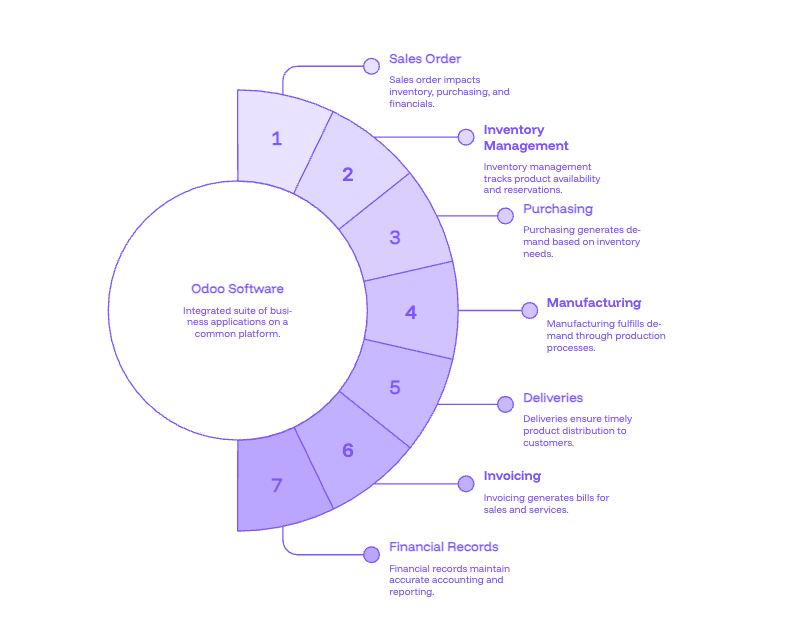
Odoo software is a suite of business applications built to operate on a common platform and database.
Traditional business software environments often grow one application at a time. A company may use one CRM for sales, separate accounting software, spreadsheets for inventory, another application for projects, and a standalone manufacturing or warehouse system. Each product may work independently, but keeping information consistent between them creates additional integrations, manual data entry, reconciliation, and reporting work.
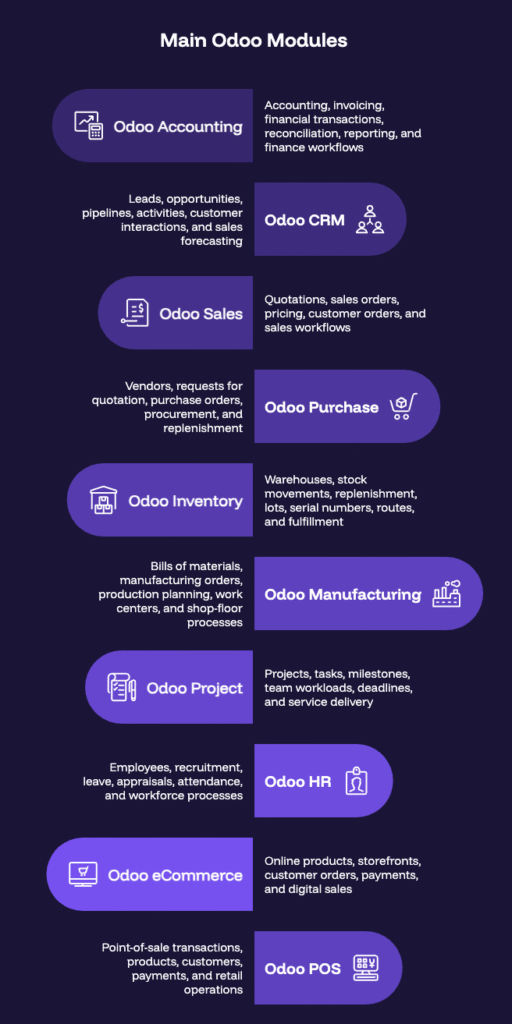
Odoo approaches the problem differently. Its applications are designed to work together, so data created in one business process can become available to another without employees repeatedly moving information between unrelated systems.
A sales order, for example, can affect product availability, inventory reservations, purchasing requirements, manufacturing demand, deliveries, invoicing, and financial records. The exact automation depends on how Odoo is configured, but the underlying principle remains the same: the business process can move through one connected system rather than several disconnected applications.
This is why Odoo may be described as Odoo ERP, Odoo ERP software, business management software, an open-source ERP platform, or an integrated business application suite. Each description reflects a different part of the same platform.
How Does Odoo ERP Software Work?
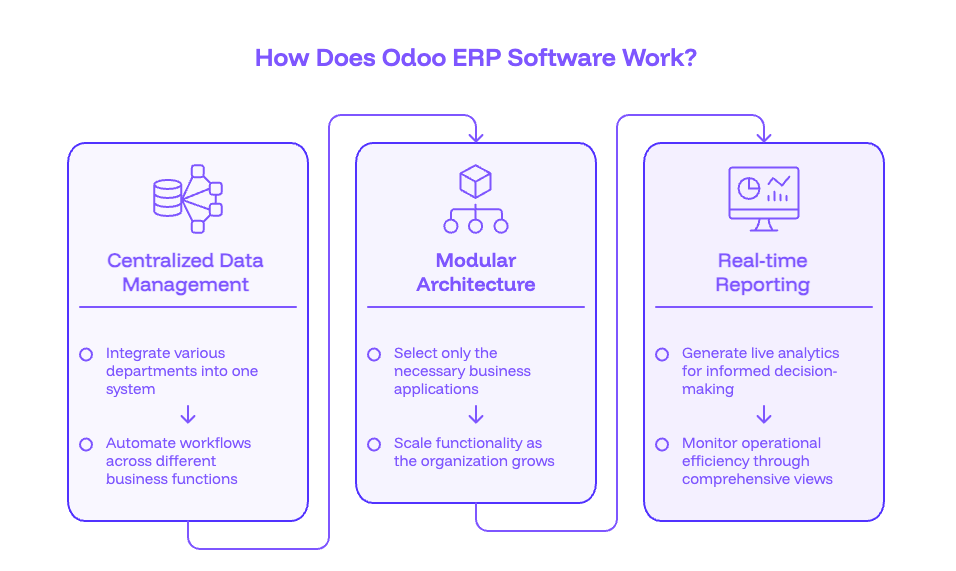
Odoo works through individual applications, often called apps or modules, that handle specific business functions while sharing information across the same platform.
Modular Applications
Businesses do not have to implement the entire Odoo suite at once.
A professional services company might begin with CRM, Sales, Project, Timesheets, and Accounting. A distributor may prioritize Sales, Purchase, Inventory, and Accounting. A manufacturer may need Manufacturing, Inventory, Purchase, Quality, Maintenance, Sales, and Finance.
Additional applications can be introduced later as business requirements change.
This modular structure allows Odoo implementations to be scoped around actual operational priorities instead of forcing every department into a large first-phase deployment.
Shared Business Data
The greater value comes from how those modules interact.
Customer information captured in CRM can flow into quotations and sales orders. Product data can be shared across Sales, Inventory, Purchase, Manufacturing, and eCommerce. Inventory movements can affect fulfillment and production. Financial transactions can be connected with the operational activities that created them.
A shared data model reduces duplicate entry and helps departments work from consistent information.
Workflow Automation
Odoo can also automate routine business actions.
Depending on the workflow, a system may automatically generate an invoice, create a replenishment requirement, reserve stock, initiate a purchase, move an approval to the next person, schedule an activity, send a notification, or update information in another connected application.
Standard Odoo configuration covers many common processes, while businesses with specialized requirements can extend those workflows through Odoo customization, Odoo integrations, and custom Odoo development.
The degree of flexibility is one of Odoo’s defining characteristics, although how customizable Odoo should be depends on the difference between a genuinely unique business requirement and a process that can reasonably adapt to standard ERP functionality.
What Are the Main Odoo Modules?
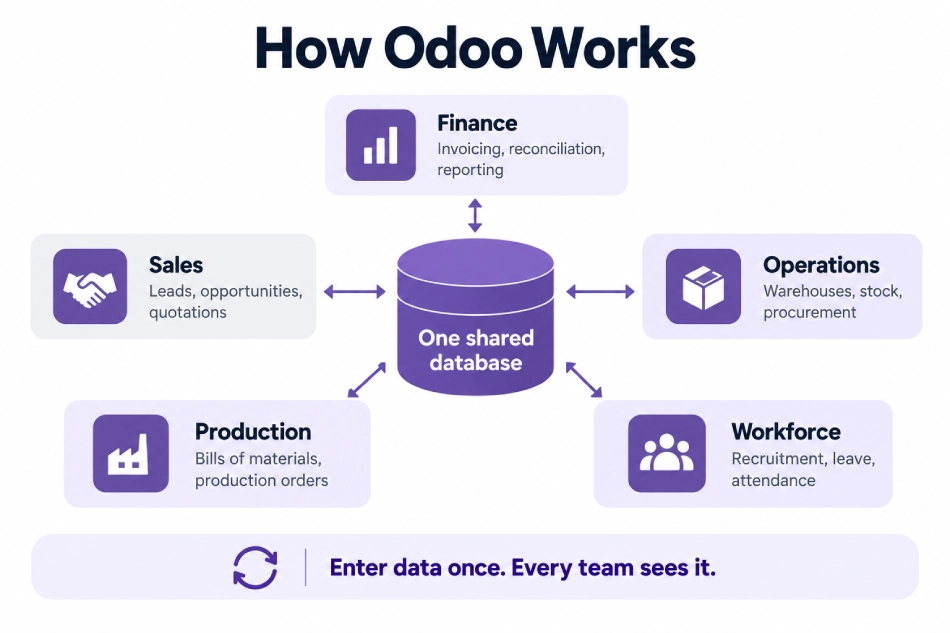
Odoo modules cover most major areas of business operations. Companies select the applications that match their processes and combine them into a connected ERP environment.
| Business Function | Odoo Module | What It Manages |
|---|---|---|
| Finance | Odoo Accounting and Finance | Accounting, invoicing, financial transactions, reconciliation, reporting, and finance workflows |
| Customer Management | Odoo CRM | Leads, opportunities, pipelines, activities, customer interactions, and sales forecasting |
| Sales | Odoo Sales | Quotations, sales orders, pricing, customer orders, and sales workflows |
| Purchasing | Odoo Purchase | Vendors, requests for quotation, purchase orders, procurement, and replenishment |
| Inventory | Odoo Inventory | Warehouses, stock movements, replenishment, lots, serial numbers, routes, and fulfillment |
| Manufacturing | Odoo Manufacturing | Bills of materials, manufacturing orders, production planning, work centers, and shop-floor processes |
| Projects | Odoo Project | Projects, tasks, milestones, team workloads, deadlines, and service delivery |
| Human Resources | Odoo HR | Employees, recruitment, leave, appraisals, attendance, and workforce processes |
| Commerce | Odoo eCommerce | Online products, storefronts, customer orders, payments, and digital sales |
| Retail | Odoo POS | Point-of-sale transactions, products, customers, payments, and retail operations |
These are only part of the wider Odoo ecosystem. The platform also includes applications for Helpdesk, Field Service, Timesheets, Planning, Documents, Sign, Maintenance, Quality, Marketing, Website, Subscriptions, Events, and other operational needs.
The broader Odoo modules ecosystem allows businesses to combine applications around their operating model, while the more detailed breakdown of which modules are included in Odoo helps distinguish individual capabilities and common module combinations.
What Is Odoo Used For?
Odoo is used to replace or connect fragmented business processes.
The strongest use cases are generally not situations where a company needs only one isolated function. Odoo becomes more valuable when sales, finance, inventory, production, projects, purchasing, customer service, or other departments need to work from connected information.
Sales and Customer Management
Sales teams can manage leads and opportunities in CRM, prepare quotations in Sales, convert them into orders, and maintain a connected history of customer activity.
When CRM and sales processes are part of the same platform as inventory, projects, subscriptions, accounting, or manufacturing, the customer relationship does not stop when an opportunity is closed.
Finance and Accounting
Odoo can connect financial processes with the business activity creating those transactions.
Invoices can originate from sales orders, timesheets, subscriptions, or other workflows. Purchases, expenses, customer payments, supplier transactions, and operational activities can feed into the financial side of the ERP instead of being re-entered into an independent accounting application.
Inventory and Distribution
Inventory-heavy businesses can use Odoo to manage warehouses, stock levels, receipts, deliveries, replenishment, lots, serial numbers, and product movements.
When Inventory works together with Purchase and Sales, demand and supply can be managed as part of the same operational flow.
Manufacturing
Manufacturers can connect bills of materials, production orders, raw materials, purchasing, inventory, quality, maintenance, sales demand, and financial information.
For companies currently managing production with spreadsheets, isolated MRP software, Access databases, or legacy systems, Odoo for manufacturing can provide a more connected operating model.
Projects and Professional Services
Project-based businesses can connect CRM, sales, projects, tasks, timesheets, expenses, planning, invoicing, and reporting.
The result is a stronger connection between work sold, work delivered, resources consumed, and revenue billed.
Commerce and Retail
Odoo can connect an eCommerce storefront or point-of-sale environment with products, customers, inventory, fulfillment, promotions, payments, and accounting.
This can reduce the number of integrations needed between front-end commerce tools and back-office operations.
Odoo Community vs Odoo Enterprise
Odoo is primarily available in Community and Enterprise editions.
| Area | Odoo Community | Odoo Enterprise |
|---|---|---|
| Licensing model | Open-source edition | Commercial subscription |
| Core business applications | Available | Available with additional capabilities |
| Enterprise-only features | Limited | Included according to plan and application |
| Odoo Studio | Not part of standard Community | Available with relevant Enterprise plan |
| Commercial Odoo services | Limited | Available according to subscription |
| Best suited for | Organizations comfortable managing more technical responsibility | Businesses wanting broader commercial functionality and support options |
Odoo Community
Odoo Community is the open-source edition.
Organizations can deploy and modify the software without purchasing a standard Enterprise user subscription, although running Community is not necessarily cost-free. Hosting, technical maintenance, implementation, customization, third-party applications, security, upgrades, and support still require resources.
Community can make sense for organizations with strong technical capability or relatively specific requirements that fit its available functionality.
Odoo Enterprise
Odoo Enterprise adds commercial applications, features, services, and licensing on top of the wider Odoo platform.
For many businesses, Enterprise is attractive because it reduces the amount of functionality that needs to be recreated through third-party modules or custom development.
The practical decision between Odoo Community and Odoo Enterprise should therefore be based on required functionality, hosting, support, customization, technical capacity, and long-term ownership cost rather than the subscription fee alone.
Businesses that need help determining the appropriate edition and subscription structure can incorporate Odoo licensing into the wider implementation planning process.
How Much Does Odoo Cost?
The total cost of Odoo is broader than the software subscription.
For most businesses, Odoo cost has several components.
| Cost Area | What It Covers |
|---|---|
| Licensing | Enterprise subscriptions and relevant Odoo plan costs |
| Implementation | Discovery, process mapping, configuration, testing, and go-live preparation |
| Migration | Extracting, cleaning, mapping, importing, and validating legacy data |
| Customization | Adjusting standard Odoo workflows around business requirements |
| Development | Custom modules, reports, business logic, portals, or specialized functionality |
| Integration | Connecting Odoo with external applications, platforms, and databases |
| Training | Preparing users and administrators to work effectively in the system |
| Support | Post-launch troubleshooting, optimization, maintenance, and ongoing improvements |
A company implementing a relatively standard set of applications will have a different budget from an organization migrating years of historical data, integrating external systems, and building specialized workflows.
The cost of Odoo implementation and development therefore depends on scope, business complexity, data condition, modules, integrations, custom development, testing requirements, and user adoption.
Odoo’s licensing cost should be evaluated alongside implementation and operational cost because the least expensive subscription does not necessarily result in the lowest total cost of ownership.
What Types of Businesses Use Odoo?
Odoo is used across industries because the platform is organized around business processes rather than one fixed industry workflow.
The best fit usually comes from the combination of operational complexity and the need for integrated information.
Manufacturing Businesses
Manufacturers often need sales demand, procurement, materials, production, quality, maintenance, inventory, and accounting to operate together.
Odoo can support both production and back-office workflows, making it particularly relevant to manufacturers moving away from fragmented ERP, MRP, spreadsheets, or custom legacy systems.
Adatasol’s manufacturing experience also extends across specialized sectors including automotive, metal fabrication, industrial equipment, electronics, packaging, pharmaceuticals, food and beverage, chemicals, plastics, textiles, and other production environments.
Healthcare Organizations
Healthcare organizations may need scheduling, purchasing, inventory, finance, staff management, operational workflows, reporting, and organization-specific processes.
An Odoo healthcare implementation must be designed with the organization’s privacy, security, regulatory, and workflow requirements in mind rather than treating healthcare as a generic ERP deployment.
Law Firms and Professional Services
Law firms and professional services companies typically rely less on manufacturing-style functionality and more on clients, matters or projects, time, billing, documents, CRM, and reporting.
That makes Odoo for law firms a different implementation problem from distribution or manufacturing even though the same ERP platform sits underneath it.
Real Estate Businesses
Real estate organizations may need to connect property information, tenant or customer workflows, vendors, maintenance, financial processes, documents, projects, and reporting.
The flexibility of Odoo for real estate allows those processes to be modeled without requiring every operation to live in a separate property-management application.
Nonprofit Organizations
Nonprofits often combine relationship management, donors or constituents, grants, events, projects, communications, accounting, volunteers, and program operations.
Odoo for nonprofits can bring more of these processes into one environment while still allowing organization-specific workflows to be configured where required.
Ultimately, who should use Odoo depends less on company size alone and more on whether the organization needs multiple business functions to share data, workflows, and reporting.
What Are the Main Benefits of Odoo?
The value of Odoo comes from integration, modularity, flexibility, and the ability to manage more of the business from a shared system.
One Connected Business Platform
A company can reduce its dependence on separate CRM, accounting, inventory, project-management, manufacturing, eCommerce, and service applications.
Consolidation does not necessarily mean every external application must disappear, but it can reduce the number of systems that require independent integrations and reconciliation.
Less Manual Data Entry
Employees often recreate the same customer, product, order, inventory, or financial information across different systems.
When the relevant functions operate in Odoo, data can move with the workflow rather than being re-entered manually.
Better Operational Visibility
A shared ERP environment can connect activity that would otherwise sit inside departmental silos.
Sales can see fulfillment information. Operations can see demand. Management can compare operational performance with financial outcomes. Service teams can work from customer information already available elsewhere in the platform.
Flexible Growth
A company can begin with a focused application set and expand later.
This makes Odoo attractive to growing organizations that do not want to replace their ERP every time they add a new business process.
Configurable and Customizable Workflows
Odoo can be adapted at several levels.
Some requirements are solved through configuration. Others may use Studio or third-party applications. More specialized processes may require custom development.
The flexibility is valuable when managed carefully because the goal should be to preserve meaningful business differentiation without creating unnecessary technical complexity.
Open-Source Foundation
Odoo’s open-source ecosystem gives businesses access to developers, partners, third-party modules, and a broader technical community.
For companies considering the strategic implications of that model, open-source ERP compared with proprietary ERP is an important part of the evaluation.
What Are the Limitations of Odoo?
Odoo is flexible, but it is not automatically simple.
Most Odoo problems come from the gap between what the platform can do and how an implementation is designed.
Poor Scoping Can Create Complexity
Trying to transform every department in the first phase can increase implementation risk.
A focused rollout generally makes it easier to validate processes, train users, and stabilize the system before expanding scope.
Excessive Customization Can Become Expensive
Customization is sometimes necessary, but recreating every behavior of a legacy system can make Odoo harder to maintain.
Custom code creates future testing, upgrade, documentation, and support responsibilities. The better approach is to customize when the requirement creates meaningful business value.
Data Migration Requires Preparation
Legacy data often contains duplicates, inconsistent naming, incomplete fields, historical workarounds, and structures that do not map cleanly to the new ERP.
Odoo migration is therefore both a data and business-process exercise rather than a simple file import.
Implementation Quality Matters
ERP touches too many parts of an organization for implementation quality to be treated as secondary.
Discovery, process mapping, configuration, integration, testing, training, and adoption all affect the result. Many common Odoo implementation challenges can be traced back to weaknesses in one of these areas.
Organizations inheriting an unstable or poorly designed system may need a structured Odoo rescue rather than continuing to add fixes on top of the original implementation.
How Is Odoo Implemented?
An Odoo implementation turns the software into an operational system aligned with the business.
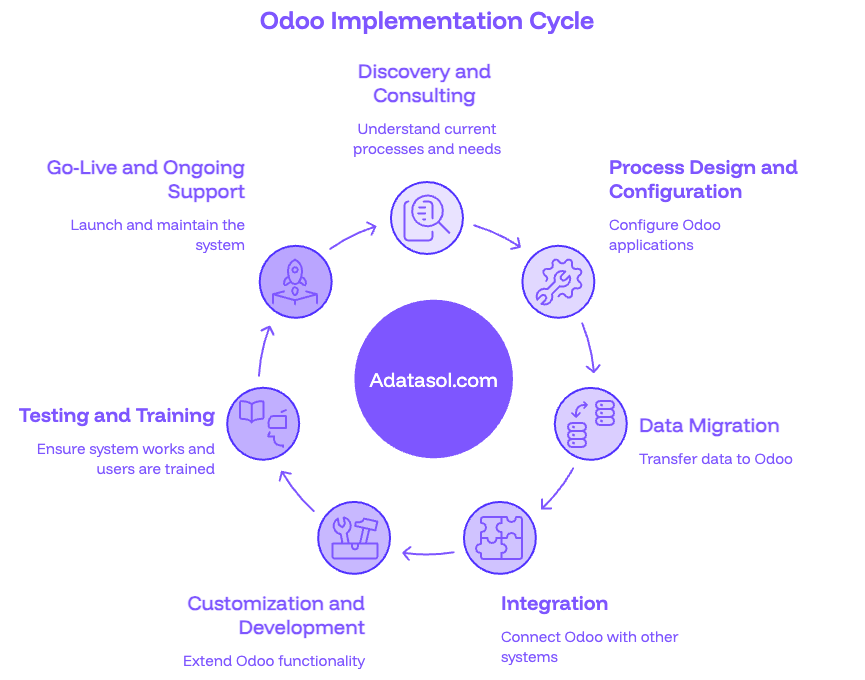
Discovery and Odoo Consulting
Implementation normally begins with understanding current processes, systems, problems, reporting requirements, integrations, user roles, and future operational needs.
Effective Odoo consulting helps separate genuine requirements from legacy habits so the new ERP does not simply recreate the limitations of the old environment.
Process Design and Configuration
Once requirements are understood, Odoo applications are configured around the organization’s sales, finance, inventory, manufacturing, project, HR, service, or other workflows.
The objective is to use standard functionality where it fits and identify only the gaps that require additional work.
Data Migration
Customer records, suppliers, products, accounts, inventory, transactions, open orders, projects, and other required data may need to move from existing systems into Odoo.
A successful migration includes cleaning, mapping, trial imports, validation, reconciliation, and final cutover planning rather than importing all historical data indiscriminately.
Integration
Odoo may need to exchange data with eCommerce platforms, logistics providers, payment systems, external databases, customer portals, specialized industry software, or other enterprise applications.
Odoo integration should define system ownership clearly so every application has an authoritative source for the information it manages.
Customization and Development
Standard Odoo does not fit every specialized workflow.
Odoo custom development can extend business logic, reports, portals, integrations, and application behavior when configuration alone cannot satisfy a justified requirement.
Testing and Training
Testing should cover end-to-end business scenarios rather than isolated screens.
Users also need training based on their actual roles. A warehouse employee, accountant, project manager, salesperson, manufacturing planner, and Odoo administrator each use the platform differently.
Go-Live and Ongoing Support
ERP stabilization continues after launch.
Real usage often reveals opportunities to improve workflows, permissions, automation, reports, and training. Structured Odoo support helps address those issues without allowing temporary workarounds to become permanent process problems.
The complete Odoo implementation process goes substantially deeper into planning, rollout, testing, adoption, and post-launch optimization, while professional Odoo implementation services combine those disciplines into a managed deployment.
Odoo Migration: Moving from an Existing System
Companies rarely implement ERP with a completely empty database.
Odoo projects often involve replacing accounting systems, legacy ERP platforms, CRMs, spreadsheets, databases, or custom-built software.
Migration therefore affects more than historical records.
Customer information may need to be normalized. Products may use different units or categories. Accounting structures must be mapped. Inventory quantities need validation. Open transactions must remain operational during cutover.
The technical movement of data is only one part of a successful Odoo migration. The more important work is deciding what should move, how it maps to the new system, which historical information remains useful, and how the migrated data will be validated before users depend on it.
Businesses moving from heavily customized or older systems should also account for integrations, historical reporting, attachments, custom fields, and process differences during migration planning.
Odoo Hosting and Deployment Options
Odoo can be deployed through different hosting approaches depending on the organization’s need for simplicity, technical control, and customization.
| Deployment | Best Fit | Main Consideration |
|---|---|---|
| Odoo Online | Standard implementations that want managed SaaS hosting | Less infrastructure responsibility |
| Odoo.sh | Businesses using custom development and structured deployment workflows | More technical flexibility |
| Self-Hosted / On-Premise | Organizations requiring infrastructure control | Greater maintenance responsibility |
Odoo Online
Odoo Online provides a managed SaaS environment.
It works well for organizations that can remain within the functionality and customization model supported by the hosted platform and do not want to manage server infrastructure.
Odoo.sh
Odoo.sh provides a managed environment designed for deployments that require more development flexibility.
It supports structured development, testing, staging, and deployment processes and is commonly used when implementations include custom modules.
Self-Hosted Odoo
Self-hosting provides greater control over infrastructure, server configuration, deployment, and technical administration.
That control also introduces responsibility for backups, monitoring, security, updates, database administration, performance, and maintenance.
The wider decision between cloud ERP and on-premise ERP should therefore consider internal technical resources alongside software functionality.
Odoo vs Other ERP Systems
Odoo competes with traditional ERP products, cloud business platforms, accounting systems, CRMs, and combinations of point solutions.
The comparison changes depending on what a business is replacing.
| Area | Odoo’s General Position |
|---|---|
| Modularity | Businesses can introduce applications gradually |
| Customization | Strong configuration and development flexibility |
| Open-source model | Community Edition and broad developer ecosystem |
| Functional breadth | CRM, finance, operations, manufacturing, projects, commerce, HR, and more |
| Integration | APIs and custom integration support external systems |
| Deployment | Online, Odoo.sh, and self-hosted approaches |
| Best-fit evaluation | Depends on requirements rather than company size alone |
Against traditional ERP systems, Odoo often appeals to organizations looking for modularity, flexibility, and a lower barrier to changing business workflows.
Against accounting products such as QuickBooks or Xero, the main difference is functional breadth. Odoo extends into sales, inventory, purchasing, manufacturing, projects, CRM, HR, and other operational processes.
Against standalone CRMs such as Salesforce, Odoo’s advantage is the ability to connect the customer lifecycle directly with operational and financial processes.
These high-level differences are only useful as a starting point. The deeper comparison of Odoo with other ERP systems evaluates the factors that matter when comparing Odoo with platforms such as SAP, NetSuite, Microsoft Dynamics 365, Acumatica, ERPNext, Sage, Infor, and other alternatives.
Adatasol’s ERP and Business Systems Experience
Odoo implementations benefit from ERP experience that extends beyond familiarity with one software product.
Adatasol brings more than 20 years of experience across ERP, enterprise software, integrations, custom development, modernization, and business systems. That broader background includes projects involving Odoo as well as SAP and other enterprise technologies.
This distinction matters because not every operational problem should automatically be treated as an Odoo configuration problem. Some organizations are migrating from other ERP systems. Others need Odoo integrated with existing enterprise software. Some require custom applications around the ERP rather than replacing everything with Odoo.
Adatasol’s case study portfolio reflects that broader history across industries and technologies rather than representing every engagement as an Odoo project.
For Odoo-specific work, the same enterprise systems experience informs implementation architecture, integration strategy, data migration, process design, customization decisions, testing, and long-term maintainability.
A Brief History of Odoo
Odoo originally began as TinyERP, later became OpenERP, and was renamed Odoo in 2014 as the product expanded beyond traditional enterprise resource planning.
The name change reflected the growing breadth of the platform. Odoo was no longer limited to conventional ERP areas such as finance, purchasing, and inventory; it had expanded into CRM, websites, eCommerce, point of sale, marketing, projects, HR, and other business applications.
The platform later evolved into the Community and Enterprise model used today, while continuing to expand its application ecosystem and release new major versions.
The technical history is useful context, but businesses evaluating Odoo today are generally better served by focusing on current functionality, implementation requirements, fit, maintainability, and total ownership cost.
Frequently Asked Questions About Odoo
Is Odoo an ERP?
Yes. Odoo is an ERP system that also includes CRM, eCommerce, project management, HR, marketing, point of sale, and other business applications beyond traditional ERP functions.
What does Odoo stand for?
Odoo is the product name rather than an acronym for a specific ERP phrase. The platform was previously known as TinyERP and OpenERP before adopting the Odoo name.
What is Odoo used for?
Odoo is used to manage sales, CRM, accounting, inventory, purchasing, manufacturing, projects, HR, eCommerce, point of sale, and other business processes in one connected platform.
Is Odoo open source?
Odoo Community is open-source software, while Odoo Enterprise is the commercial edition with additional features and services. The practical differences between Odoo Community and Enterprise extend beyond licensing alone.
Is Odoo free?
Odoo Community can be used without a standard Enterprise user subscription, but hosting, implementation, maintenance, development, migration, and support may still create costs.
Is Odoo good for small businesses?
Yes, especially when a growing business needs more than standalone accounting or CRM software. Its modular model allows companies to begin with a focused application set and expand later.
Can large companies use Odoo?
Yes, although ERP fit depends on operational complexity, reporting, financial requirements, integrations, governance, regulatory needs, and customization rather than employee count alone.
What modules are available in Odoo?
Odoo includes applications for CRM, Sales, Accounting, Purchase, Inventory, Manufacturing, Project, HR, eCommerce, POS, Helpdesk, Marketing, Field Service, Documents, and many other functions. The full Odoo module structure explains how they fit together.
Can Odoo replace QuickBooks?
Odoo can replace QuickBooks for businesses that need accounting combined with broader ERP functions such as CRM, inventory, purchasing, projects, or manufacturing. The suitability depends on the company’s accounting and operational requirements.
Can Odoo replace Salesforce?
Odoo includes CRM and sales applications, so it can replace Salesforce in some environments. Businesses with highly sophisticated standalone CRM requirements should compare the two platforms against their actual sales, integration, and reporting needs.
Is Odoo customizable?
Yes. Odoo supports configuration, integrations, Studio capabilities where available, third-party applications, and custom module development. The key is distinguishing necessary customization from changes that unnecessarily complicate future maintenance.
Can Odoo integrate with other software?
Yes. Odoo can integrate with external applications, databases, eCommerce systems, payment platforms, logistics tools, portals, and specialized business systems through APIs, connectors, and custom Odoo integrations.
Can Odoo be self-hosted?
Yes. Odoo supports self-hosted deployments as well as managed hosting options such as Odoo Online and Odoo.sh.
How long does Odoo implementation take?
Implementation time depends on modules, users, integrations, data migration, customization, testing, and organizational complexity. A focused implementation may move quickly, while complex multi-department programs can take significantly longer. The main variables are covered in Odoo implementation timelines.
How much does Odoo implementation cost?
Odoo implementation cost varies with scope, modules, migration, integrations, customization, training, and support. A realistic budget should consider total implementation effort rather than software licensing alone.
What happens if an Odoo implementation fails?
A failed implementation does not always require starting over. Configuration, custom code, integrations, data quality, performance, and process design can be audited to determine whether the system can be stabilized through an Odoo rescue.
Is Odoo better than SAP or NetSuite?
There is no universal winner. Odoo, SAP, NetSuite, and other ERP platforms serve different requirements. Odoo is particularly strong in modularity and flexibility, while the right decision depends on financial complexity, operations, industry needs, integrations, scale, and implementation strategy.
Who should use Odoo?
Odoo is best suited to organizations that need multiple business functions to share information and workflows rather than operating through disconnected applications. The broader Odoo fit assessment depends on process complexity and business requirements.
Is Odoo Right for Your Business?
Odoo is most valuable when the problem is larger than replacing one piece of software.
Businesses usually begin evaluating Odoo because customer information, accounting, inventory, manufacturing, projects, purchasing, or other operations have become fragmented across systems that no longer work well together.
The right implementation starts by understanding those processes before choosing modules or writing custom code. From there, Odoo consulting, Odoo implementation, data migration, system integration, customization, custom development, licensing, and ongoing support can be scoped around the actual requirements of the business.
A well-designed Odoo system should simplify the way the organization operates rather than simply moving existing complexity into a new ERP.

