
SAP Business One to Odoo migration moves the master data, open transactions, inventory, accounting position, manufacturing records, and required history into Odoo. It must preserve how Business Partners, Items, pricing, warehouses, documents, batches, serial numbers, and financial records relate after cutover.
SAP Business One and Odoo model these processes differently. CardCodes, CardTypes, ItemCodes, pricing rules, inventory structures, and document relationships have to fit the Odoo implementation workflows that will operate after SAP Business One is retired.
Why SAP Business One Data Cannot Be Copied Straight Into Odoo
An SAP Business One record rarely operates alone. Business Partners affect pricing and documents, Items depend on units and inventory settings, and open documents may already be partially fulfilled.
Business Partners Are More Than Contact Records
SAP Business One identifies Business Partners with a CardCode and CardType such as customer, vendor, or lead. They can also carry addresses, payment terms, price-list assignments, credit information, and tax data.
Business Partners map to Odoo contacts and their sales or purchasing roles. When one legal entity exists as separate customer and vendor records, Odoo may need one contact serving both roles rather than duplicate records.
ItemCodes Carry Product, Inventory, and Pricing Relationships
An SAP Business One Item can carry an ItemCode, units of measure, warehouse settings, batch or serial tracking, pricing, purchasing data, and accounting assignments.
The ItemCode should resolve to the correct Odoo product or variant while units, tracking, pricing, and inventory behavior are mapped separately for Odoo Sales and downstream operations.
Warehouse Stock May Depend on Bins, Batches, and Serials
SAP Business One can manage inventory by warehouse, bin location, batch, and serial number. Odoo separates warehouses from internal locations and also supports lot and serial traceability.
Product, warehouse, location, batch or serial identifier, and quantity must remain aligned in Odoo Inventory. Opening quantity alone is not enough.
Open Documents Need Their Remaining Quantities and References
SAP Business One document flow can connect a Sales Order to a Delivery and A/R Invoice, or a Purchase Order to a Goods Receipt PO and A/P Invoice.
Migration must preserve remaining quantities, Business Partners, Items, prices, and source references without recreating completed portions as new work in Odoo Purchase, Sales, Inventory, or Accounting.
What SAP Business One Data Can Move to Odoo?
Odoo only needs the SAP Business One records, relationships, balances, and history required after cutover.
| SAP Business One data | Odoo destination | Migration treatment |
| Business Partners / CardCodes | Contacts | Preserve active identity, CardType, terms, and addresses |
| Items / ItemCodes | Products and variants | Map UoM, attributes, tracking, categories, and source IDs |
| Price Lists / Special Prices | Pricelists | Rebuild approved pricing rules |
| Warehouses / Bin Locations | Warehouses / internal locations | Preserve required stock structure |
| Open sales orders | Sales | Carry remaining quantities, pricing, and references |
| Open purchase orders | Purchase | Carry remaining quantities, supplier data, and references |
| Batches / serial numbers | Lots / serials | Preserve identifier, product, quantity, and location |
| Chart of accounts / balances | Accounting | Map accounts and reconcile cutover balances |
| BOMs / production orders | Manufacturing | Move active production structures |
| Closed history | Odoo or archive | Select by operational, reporting, and audit need |
Preserve CardCodes, ItemCodes, and Source IDs
Business Partner codes, ItemCodes, document numbers, and other stable identifiers should remain available as migration references. Odoo External IDs can be used where appropriate so repeated test imports update the intended record instead of creating duplicates.
Rebuild SAP Business One Pricing Rules in Odoo
SAP Business One pricing can involve Price Lists, Special Prices for Business Partners, Discount Groups, Period and Volume Discounts, quantity breaks, dates, currencies, and units of measure.
Those rules should be translated into Odoo pricelists rather than copying displayed prices alone.
Keep Manufacturing Relationships Intact
Active BOMs, components, production orders, operations, and work-center requirements can move into Odoo Manufacturing when production will continue in Odoo. Finished products, components, quantities, units, operations, and work centers must remain connected.
What Should Stay Out of the New Odoo Database?
Inactive Business Partners, discontinued Items, obsolete pricing, unused custom structures, and closed transactions do not need to become active Odoo records.
Obsolete Business Partners and Items
Duplicate customers, dormant vendors, discontinued products, and unused warehouses should be cleaned or archived before migration.
UDFs, UDOs, and Add-Ons Need a Business Reason to Move
SAP Business One can contain User-Defined Fields, User-Defined Tables, User-Defined Objects, reports, and third-party add-ons. They should move only when the business requirement remains after cutover.
Required behavior can map to standard configuration or custom Odoo development. Custom logic is reserved for requirements Odoo cannot meet.
Closed SAP Business One History Can Remain Read-Only
Open transactions and history can move to Odoo while older closed orders, invoices, journal activity, and inventory transactions remain in an archive or read-only SAP Business One environment. Keep only history still required after cutover.
How We Migrate SAP Business One to Odoo
Company-database structure, business partners, items, pricing, warehouses, custom objects, open documents, and accounting determine what must change before Odoo takes over operations.
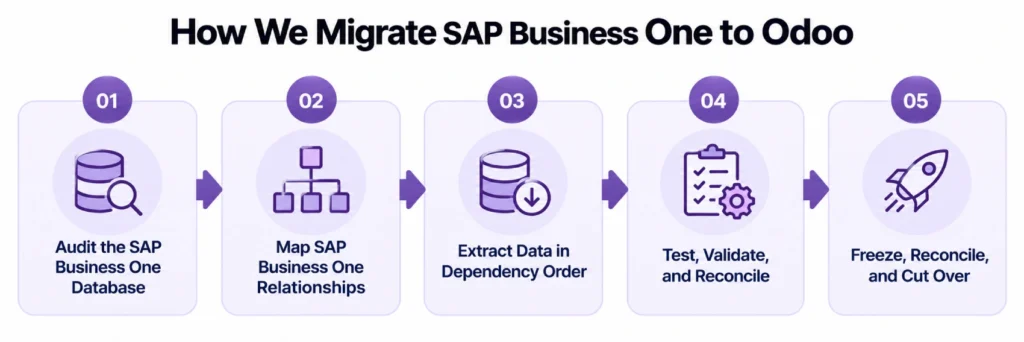
Audit the SAP Business One Company Database
We identify Business Partners, Items, pricing, warehouses, bins, batches, serials, open documents, financial structures, UDFs, UDOs, add-ons, manufacturing data, and external connections. We also confirm whether SAP Business One runs on Microsoft SQL Server or SAP HANA and which approved extraction methods are available.
Our Odoo consulting work identifies B1 workflows standard Odoo can replace without rebuilding the same configuration.
Map SAP Business One Relationships
Business Partners become Odoo contacts. Items become products or variants. Warehouses and bins become the required warehouse/location structure. Pricing is rebuilt against Odoo pricelists, and open documents move into the applications that will continue them.
External connections can be rebuilt through Odoo integration when SAP Business One is removed from the architecture.
Extract Data in Dependency Order
Contacts, products, accounts, units, taxes, and warehouses are loaded before dependent orders, invoices, bills, stock, or production records. CardCodes and ItemCodes stay consistent so each source record maps to the same Odoo record across test migrations.
Test Pricing, Inventory, Documents, and Finance
Record counts can agree while pricing, document relationships, stock locations, or account mappings are wrong.
Test migrations validate Business Partner matching, Item mapping, pricing, open quantities, warehouse/bin conversion, batch or serial traceability, A/R, A/P, taxes, inventory valuation, account mapping, and opening balances.
Reconcile and Cut Over
A controlled transaction freeze separates final SAP Business One activity from production Odoo activity. Remaining approved changes are loaded and financial and inventory figures are reconciled again before users move to Odoo.
After go-live, Odoo support can cover validation, workflow adjustments, integration issues, and stabilization.
What We Validate Before SAP Business One Is Retired
A migration is ready when operational and financial positions agree and users can continue open business without rebuilding SAP transactions manually.
| Area | What must agree | Cutover check |
| Business Partners | Active records and open balances | CardCodes resolve correctly |
| Items | ItemCode, UoM, tracking, status | Active products are usable |
| Inventory | Quantity by warehouse/location | Stock position agrees |
| Batches / serials | Identifier, quantity, location | Traceability continues |
| Accounts receivable | Open customer balances | A/R reconciles |
| Accounts payable | Open vendor balances | A/P reconciles |
| General ledger | Approved opening balances | Trial balance agrees |
| Open documents | Remaining quantities and references | Sales and purchasing continue |
Inventory valuation must also agree with the approved cutover position before finance begins operating in Odoo Accounting.
If the source landscape also includes ECC, S/4HANA, or other SAP environments, the project expands into a broader SAP to Odoo migration rather than a Business One-only cutover.
SAP Business One to Odoo Migration Services From Adatasol
Replacing SAP Business One affects pricing, inventory, purchasing, sales, accounting, manufacturing, and integrations.
US-Based Odoo Certified Ready Partner
Adatasol is based in Willoughby, Ohio and works with US businesses on ERP migration, implementation, integration, customization, and support. Our Odoo migration services cover the data and processes that must continue after SAP Business One is retired.
We Do Not Rebuild Every SAP Business One Customization
UDFs, UDOs, add-ons, reports, pricing rules, and other extensions are retained only when their business purpose is still required after cutover. Custom logic is reserved for requirements standard Odoo cannot meet.
We Preserve the Relationships Behind the Records
An Item is not correctly migrated if its price, warehouse, tracking, or account mapping is wrong. A Business Partner is not complete if its open documents cannot resolve to it. We validate connected transactions, not isolated record creation.
More Than 20 Years of ERP Experience
Our ERP experience includes more than 20 years of ERP work across finance, operations, inventory, manufacturing, and integration.
Schedule a free migration assessment to review your SAP Business One company database, Business Partners, Items, pricing, inventory, custom structures, open transactions, history, and Odoo cutover requirements.
SAP Business One to Odoo Migration FAQs
Can SAP Business One data be migrated to Odoo?
Yes. Business Partners, Items, pricing, open orders, inventory, accounting balances, BOMs, production data, and selected history can move when their relationships and Odoo destinations are defined correctly.
How are SAP Business One Business Partners migrated?
CardCodes, CardTypes, names, addresses, terms, and required commercial data map to Odoo contacts. Customer and vendor duplicates should be resolved before dependent transactions are loaded.
Can SAP Business One Price Lists and Special Prices move to Odoo?
Yes, but the pricing logic should be rebuilt against Odoo pricelists. Partner-specific pricing, discounts, quantity breaks, dates, currencies, and UoMs may require transformation.
Can SAP Business One batches and serial numbers be migrated?
Yes. Required identifiers can move with their product, quantity, warehouse, or location so lot and serial traceability continues after cutover.
What happens to SAP Business One UDFs and UDOs?
Required fields and objects can map to standard or custom Odoo structures when their business purpose remains. Obsolete customizations should stay behind.
Should all SAP Business One history move to Odoo?
No. Open transactions and useful history can move while older closed records remain accessible in an archive or read-only SAP Business One environment.
How is SAP Business One migration validated?
Business Partners, Items, open documents, stock, batches, serials, A/R, A/P, inventory valuation, and opening balances are reconciled before production work begins in Odoo.
How long does SAP Business One to Odoo migration take?
Timing depends on company databases, data volume, pricing complexity, UDFs, UDOs, add-ons, inventory structure, integrations, historical scope, and required test migrations.















