
SAP to Odoo migration moves the business data and active processes you still need from SAP into a configured Odoo environment. Typical scope includes customers, suppliers, products, open orders, inventory, accounting balances, BOMs, and selected history, followed by financial, inventory, and operational reconciliation before SAP is retired.
SAP Business One, SAP ECC, SAP S/4HANA, and other SAP environments use different data structures, extensions, and extraction methods. The data moved from SAP should support the sales, purchasing, accounting, inventory, manufacturing, and other Odoo implementation workflows that will operate after cutover.
Why SAP to Odoo Migration Requires More Than Data Transfer
SAP records carry account assignments, units, document relationships, inventory states, custom fields, and process rules. Those relationships still need to work after the data moves into Odoo.
SAP Master Data Cannot Be Copied One-for-One
Customers, suppliers, materials, units of measure, warehouses, price lists, payment terms, and account codes rarely map directly into Odoo.
Configured Odoo workflows determine which records remain active, which fields are required, and which duplicate or obsolete master records should stay out of the new database.
Open Transactions Must Continue in Odoo
Open sales orders, purchase orders, invoices, bills, receipts, deliveries, and production orders need their remaining quantities, status, and SAP source references preserved.
Users should be able to continue approved transactions through Odoo Sales and Odoo Purchase without recreating transactions already entered in SAP.
SAP Custom Logic Should Be Reassessed Before It Moves
Custom fields, reports, ABAP and Z developments, Business One add-ons, and other SAP extensions can represent years of accumulated process changes.
An SAP customization should move only when the business requirement still exists and standard Odoo does not already handle it. Unique requirements can be delivered through custom Odoo development instead of direct code conversion.
Reconciliation Decides Go-Live
A completed import does not prove that the migration is correct.
Trial balance, open AR/AP, stock quantities, inventory valuation, and open sales, purchasing, manufacturing, and inventory transactions must agree with the approved SAP cutover position before finance and inventory operations move into Odoo Accounting and Odoo Inventory.
What Data Can Be Migrated From SAP to Odoo?
The migration should move records required to operate in Odoo, preserve source relationships, and avoid importing inactive structures simply because they exist in SAP.
| SAP data | Odoo destination | Recommended treatment |
| Customers / Business Partners | Contacts | Active records with stable SAP identifiers |
| Vendors | Contacts / Purchase | Active suppliers, terms, and references |
| Materials / Items | Products and variants | Active catalog, UoM, attributes, and source IDs |
| Chart of accounts | Accounting | Map to approved Odoo account structure |
| Open AR / AP | Customer invoices / vendor bills | Migrate and reconcile at cutover |
| Sales orders | Sales | Open and partially fulfilled transactions |
| Purchase orders | Purchase | Open and partially received transactions |
| Inventory | Inventory | Quantity, location, lot/serial, and valuation where required |
| BOMs / routings | Manufacturing | Active structures needed after go-live |
| Closed history | Odoo or archive | Select by reporting, audit, and operational need |
Preserve SAP Source Identifiers
SAP identifiers should be retained as cross-system references or Odoo External IDs where appropriate. This helps repeated migration loads update the intended record instead of creating duplicates and allows relationships between customers, products, orders, invoices, and other dependent records to be reconstructed consistently.
Load Data in Dependency Order
Customers and suppliers must exist before their open transactions. Products, accounts, warehouses, currencies, units, and tax structures need to exist before dependent orders and accounting records are loaded.
Migration sequencing should follow those dependencies rather than importing every SAP extract independently.
Keep Manufacturing Relationships Intact
Active BOMs, operations, work centers, and open production orders can move into Odoo Manufacturing when production will continue in Odoo.
Product references, units, components, operations, and routing relationships need to remain consistent after migration.
Decide How Much SAP History Belongs in Odoo
Historical data should be divided by how the business will use it after go-live.
Migrate: Open transactions, active master data, balances, inventory, and history required for current operations.
Selective history: Recent invoices, sales, purchasing, or other records users regularly need for reporting, customer service, or comparison.
Archive: Older closed records that must remain available for audit, legal, or reference purposes but do not need to behave as live Odoo documents.
What Should Not Be Migrated From SAP to Odoo?
Not every SAP record or customization belongs in the new operating database.
Obsolete Master Records
Inactive customers, duplicate suppliers, discontinued materials, expired price lists, unused warehouses, and dormant accounts should be removed or archived instead of carried into Odoo.
Customizations Without a Current Requirement
Legacy SAP logic should not be rebuilt automatically. If standard Odoo now handles the requirement, the old customization can be retired instead of recreating unnecessary complexity.
Closed History That Does Not Need to Operate
Older completed orders, settled transactions, closed stock movements, and other historical documents can remain available through an archive or read-only SAP environment when users do not need them as operational Odoo records.
How We Migrate SAP to Odoo
SAP product, active modules, companies, custom objects, integrations, history requirements, and target Odoo processes determine the migration path.
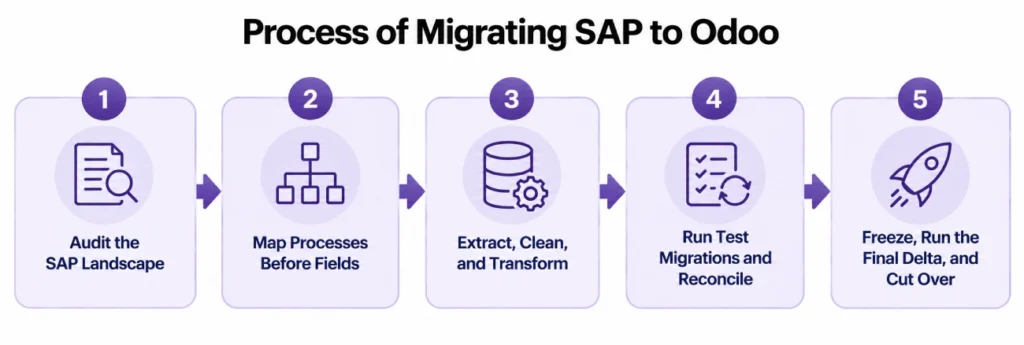
Audit the SAP Landscape
We identify whether the source is SAP Business One, SAP ECC, SAP S/4HANA, or another SAP environment, then document companies, active modules, master data, open transactions, extensions, integrations, and reporting requirements.
Connections to banks, eCommerce platforms, EDI partners, shipping systems, or other applications can be rebuilt through Odoo integration when SAP is removed from the architecture.
Map Processes Before Fields
Customers, products, orders, accounts, warehouses, manufacturing objects, and approvals are mapped into the target Odoo process.
Each requirement is classified as standard Odoo configuration, data transformation, integration, custom development, or retirement. SAP structures are not recreated when Odoo handles the same business requirement differently.
Extract, Clean, and Transform
Approved SAP records are extracted in the sequence required by Odoo dependencies.
Duplicate master records, invalid references, obsolete data, inconsistent units, account-code differences, tax mappings, product structures, company assignments, and document states are corrected or transformed before import.
Run Test Migrations and Reconcile
Test migrations verify record counts, relationships, open transactions, balances, stock quantities, valuation, and operational workflows.
Mapping and transformation errors are corrected before the migration is repeated. Users validate operational records while finance and operations confirm the figures required for cutover.
Freeze, Run the Final Delta, and Cut Over
A defined transaction freeze prevents SAP and Odoo from changing the same business data during final cutover.
Remaining approved SAP changes are loaded, reconciliation is repeated, and users move to Odoo after the agreed controls pass. After go-live, Odoo support can cover post-cutover validation, workflow adjustments, integration issues, and stabilization.
How We Validate SAP to Odoo Migration Before Cutover
Reconciliation proves that Odoo starts from an approved business position rather than merely showing that source files imported successfully.
| Area | What must agree | Go-live check |
| General ledger | Approved opening balances | Trial balance agrees |
| Accounts receivable | Open customer balances | AR reconciles |
| Accounts payable | Open supplier balances | AP reconciles |
| Inventory quantity | Quantity by required location | Stock agrees |
| Inventory valuation | Inventory value at cutover | Valuation agrees |
| Open sales | Remaining quantities and status | Orders can continue |
| Open purchasing | Receipts, remaining quantities, bills | Purchasing can continue |
Lot- and serial-controlled products also need the identifiers, quantities, locations, and required valuation data for post-cutover traceability.
SAP ECC Migration Planning
SAP Business Suite 7 core applications, including SAP ERP 6.0, remain under mainstream maintenance through the end of 2027, with optional extended maintenance through the end of 2030.
For ECC users, the migration decision should compare the future SAP path with the ERP requirements the business intends to carry forward. These dates do not apply to SAP Business One or SAP S/4HANA.
SAP to Odoo Migration Services From Adatasol
ERP replacement affects finance, inventory, purchasing, sales, manufacturing, integrations, and user workflows. Adatasol combines Odoo delivery with more than 20 years of ERP experience and a longer software-development history.
US-Based Odoo Certified Ready Partner
Adatasol is based in Willoughby, Ohio and works with US businesses on implementation, migration, integration, customization, and support.
Our Odoo migration services cover the data move together with the processes and controls that must continue after SAP is retired.
More Than 20 Years of ERP Experience
ERP migration extends beyond importing database records. Finance, inventory, purchasing, manufacturing, integrations, and operational workflows all have to work correctly after cutover.
Our ERP experience includes more than 20 years of ERP work and a longer software-development history.
We Tell You What Should Not Migrate
SAP records, customizations, and historical transactions that no longer serve the target process stay out of the new operating database.
That reduces unnecessary migration volume and prevents legacy complexity from being rebuilt inside Odoo.
We Correct Migration Problems Before They Spread
Duplicate records, unexplained balances, broken product relationships, incorrect opening inventory, and incomplete transactions should be corrected before dependent workflows go live.
We trace the SAP source record, transformation rule, Odoo destination, and reconciliation difference until the cause is isolated.
Schedule a free migration assessment to review your SAP environment, target Odoo processes, historical-data requirements, integration dependencies, and cutover controls.
SAP to Odoo Migration FAQs
Can SAP data be migrated to Odoo?
Yes. Customers, suppliers, products, accounts, open orders, inventory, accounting balances, BOMs, and selected history can move when SAP source objects are mapped to the required Odoo records and processes.
What SAP data should be migrated to Odoo?
Migrate the master data, open transactions, balances, inventory, and history required for ongoing operations. Obsolete records, unused customizations, and older closed history can be cleaned, transformed, or archived instead.
Do we need to migrate all historical SAP transactions?
No. Active data and selected history can move while older SAP records remain in an archive or read-only environment based on reporting, audit, legal, and operational requirements.
Can SAP Business One, SAP ECC, and SAP S/4HANA migrate to Odoo?
Yes, but they require different extraction and mapping approaches. The SAP product, active modules, custom fields, companies, integrations, and target Odoo processes need to be identified first.
What happens to SAP customizations and ABAP programs?
Each customization is reviewed against the business requirement it serves. Standard Odoo can replace some custom behavior, while unique requirements may need configuration, integration, or custom development.
How do you verify financial and inventory data after migration?
Trial balance, open AR, open AP, stock quantities, inventory valuation, and open operational transactions are reconciled against the approved SAP cutover position before finance and inventory operations move into Odoo.
How long does an SAP to Odoo migration take?
The timeline depends on the SAP product, modules, companies, data volume, history, integrations, custom logic, and test migrations. We estimate it after the SAP landscape and cutover scope are audited.















