
Odoo Stripe integration connects your Stripe account to Odoo ERP so charges, fees, refunds, payouts, customers, and subscription invoices move between the two systems automatically. It runs through Odoo’s built-in payment provider, a connector module, middleware, or a custom API build, depending on how much of your revenue Stripe bills.
Most Odoo users already have Stripe switched on. Cards clear, invoices get marked paid, and it looks finished. Then the deposit lands net of fees, the subscriptions Stripe billed never became Odoo invoices, and someone matches two dashboards by hand every month. We close that gap as a US-based Odoo integration partner.
Why Your Business Needs Odoo Stripe Integration
Stripe takes the money. It authorizes the card, holds the balance, and deposits it on a payout schedule. It does not post a journal entry, allocate a fee to an expense account, or tell you which invoice a deposit paid. If you sell through Odoo eCommerce, the built-in provider covers checkout and stops there. Everything after the charge lands on whoever closes your month.
Payments Arrive With No Invoice to Match
Stripe accepts money through payment links, Checkout sessions, and invoices raised in its own dashboard. Odoo sees none of it. A settled payment link does not confirm the quotation behind it in Odoo Sales, so the order sits unconfirmed and your overdue list still shows a customer who paid last week.
The Payout Report Gets Retyped Every Week
Someone exports the Stripe balance report, separates gross charges from fees, finds the refunds, and enters a total against the bank line. At forty transactions a week that is an hour. At four hundred it is a full-time job spent copying numbers Stripe already publishes through its API.
Stripe Is Already Switched On, and It Is Not Enough
Odoo ships Stripe as one of its built-in payment providers, so it looks like the job is done. It authorizes cards, marks the invoice paid, and logs a transaction. It does not import your fees, match a payout to your bank deposit, or create anything for revenue Stripe billed on its own.
Fees, Refunds, and Disputes Never Reach the Ledger
Stripe deducts fees before it pays you, refunds settle against a different payout than the original charge, and a disputed payment is debited immediately with its dispute fee. Without those flows mapped into Odoo Accounting, revenue is overstated and every month closes on a difference somebody writes off.
Key Benefits of Odoo Stripe Integration
Connected properly, Stripe stays the processor and Odoo becomes the record. Fees, refunds, and disputes arrive as accounting entries rather than dashboard rows, payouts land as a batch you can match to the bank, and both systems agree on what a customer owes.
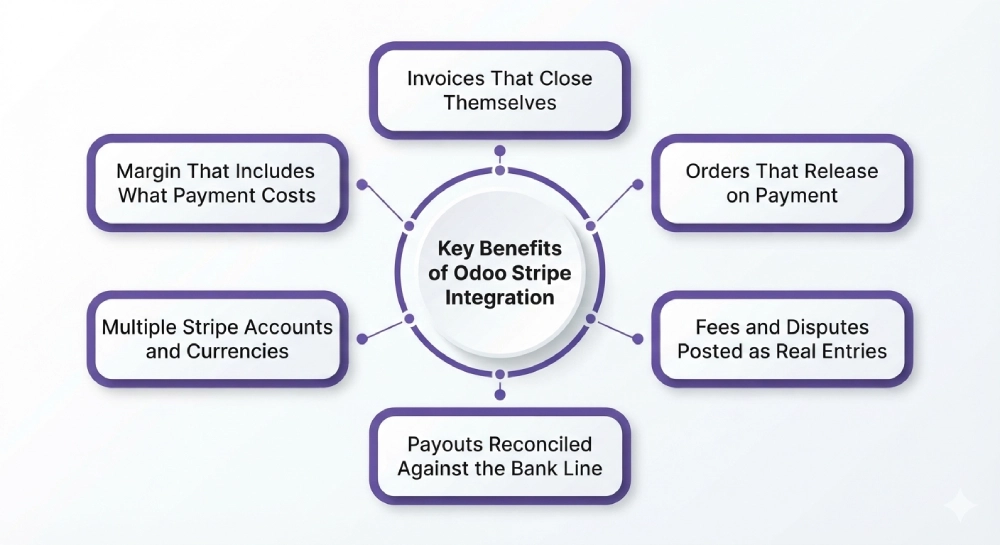
Invoices That Close Themselves
A successful charge posts against the matching Odoo invoice with the payment method, Stripe reference, and exact amount attached. Partial payments and payments taken outside Odoo are matched on the payment intent rather than guessed from the amount.
Orders That Release on Payment
Payment confirmation confirms the sales order and releases the delivery in Odoo Inventory without anyone checking a dashboard first. Failed payments and authorizations that were never captured hold the order, so you stop shipping against a declined card.
Fees and Disputes Posted as Real Entries
Every processing fee posts to your expense account against the charge it belongs to. Refunds create credit notes, disputes post to a holding account with the dispute fee separated out, and a won dispute reverses cleanly.
Payouts Reconciled Against the Bank Line
Each payout arrives as a batch listing the charges, refunds, and fees inside it, totaling exactly what your bank deposited. Reconciliation becomes a match rather than a rebuild, and nobody spends a week proving where the money went.
Multiple Stripe Accounts and Currencies
Separate accounts for different brands, entities, or regions map to their own Odoo companies and journals. The currency your customer paid in, the currency Stripe settled to you, and the rate Stripe used are recorded exactly as Stripe reported them.
Margin That Includes What Payment Costs
Processing fees, currency conversion, and refund costs sit against the revenue that generated them. You see margin per product and per plan after the cost of collecting, which is how you find out that your cheapest plan barely covers its own card fees.
What Odoo Stripe Integration Automates
Scope on a payments integration is decided by direction, object by object. Pushing an invoice out to Stripe and pulling the money movement back are two different jobs, and only the second changes how your month closes. Have the direction and the trigger written down for each object before you agree a price, and check that fees, payouts, and disputes are on the list.
| Data object | Direction | Trigger |
| Customers | Odoo to Stripe | On first invoice or charge, matched on Stripe customer ID |
| Invoices | Odoo to Stripe | On confirmation, as a hosted payment link |
| Charges and payment intents | Stripe to Odoo | Webhook on success |
| Processing fees | Stripe to Odoo | With the balance transaction |
| Refunds | Both | On processing, as a credit note |
| Disputes and chargebacks | Stripe to Odoo | Webhook, on open and on resolution |
| Payouts | Stripe to Odoo | On payout paid, as a batch you can match to the bank |
| Stripe Billing subscriptions | Both, one master agreed | On creation, renewal, and cancellation |
| Saved cards and mandates | Stripe to Odoo | On setup intent, token reference only |
| Connect transfers and application fees | Stripe to Odoo | On transfer, split per connected account |
Some requirements need rules written for your business whichever route you take. Revenue recognition on Stripe Billing subscriptions, US sales tax on invoices Stripe raised, Connect application fees split across connected accounts, retry rules on failed renewals, instant payouts that arrive off your normal schedule, and Stripe Terminal receipts flowing back into Odoo POS all sit outside standard connector behavior. They are solvable through custom development, and the ones nobody raised in your quote are the ones you meet after go-live.
How We Integrate Stripe With Odoo
Most of your cost is settled in the first two steps, before anyone writes code. Marking an invoice paid when a card clears is configuration. Pulling every balance transaction back, splitting fees, and reconciling payouts across three Stripe accounts in two currencies is a build. We establish which one you need before quoting.
We Audit Your Stripe and Odoo Setup
Your account structure, whether Billing or Connect is in use, transaction volume, payout schedule, settlement currencies, chart of accounts, existing bank feed, and your Odoo version and hosting. This is the front end of every Odoo consulting engagement we run, and what turns up here decides your route and most of your budget.
We Recommend a Route
| Route | Suits | Timeline |
| Built-in payment provider, configured properly | Invoices raised in Odoo, checkout only, no fee capture needed | 1 to 2 weeks |
| Connector module with fee and payout mapping | One Stripe account, reconciliation to the bank line | 3 to 6 weeks |
| Middleware such as Make, Zapier, or Celigo | A few objects, low volume, no accounting-grade requirement | 2 to 4 weeks |
| Custom API build | Stripe Billing, Connect, multiple accounts, multi-currency settlement | 8 to 14 weeks |
We Map Payments to Journals
Payment intents to invoices, fees to expense accounts, each Stripe account to its own journal, and refunds back to the charge they reverse. Mapping is where payment integrations fail quietly, because a fee posted to the wrong account throws no error. It moves your margin by a percent and nobody catches it until year end.
We Test Against Real Transactions
A successful charge, a declined card, a 3D Secure challenge, a partial refund, a dispute opened and won, a failed renewal, and a payout containing all of it. Stripe can deliver the same event more than once and does not guarantee the order it arrives in, so the handler needs duplicate protection or one retry posts a payment twice.
We Cut Over and Monitor
Phased go-live, alerting on failed webhooks and unmatched transactions, and payout reconciliation checked against the bank for the first few cycles. After that you have ongoing support, because Stripe versions its API and retires old versions on its own schedule.
Odoo Stripe Integration Services From Adatasol
Stripe charges a couple of percent to take the money. The expensive outcome is a year of books where fees were never posted, payouts never reconciled, and revenue Stripe billed never reached Odoo at all. It comes out when an accountant or a buyer looks at your books, and unwinding it costs more than the build would have.
You Get a US-Based Odoo Certified Ready Partner
We work from Willoughby, Ohio, on US business hours, under the revenue recognition and sales tax rules you file under. The same team runs your discovery, build, testing, and support. If you need capacity beyond the project, we can place an Odoo developer alongside your team.
We Have Been Doing ERP for 20+ Years
A payments integration is an accounting problem with a webhook attached. Two decades of ERP delivery is what tells us which account a dispute belongs in and what must never post automatically. Most of our client work is manufacturing, distribution, and professional services.
We Tell You If a Connector Is Enough
If the built-in provider and careful configuration cover what you need, we say so before you have paid for anything. We quote a build when fee capture, payout reconciliation, Billing, or Connect genuinely require one, and we classify every requirement before you agree scope.
We Fix Syncs That Are Already Broken
If Stripe payments are duplicating in Odoo, invoices are closing against the wrong charge, or payouts have never once reconciled, that is integration rescue rather than another build. We audit what you have before recommending you throw any of it away.
Book a free integration assessment and we will review your Stripe account structure, your transaction volume, and your Odoo accounting setup, then tell you which route fits.
Odoo Stripe Integration FAQs
Does Odoo integrate with Stripe?
Yes, at two levels. Odoo ships Stripe as a built-in payment provider, so accepting cards is configuration. Bringing fees, payouts, disputes, and Stripe-billed revenue back into your accounts is a separate integration, built through a connector, middleware, or a custom API build.
How do I integrate Odoo with Stripe?
Enter your publishable and secret keys in the payment provider, register the webhook endpoint, and test before switching to live keys. That covers checkout. Reconciliation then means mapping fees to expense accounts, payouts to their own journal, and payment intents to invoices.
How much does Odoo Stripe integration cost?
Configuring the built-in provider is the cheapest route by a wide margin. Fee and payout reconciliation costs more, and Billing or Connect work costs considerably more again. Cost tracks how many objects you pull back and how many exceptions need rules.
How long does it take?
One to two weeks to configure the built-in provider. Three to six weeks to add fee capture and payout reconciliation, which covers most US businesses. Eight to fourteen weeks for custom builds involving Billing, Connect, several accounts, or more than one settlement currency.
Can I reconcile Stripe fees and payouts in Odoo?
Yes, and it is the main reason to build anything beyond the payment provider. Stripe carries the fee on every charge and groups them into payout batches. Mapped into Odoo, each payout reconciles against your bank deposit instead of being rebuilt in a spreadsheet.
Does it handle Stripe Billing subscriptions and Stripe Connect?
Both are possible and neither is standard connector behavior. Billing raises its own invoices, so you decide which system is master for a subscription. Connect adds application fees, destination charges, and connected account balances, each needing its own rules.
Can I connect multiple Stripe accounts to one Odoo database?
Yes. Separate accounts for different brands or countries map into one database with their own companies and journals. Decide it at the start, because retrofitting a second account onto an integration built for one means rewriting the journal mapping.
Which Odoo versions and hosting are supported?
Community and Enterprise both work, across Odoo 16 through 19 on Odoo Online, Odoo.sh, and self-hosted. Custom modules need Odoo.sh or self-hosted. Because reconciliation touches your chart of accounts, settle it alongside your wider Odoo implementation.















