
Odoo PayPal integration connects your PayPal business account to Odoo ERP so completed payments, pending transactions, fees, refunds, disputes, and balance movements reach your accounts automatically. It runs through Odoo’s built-in provider, a connector module, or a custom API build, depending on your volume and whether you need the balance reconciled.
PayPal behaves differently from the other gateways you run. It takes the payment, then holds the money in an account of its own until you move it. Fees come out of that balance, refunds come out of it, and some businesses pay suppliers from it. Treat PayPal as a payment method and that cash never appears properly. We fix that as a US-based Odoo integration partner.
Why Your Business Needs Odoo PayPal Integration
PayPal takes the money and holds it. It does not post a journal entry, allocate a fee, or tell you which invoice a payment settled. If you are choosing between gateways, start with the gateway options. If PayPal is already at your checkout, four things are costing you.
Orders Confirm Before the Money Clears
Not every PayPal payment completes at checkout. eChecks take days to clear and some transactions sit under review. Confirm on the wrong event and the sales order in Odoo Sales confirms, the delivery releases from Odoo Inventory, and you have shipped against money that has not arrived and sometimes never will.
Somebody Downloads the Activity Report Every Month
Finance exports PayPal activity, separates gross payments from fees, finds the refunds, works out which withdrawal covered which days, and posts a summary journal. It takes a morning at low volume and a week at high volume, and produces a number nobody can trace to individual orders.
The Odoo PayPal Setup Changed and Yours Did Not
Older Odoo versions connected to PayPal using IPN, Payment Data Transfer, and a PDT identity token. Newer versions use a client ID, a client secret, and a generated webhook. Upgrading without reconfiguring leaves payments taken and never confirmed, and the failure is silent because checkout still works for the customer.
Your PayPal Balance Is a Bank Account You Never Reconcile
Money sits in PayPal until somebody withdraws it. Without a dedicated journal in Odoo Accounting, that balance is invisible, the withdrawal looks like income from nowhere, and your cash position is understated by whatever PayPal holds.
Key Benefits of Odoo PayPal Integration
Connected properly, PayPal becomes a cash account in Odoo rather than a payment button. Payments post against invoices, fees post to expense, the balance is visible, and withdrawals reconcile against your bank statement as transfers.
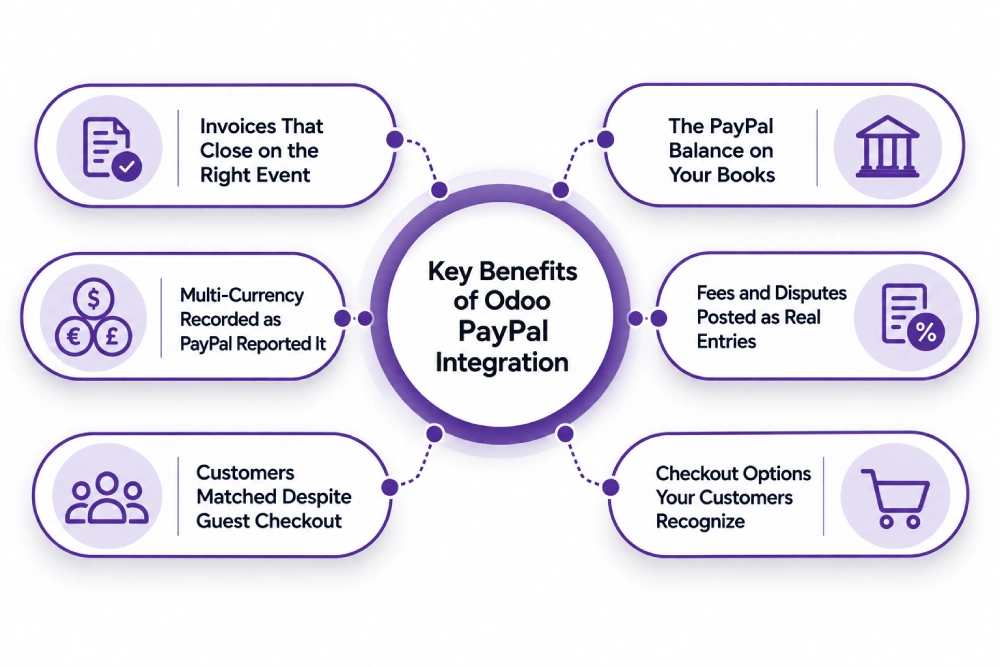
Invoices That Close on the Right Event
A completed payment posts against the matching invoice with the PayPal transaction reference attached. Pending payments stay pending, so nothing closes and nothing ships until the money is there.
The PayPal Balance on Your Books
PayPal gets its own journal and account, so the money it holds shows in your cash position. Withdrawals post as transfers matched on both sides, and the deposit on your bank statement reconciles to the days it covers.
Fees and Disputes Posted as Real Entries
Transaction fees post to your expense account against the payment they belong to. Refunds create credit notes, disputes post to a holding account, and a resolved claim reverses cleanly rather than being written off.
Checkout Options Your Customers Recognize
PayPal, Venmo, Pay Later, and card payments run through one provider at your Odoo eCommerce checkout, with saved methods for repeat buyers. Availability varies by eligibility, so the mix gets confirmed against your account.
Customers Matched Despite Guest Checkout
PayPal buyers often pay from an email address that is not the one on your invoice. Matching runs on the transaction and order reference rather than the email alone, so a guest payment lands on the right customer record instead of creating a duplicate.
Multi-Currency Recorded as PayPal Reported It
Cross-border payments carry PayPal’s own conversion rate and cross-border fee, both recorded as PayPal applied them rather than restated at an average rate you never received.
What Odoo PayPal Integration Automates
Scope on a PayPal integration is decided by how far past the checkout button it goes. Taking the payment is configuration. Bringing fees, disputes, the balance, and the withdrawals back is what changes your accounts. Have both priced separately.
| Data object | Direction | Trigger |
| Customers | Odoo to PayPal | With the payment request |
| Invoices and payment links | Odoo to PayPal | On confirmation |
| Completed payments | PayPal to Odoo | Webhook on capture |
| Pending and eCheck payments | PayPal to Odoo | Webhook, held until cleared |
| Transaction fees | PayPal to Odoo | With the transaction record |
| Refunds | Both | On processing, as a credit note |
| Disputes and claims | PayPal to Odoo | Webhook, on open and on resolution |
| Balance movements | PayPal to Odoo | Daily, into the PayPal journal |
| Withdrawals to your bank | PayPal to Odoo | On transfer, matched on both sides |
| Currency conversion | PayPal to Odoo | With the transaction, at PayPal’s rate |
Some requirements need rules written for your business whichever route you take. Rolling reserves and account holds, subscriptions billed outside Odoo, mass payouts to sellers, supplier payments made from the balance, partial refunds against multi-line invoices, and sales tax on transactions PayPal recorded sit outside standard behavior. They are solvable through custom development, and the ones nobody raised in your quote are the ones you meet at your first close.
How We Integrate PayPal With Odoo
Most of your cost is settled in the first two steps, before anyone writes code. Marking an invoice paid when a payment completes is configuration. Bringing every fee, dispute, and balance movement back and reconciling withdrawals is a build. We establish which you need before quoting.
We Audit Your PayPal and Odoo Setup
Which PayPal products you use, how many accounts and currencies, transaction volume, how often you withdraw, how common pending payments are, your chart of accounts and bank feed, and your Odoo version and hosting. This is the front end of every Odoo consulting engagement we run, and it decides your route.
We Recommend a Route
| Route | Suits | Timeline |
| Built-in PayPal provider, configured properly | Checkout only, invoices raised in Odoo, no fee capture | 1 to 2 weeks |
| Provider plus balance journal and fee mapping | Most US businesses wanting reconciliation | 3 to 6 weeks |
| Middleware such as Make, Zapier, or Celigo | A few objects, low volume, no accounting requirement | 2 to 4 weeks |
| Custom API build | Several accounts, mass payouts, multi-currency settlement | 8 to 14 weeks |
We Map Payments, Fees, and the Balance
Transactions to invoices, fees to expense accounts, the balance to its own journal, and withdrawals to a transfer matching your bank line. Mapping is where payment integrations fail quietly, because a fee posted to the wrong account throws no error. It moves your margin and nobody catches it until year end.
We Test Against Real Transactions
A completed payment, an eCheck that clears days later, a guest checkout from an unmatched email, a partial refund, a dispute opened and resolved, and a withdrawal. We check the balance in Odoo against PayPal at the end of the test period, because that number proves the mapping.
We Cut Over and Monitor
Phased go-live, alerting on failed webhooks and unmatched transactions, and the balance reconciled against your accounts for the first few cycles. After that you have ongoing support, because PayPal changes its APIs and Odoo changes how it connects to them.
Odoo PayPal Integration Services From Adatasol
PayPal takes a couple of percent to move the money. The expensive outcome is a year of books where the balance was never accounted for, fees never posted, and withdrawals landing as unexplained deposits. That surfaces when an accountant reviews your books, and unwinding it costs more than the build.
You Get a US-Based Odoo Certified Ready Partner
We work from Willoughby, Ohio, on US business hours, under the revenue recognition and sales tax rules you file under. The same team runs discovery, build, testing, and support. If you need capacity beyond the project, we can place an Odoo developer alongside your team.
We Have Been Doing ERP for 20+ Years
A PayPal integration is a cash accounting problem with a checkout attached. Two decades of ERP delivery is what tells us a held balance belongs on the balance sheet and what must never post automatically. Most of our client work is manufacturing, distribution, and professional services.
We Tell You If the Built-In Provider Is Enough
If the native provider and careful configuration cover what you need, we say so before you have paid for anything. We quote a build when fee capture, balance reconciliation, or multiple accounts require one, and we classify every requirement before you agree scope.
We Fix Syncs That Are Already Broken
If payments are taken but never confirmed, orders ship against pending eChecks, or your PayPal balance has never matched your books, that is integration rescue rather than another build. We trace it before recommending a rebuild.
Book a free integration assessment and we will review your PayPal accounts, your transaction volume, and your Odoo accounting setup, then tell you which route fits.
Odoo PayPal Integration FAQs
Does Odoo integrate with PayPal?
Yes. Odoo ships a PayPal payment provider covering checkout, and PayPal publishes its own module adding Venmo, Pay Later, and card payments. Bringing fees, disputes, the balance, and withdrawals into your accounts is a separate integration.
How do I connect PayPal to Odoo?
On current versions, create an app in the PayPal developer dashboard, then enter your account email, client ID, and client secret in the payment provider and generate the webhook. Test in sandbox first, using PayPal’s sandbox merchant and buyer accounts.
Why did PayPal stop confirming payments after an upgrade?
The connection method changed. Older versions relied on IPN, Payment Data Transfer, and a PDT identity token, while newer ones use a client ID, secret, and webhook. An upgraded database keeps taking payments and stops recording them until the provider is reconfigured.
How should the PayPal balance be handled in Odoo?
As its own journal and account, not as a payment method alone. Payments and fees post into it, withdrawals post as transfers matched on both sides, and the balance in Odoo should equal the balance in PayPal at any point.
How long does it take?
One to two weeks to configure the built-in provider. Three to six weeks to add fee capture and balance reconciliation, which covers most US businesses. Eight to fourteen weeks for builds involving several accounts, mass payouts, or multi-currency settlement.
How much does Odoo PayPal integration cost?
Configuring the built-in provider is the cheapest route by a wide margin. Balance and fee reconciliation costs more, several accounts or mass payouts more again. Cost tracks how many objects you pull back and how many exceptions need rules.
Can I connect multiple PayPal accounts to one Odoo database?
Yes. Separate accounts for different brands, entities, or currencies map into one database with their own journals and providers. Decide it at the start, because adding a second account later means rewriting the journal mapping.
Which Odoo versions and hosting are supported?
PayPal works across Odoo 16 through 19 on Odoo Online, Odoo.sh, and self-hosted, though credentials differ by version. Custom modules need Odoo.sh or self-hosted. Because reconciliation touches your chart of accounts, settle it alongside your wider Odoo implementation.















