
An Odoo implementation checklist is a step-by-step guide to help you plan, configure, migrate, test, train, and launch Odoo with clear ownership, controlled scope, clean data, and measurable results. In 2026, a successful Odoo ERP rollout is about more than enabling modules. It requires governance, reliable integrations, security and audit readiness, data integrity, performance benchmarks, and real user adoption across day-to-day workflows.
This checklist is built for teams implementing Odoo for the first time, migrating from a legacy ERP, or scaling to multi-company and multi-warehouse operations. It focuses on the practical steps that reduce go-live risk, prevent scope creep, and help teams run Odoo with confidence after launch.
For a step-by-step implementation process and deliverable examples, see our Odoo Implementation Guide. Want help mapping this to your specific business workflows? Schedule a free call with an Odoo implementation expert.
TL;DR
- Lock goals, KPIs, owners, scope, and acceptance criteria before configuration.
- Design workflows and controls first, then configure Odoo modules, then customize only when justified.
- Migrate data in waves with cleansing rules, mapping, validation, and reconciliation thresholds.
- Test end-to-end scenarios and exception paths, not only happy paths.
- Train by role and by workflow, including approvals and failure recovery.
- Go live with a cutover plan, rollback plan, monitoring, and support.
Benefits of a Structured Odoo Implementation
A structured checklist is the fastest way to reduce costly rework and operational disruption. Teams that follow a clear Odoo implementation plan typically see these advantages:
- Predictable delivery and fewer surprises through scope boundaries, change control, and staged signoffs.
- Higher data accuracy and reporting trust through governance, validation rules, and reconciliation checkpoints.
- Faster user adoption through role-based training, realistic scenarios, and documentation for exception handling.
- Lower customization burden by using configuration standards and customization justification gates.
- Safer go-live execution through readiness checks, cutover sequencing, rollback criteria, and support.
- Better ROI visibility by tying Odoo workflows to measurable KPIs such as order-to-cash time, inventory variance, and close cycle time.
The Importance of a Detailed Odoo Implementation Plan
A detailed plan prevents configuration-first implementation. When teams configure screens before defining workflows, Odoo becomes a patchwork of partial decisions: inconsistent master data, unclear approvals, integration failures, and reporting that no one trusts. A strong Odoo implementation plan creates alignment across business, operations, finance, and IT so the system reflects reality and improves it.
A complete plan includes: scope, priorities, milestones, owners, risks, change control, data strategy, integration strategy, testing gates, training approach, and go-live criteria. For a structured walkthrough of that planning process and deliverables, reference the Odoo Implementation Guide.
Odoo Implementation Checklist
- Define goals, success metrics, constraints, and timeline
- Identify stakeholders, process owners, and decision makers
- Inventory current systems, integrations, reports, and data sources
- Set scope boundaries, phases, and change control rules
- Map current workflows and define future workflows
- Select Odoo modules, licensing, hosting, and environments
- Define security model, roles, permissions, and audit requirements
- Establish configuration standards and naming conventions
- Create a customization register with justification and acceptance criteria
- Create data mapping, cleansing plan, validation rules, and reconciliation thresholds
- Build integration design, error handling, reconciliation workflow, and observability
- Configure modules, master data governance, approvals, and automation rules
- Run migration test waves and validate totals, counts, and referential integrity
- Execute testing plan: unit, integration, process, regression, UAT
- Train users by role and workflow, including exceptions and approvals
- Prepare cutover plan, rollback plan, and go-live communications
- Go live with monitoring, support, and issue triage
- Stabilize performance, optimize reports, and prioritize improvements
Odoo Implementation Checklist: A Detailed Breakdown
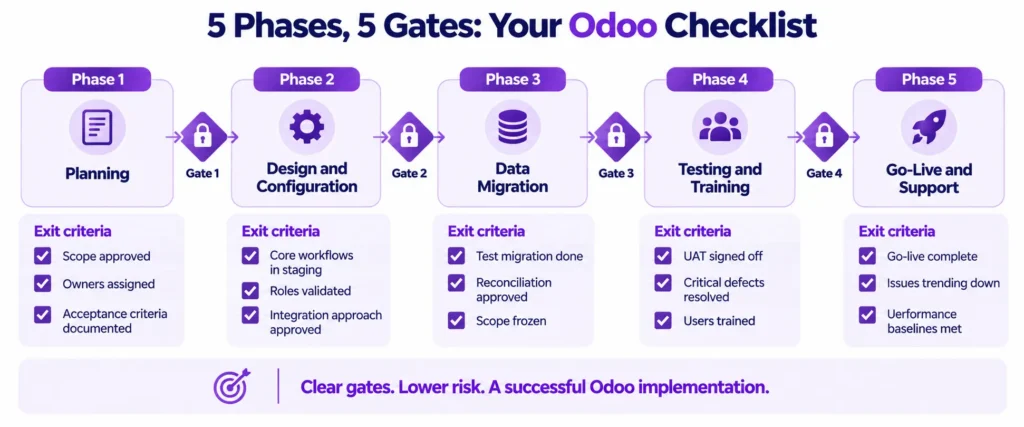
Phase 1: Planning and Requirements Gathering Checklist
Phase goal: define what “success” means and how the business will operate in Odoo, with named owners and measurable acceptance criteria.
Phase deliverables
- Implementation charter: goals, timeline, scope, KPIs
- Stakeholder map and decision structure
- Process inventory and future-state workflow outline
- Integration inventory and data source inventory
- Risk register and change control policy
Exit criteria
- Scope and priorities approved
- Owners assigned for each workflow and data domain
- Success metrics and acceptance criteria documented
Odoo Implementation Requirements Checklist
Gather requirements by entity and workflow, not by features.
Business context
- Business model, revenue drivers, and operational constraints
- Company structure: multi-company, multi-currency, multi-warehouse
- Compliance requirements: audit trails, approvals, retention
- Reporting needs: KPIs, dashboards, close cycle, operational reporting
Workflow requirements
- Sales: lead stages, quoting, pricing rules, discounts, approvals, delivery promises
- Purchasing: vendor approvals, procurement lead times, three-way matching needs
- Inventory: receiving, putaway, picking, packing, shipping, returns, lot and serial tracking
- Manufacturing: BOMs, routings, work centers, quality checks, maintenance triggers
- Finance: taxes, journals, payment terms, revenue recognition constraints, multi-entity consolidation
- Service and projects: SLAs, ticket flows, timesheets, billing rules, escalations
Data see-through requirements
- Master data ownership: customers, vendors, products, categories, units, locations
- Data quality issues: duplicates, missing fields, inconsistent units, outdated pricing
- Historical data scope: years, level of detail, and reporting needs
- Security needs: field visibility, role-based restrictions, segregation of duties
Integration requirements
- Systems list: ecommerce, payment gateways, shipping, CRM, BI, payroll, legacy accounting
- Direction and frequency: Odoo to system, system to Odoo, bidirectional, batch vs real time
- Error handling: retries, alerts, manual reconciliation steps, audit logs
- Source of truth: who owns customer, product, price, tax, and fulfillment fields
Defining Project Scope and Objectives
- Define goals in measurable terms
Examples: reduce order-to-cash by 15 percent, reduce inventory variance by 30 percent, shorten month-end close by 3 days. - Define scope boundaries by workflow, module, integration, report, and data scope
- Choose delivery approach: phased rollout, pilot then scale, or big bang with strict readiness gates
- Define change control: request format, impact evaluation, estimation, approval authority, release windows
- Define acceptance criteria for each phase: UAT pass thresholds, reconciliation tolerances, performance baselines
Assembling the Implementation Team
Assign names, backups, and decision rights.
- Executive sponsor: escalation and budget authority
- Product owner: scope and priority control
- Process owners: sales, purchasing, inventory, manufacturing, finance, services
- Data owner: cleansing, mapping, validation signoff
- Functional lead: configuration and workflow mapping
- Technical lead: integrations, environments, performance, custom development
- QA lead: test plan, defect triage, regression discipline
- Training lead: role-based enablement and materials
- Support owner: Maintenance, SLAs, incident process
Phase 2: Design and Configuration Checklist
Phase goal: translate requirements into Odoo configuration, governed master data, secure access, and reliable integrations.
Phase deliverables
- Target architecture diagram and environment plan
- Security model and role matrix
- Module configuration blueprint and configuration log
- Customization register and technical design specs
- Integration design with reconciliation workflow and monitoring requirements
Exit criteria
- Core workflows configured in staging
- Roles and permissions validated
- Integration approach approved with an error handling plan
System Design and Architecture
- Define environments: development, staging, production
- Define deployment and backup strategy, including restore tests
- Define security model:
- roles and groups
- segregation of duties for finance approvals and posting rights
- access review cadence and audit expectations
- Define logging and monitoring requirements:
- integration queue monitoring
- error alerts
- audit logs for key changes
- Define performance expectations:
- peak user counts
- peak order volumes
- reporting response time targets
Module Selection and Configuration
Select modules based on workflows and dependencies.
- Confirm module scope for each phase: CRM, Sales, Purchase, Inventory, Manufacturing, Accounting, Helpdesk, Projects
- Establish configuration standards:
- naming conventions for products, accounts, analytic tags, and warehouses
- document sequences and approval rules
- mandatory fields and data validation constraints
- Configure governance:
- who can create or edit products, customers, and vendors
- approval workflows for pricing, discounts, and key master data changes
- Document critical configuration decisions in a configuration log with the owner and rationale
Customization and Development (If Required)
Customization is valid when it prevents operational failure, compliance risk, or measurable inefficiency.
- Create a customization register:
- purpose and workflow impacted
- business justification
- dependencies and the rollout phase
- maintenance implications and upgrade risk
- Define acceptance criteria for each customization:
- functional behavior and edge cases
- performance thresholds
- security and permission checks
- logging and error handling behavior
- Prefer configuration and automation rules before custom code
- Build with upgrade safety in mind: minimal overrides, clear documentation, test coverage for core flows
Looking for Odoo Implementation, Customization, Integration, or Support Services?
Phase 3: Data Migration Checklist
Phase goal: bring accurate, usable data into Odoo with validation and reconciliation so users trust the system on day one.
Phase deliverables
- Data mapping workbook and transformation rules
- Cleansing plan and ownership assignments
- Migration scripts or import procedures
- Validation and reconciliation reports
- Final migration runbook
Exit criteria
- Test migration completed with approved validation results
- Reconciliation thresholds met and signed off
- Final migration scope frozen for go-live
Odoo Implementation Data Migration Checklist
- Inventory sources and owners: ERP, CRM, spreadsheets, ecommerce platforms, accounting tools
- Define scope:
- master data: customers, vendors, products, price lists, taxes, warehouses
- opening balances: AR, AP, bank, inventory valuation, GL balances
- open transactions: open sales orders, open purchase orders, open invoices
- historical transactions: only if required for reporting and audit
- Define rules:
- mandatory fields and allowed values
- de-duplication logic for customers and products
- unit of measure standardization
- product variant and attribute normalization
- Define validation:
- counts per entity
- totals per balance
- inventory quantities by location
- Referential integrity checks for linked records
Data Cleansing and Transformation
- Profile data issues: missing IDs, duplicates, inconsistent pricing, outdated addresses, incorrect tax rules
- Cleanse with accountable owners:
- Business owners approve the meaning
- The implementation team standardizes formats and transformations
- Standardize structures:
- product categories and attributes
- chart of accounts mapping
- customer segmentation and payment terms
- Freeze transformation rules before final migration to avoid last-minute drift
Data Migration Testing and Validation
- Run at least two migration test waves in staging
- Validate with process owners using real scenarios:
- quote to cash, including returns and credits
- procure to pay, including partial receipts
- inventory transfers and adjustments
- manufacturing consumption and completions
- Reconcile with explicit thresholds:
- financial balances match within the agreed tolerance
- Inventory valuation and quantities match within the agreed tolerance
- Sign-off required from finance and operations owners
Phase 4: Testing and Training Checklist
Phase goal: prove end-to-end operational readiness and prepare users to execute daily workflows confidently.
Phase deliverables
- Test plan and test cases for all critical workflows
- Defect log with severity and resolution tracking
- UAT scripts and signoff documents
- Training plan and role-based training materials
- Operational runbooks for exceptions and escalations
Exit criteria
- UAT completed with sign-offs
- Critical defects resolved or mitigated with approved workarounds
- Users trained for day-one workflows and exceptions
Odoo Implementation Testing Checklist
Unit testing
- Validate each module configuration element and access restriction
- Confirm approvals and automation triggers behave correctly
Integration testing
- Test success and failure paths for each integration
- Validate retries, alerts, reconciliation steps, and audit logs
- Confirm data ownership rules and conflict resolution
Process testing
- Test end-to-end workflows, including exceptions:
- partial shipments
- backorders
- returns and refunds
- vendor price changes
- manufacturing scrap or rework
- payment failures or disputed invoices
Regression testing
- Re-test core flows after any configuration or custom changes
- Freeze major scope changes before UAT to protect stability
User Acceptance Testing (UAT)
- Use role-based scripts that mirror real work
- Include exception scenarios and approvals
- Define acceptance criteria:
- UAT pass rate threshold agreed in the plan
- No unresolved critical defects
- Reconciliation results approved
- Require signoff by process owners, not only by the project team
Odoo Implementation Training Checklist
- Segment users by role: sales, purchasing, warehouse, manufacturing, finance, management
- Train by workflow, not menus:
- Daily tasks
- Approvals
- Exception recovery steps
- Use staging with realistic data for hands-on practice
- Provide quick reference guides for first-week execution
Creating Training Materials and Documentation
- SOPs for critical workflows: steps, approvals, and expected outputs
- Exception runbooks:
- Integration failures and queue handling
- Inventory discrepancies and adjustments
- Invoice mismatches and credit notes
- Manufacturing variances
- Escalation map and support channels for
Phase 5: Go-Live and Support Checklist
Phase goal: cut over safely, stabilize quickly, and protect the business from operational disruption.
Phase deliverables
- Cutover runbook with timing, owners, and checkpoints
- Rollback plan and rollback triggers
- Monitoring dashboards and alert rules
- plan with triage process and SLAs
Exit criteria
- Go-live completed with operational stability
- issues are trending down
- Performance baselines met for critical workflows
Odoo Go-Live Checklist
- Confirm go-live date, downtime window, and communication plan
- Execute final migration steps:
- Data freeze cutoff
- Final import sequence
- Reconciliation checkpoints and approvals
- Switch integrations with controlled sequencing and monitoring
- Validate day-one workflows:
- Create and fulfill an order
- Receive and bill a purchase
- Post accounting entries and run key reports
- Rollback plan readiness:
- Defined triggers
- Decision authority
- Technical steps for restoring systems and integrations
Post-Go-Live Support and Monitoring
- Define the maintenance period and the daily operating rhythm
- Triage process:
- severity levels
- response times
- escalation paths
- Monitor operational signals:
- integration failures, queue backlogs, retries
- order processing delays
- accounting posting errors
- inventory variance alerts
- slow reports and performance regressions
Performance Monitoring and Optimization
- Establish performance baselines for critical workflows and reports
- Optimize:
- access roles and menu simplicity
- reports and dashboards aligned to KPIs
- automation rules to reduce noise and increase reliability
- data archiving strategy for long-term performance
Odoo Implementation Best Practices
Communication and Collaboration
- Weekly steering meeting for scope, priorities, and decisions
- Clear decision records: owner, rationale, impacted workflows, approval date
- Single source of truth for requirements, changes, defects, and sign-offs
- Continuous involvement of process owners during configuration and testing
Risk Management and Mitigation
Common implementation risks are predictable, measurable, and preventable.
- Maintain a risk register with probability, impact, owner, and mitigation plan
- Focus on high-impact risks:
- Scope creep without change control
- Data quality surprises late in the project
- Integration failures without reconciliation workflow
- Insufficient UAT coverage of exception cases
- Over-customization without acceptance criteria and documentation
For risk patterns and mitigation, read more about the Odoo Challenges.
Change Management
- Identify change champions in each department
- Communicate new responsibilities and approval rules
- Reinforce master data discipline and governance
- Provide post go-live reinforcement through coaching, office hours, and targeted retraining
- Tie adoption to measurable outcomes: cycle time, error rate, on-time delivery, and close speed
Conclusion
A reliable Odoo ERP rollout in 2026 requires structured execution across planning, design, data migration, testing, training, go-live, and stabilization. When scope is controlled, ownership is clear, data is validated, integrations are observable, security is enforced, and users are trained for real workflows, Odoo becomes a trusted operational system rather than a recurring project.
If you want a clear path from checklist to execution, explore our Odoo implementation service and schedule a call with Adatasol to map this to your workflows.

