
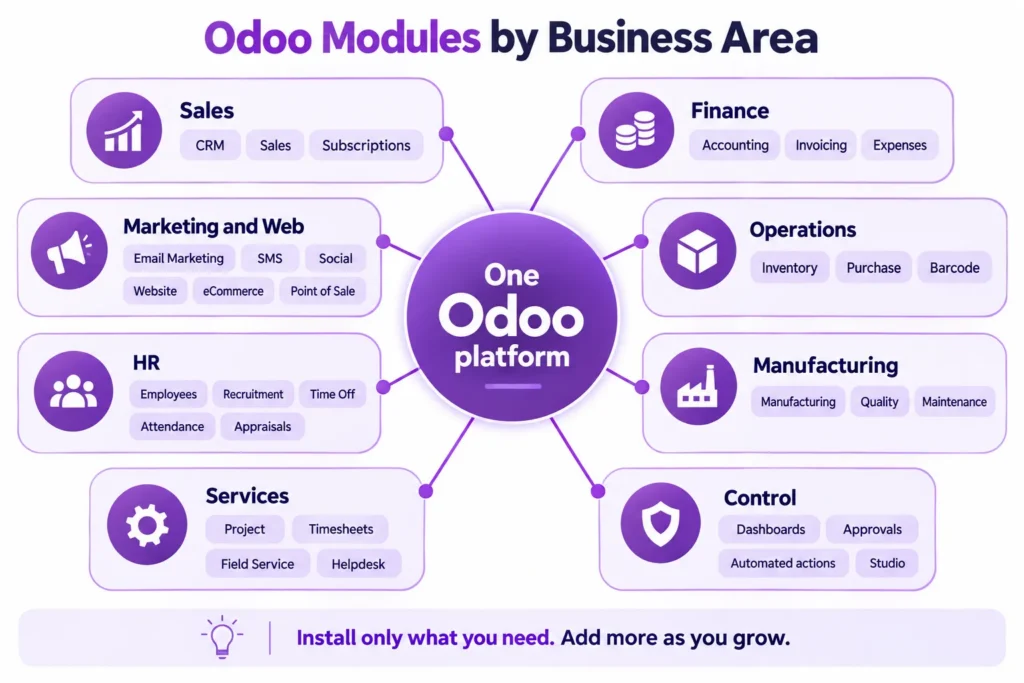
Odoo includes a wide range of business modules for sales, accounting, inventory, purchasing, manufacturing, HR, projects, customer support, marketing, e-commerce, and reporting. Businesses can install the apps they need, run them in one connected system, and add more later as operations grow. That makes Odoo a flexible ERP option for companies that want one platform without forcing every department into the first rollout.
What is an Odoo module?
An Odoo module is a business app built for a specific function. One module may manage sales quotations, another may handle invoices, another may track warehouse stock, and another may store employee records. Each app has its own purpose, but all of them run inside the same platform.
That shared structure matters. Data entered in one area can update another automatically, which cuts down on duplicate entry and reduces the gaps that show up when teams work in separate tools. A sales order can move into delivery and invoicing. A purchase order can affect stock levels. A production order can pull demand from inventory and purchasing.
This is one reason many companies roll out Odoo in stages. They start with the apps that fix the biggest operational problems first, then expand with Odoo implementation services or Odoo consulting once the first phase is stable.
Main Odoo modules by business area
Odoo covers most of the functions a business needs to run daily work. The exact setup depends on industry, process, and company size, but the main module groups are easy to recognize.
| Business area | Common Odoo modules |
| Sales | CRM, Sales, Subscriptions, Invoicing |
| Finance | Accounting, Invoicing, Expenses |
| Purchasing and inventory | Purchase, Inventory, Barcode |
| Manufacturing | Manufacturing, Quality, Maintenance |
| Services | Project, Timesheets, Field Service, Helpdesk |
| HR | Employees, Recruitment, Time Off, Attendance, Appraisals |
| Marketing | Email Marketing, Marketing Automation, SMS Marketing, Social Marketing |
| Web and retail | Website, Ecommerce, Point of Sale |
| Admin and reporting | Dashboards, Approvals, Studio, automated actions |
Not every company needs every module. A law firm, a manufacturer, a nonprofit, and an ecommerce business will not start with the same app mix. Module selection has to follow the business model.
Sales and customer management modules
The CRM module helps sales teams manage leads, opportunities, activities, and pipeline stages. It gives structure to follow-up work and keeps the sales record tied to the rest of the business system.
The Sales module manages quotations, sales orders, price lists, discounts, and order confirmation. Once an order is approved, Odoo can connect it with inventory, delivery, and invoicing. That makes the sales process easier to control because teams are not pushing the same information through separate software.
For recurring billing models, the Subscriptions module handles plans, renewal cycles, and repeat invoicing. Businesses with service contracts or recurring revenue often need this from the beginning.
Sales modules matter because poor sales data spreads quickly. If the quote, order, invoice, and payment history sit in different places, teams lose time checking records instead of acting on them.
Accounting and finance modules
Odoo includes finance modules for routine accounting work and reporting.
The Accounting module supports general ledger, accounts payable, accounts receivable, reconciliation, tax configuration, and financial reports. Since it connects with sales, purchasing, and inventory, finance records can reflect live operational activity instead of waiting for manual updates from another system.
The Invoicing module handles customer invoices, vendor bills, and payment tracking. Expenses supports employee claims and approval flow. For businesses trying to clean up finance operations, these modules often move into phase one because poor accounting visibility creates problems everywhere else.
Finance modules only stay clean when the rest of the process is mapped properly. If approvals, order flow, permissions, or tax handling are messy, accounting ends up carrying the cleanup work.
Inventory and purchasing modules
Businesses that buy, store, move, or ship products usually need tighter control over inventory and procurement.
The Inventory module manages receipts, deliveries, transfers, replenishment rules, and stock visibility across one or more locations. The Purchase module manages suppliers, requests for quotation, purchase orders, and procurement flow tied to business demand.
Warehouse teams may also use barcode-based workflows depending on the setup. For companies dealing with frequent stock movement, that can improve transaction speed and reduce manual mistakes.
This is often the part of the business where disconnected systems hurt the most. Sales has one number, purchasing has another, the warehouse has a third version, and finance finds the problem after it has already affected delivery or reporting.
Manufacturing modules
Manufacturing companies usually need more than stock tracking. They need a system that can handle materials, planning, work orders, equipment, and quality without splitting those functions across different tools.
The Manufacturing module supports bills of materials, production orders, work centers, and production planning. It connects with Inventory and Purchase so material demand, availability, and consumption stay linked.
Quality and Maintenance often sit alongside Manufacturing in the same setup. Quality handles inspections and checks tied to production or inventory flow. Maintenance helps manage scheduled equipment service and repair activity.
For businesses in manufacturing, module planning has to reflect the real production process. If the manufacturing setup is weak, the business usually feels it in purchasing, scheduling, lead times, and reporting.
Project, service, and support modules
Service businesses need a different module mix. They may care less about warehouse activity and more about projects, labor time, field work, and customer tickets.
The Project module helps teams manage tasks, deadlines, owners, and delivery status. Timesheets records labor time that can be used for billing, internal costing, or utilization tracking. Field Service supports work orders and on-site scheduling. Helpdesk manages support tickets and service queues.
These modules fit consulting teams, support-heavy organizations, service providers, and firms that need better control after a sale is closed.
That mix can change by industry. Adatasol works with businesses in healthcare, law firms, non-profits, and commercial real estate, where service and internal process often matter just as much as finance.
HR modules
Odoo’s HR apps give businesses one place to manage employee information and common HR tasks.
The Employees module stores staff records, job details, contracts, and reporting lines. Recruitment manages hiring flow. Time Off handles leave requests and approvals. Attendance supports employee time tracking. Appraisals supports review cycles and performance conversations.
Payroll needs vary by region and configuration, so businesses should confirm requirements early rather than assuming a standard payroll rollout will cover everything. That small check can prevent a bigger problem later.
Marketing, website, and ecommerce modules
Odoo also includes customer-facing modules for campaign management and online selling.
Email Marketing, Marketing Automation, SMS Marketing, and Social Marketing help businesses manage outreach and follow-up activity. Those modules become more useful when they connect back to CRM because teams can see which campaigns produce leads and customer activity.
Website and Ecommerce support content management, product listings, storefront setup, and checkout flow. Point of Sale supports in-store transactions. When these apps connect to inventory and accounting, the business gets cleaner sales records across channels.
That matters more than it sounds. Separate online, retail, and back-office systems usually create separate numbers, and separate numbers usually lead to bad decisions.
Reporting, approvals, and workflow tools
Some of the most useful Odoo tools are not tied to one department.
Dashboards help managers track performance. Approvals can formalize internal signoff steps. Automated actions reduce repetitive admin work. Studio allows low-code changes to fields, forms, and selected workflows.
These tools help the system match day-to-day operations more closely. They can also create problems if they are added carelessly. A bad approval chain or rushed customization can slow work just as easily as missing functionality.
That is why some businesses stay close to standard Odoo early on, then add Odoo customization, Odoo custom development, or Odoo integrations after the base process is stable.
Which Odoo modules should a business start with?
Most businesses do not need the longest possible module list. They need the right starting point.
A service company may begin with CRM, sales, projects, timesheets, and accounting. A distributor may need purchase, inventory, sales, and accounting. A manufacturer may need inventory, manufacturing, purchase, quality, and accounting. A support-focused team may start with Helpdesk, CRM, Invoicing, and Accounting.
Here is a practical way to frame it.
| Business type | Good starting modules |
| Service business | CRM, Sales, Project, Timesheets, Accounting |
| Manufacturer | Inventory, Manufacturing, Purchase, Quality, Accounting |
| Distributor | Purchase, Inventory, Sales, Accounting |
| Ecommerce business | Website, Ecommerce, Inventory, Sales, Accounting |
| Retail business | Point of Sale, Inventory, Sales, Accounting |
| Support-focused team | Helpdesk, CRM, Invoicing, Accounting |
The key is sequencing. If phase one is too large, training gets harder, testing gets thinner, and teams spend more time fixing rollout issues than using the system.
Are all Odoo modules included by default?
No. Odoo does not install every module by default, and most businesses would not want that anyway.
Companies choose modules based on scope, process, and operational need. That keeps the first rollout easier to manage and gives teams time to adapt before more apps are added.
Availability can also vary by edition and setup. That is why module planning should happen before build work starts, not halfway through the implementation.
Can Odoo modules be customized or extended?
Yes. Odoo modules can be configured, extended, and connected to outside systems.
Some changes are simple, such as adding fields, changing forms, or adjusting approval flow. Other changes are heavier and may involve custom logic, third-party integrations, or workflow changes that do not exist in the standard apps.
That is where services like Odoo migration, Odoo licensing, and Odoo support packages fit into the broader rollout plan. If a business is dealing with damaged legacy data or a troubled transition, Odoo data migration recovery may also be relevant.
Common mistakes in module planning
The most common mistake is choosing modules by feature list instead of business process.
A long list of apps can sound like progress, but that does not mean the rollout will work. If order flow, reporting, user roles, approvals, and data quality have not been sorted out, adding more modules usually adds more confusion.
Another mistake is loading too much into the first phase. Businesses often think this saves time. In practice, it usually stretches training, weakens testing, and creates more rework after go-live.
Support planning gets missed too. The software may be live, but the business still has to manage user adoption, corrections, reporting changes, and system upkeep. Post-launch support matters for the same reason implementation matters: the system has to hold up under daily use.
If a rollout is already unstable, the business should fix that before adding more scope. Teams in that position often start by looking at common Odoo implementation mistakes, signs Odoo implementation is failing, or the cost of failed Odoo implementation.
FAQ
How many modules does Odoo have?
Odoo includes dozens of core modules, along with a larger ecosystem of community and third-party apps. The number changes over time, but the standard platform already covers most common business functions.
Does every business need the same Odoo modules?
No. Module choice depends on industry, workflow, team structure, and reporting needs. A manufacturer, nonprofit, law firm, and retailer will not start with the same app mix.
Can a business start with only a few Odoo modules?
Yes. That is one of the main advantages of Odoo. A company can begin with a smaller rollout and add more modules later.
Can Odoo modules work together automatically?
Yes. Odoo modules share one database, so activity in sales, inventory, purchasing, finance, service, and HR can connect without duplicate entry.
Should businesses customize Odoo from the start?
Sometimes. If standard Odoo already fits the process, a cleaner setup is usually the better move. If the business has tighter workflow or integration requirements, customization may need to happen in the first rollout.
How Adatasol helps businesses choose the right Odoo modules
Adatasol helps businesses choose Odoo modules based on process, rollout scope, and operational fit. The goal is to decide which workflows need to connect first, which modules belong in phase one, and which ones should wait until the system is stable.
As a certified Odoo implementation partner in the USA with 20+ years of ERP experience, Adatasol supports Odoo consulting, implementation, customization, integrations, migration, custom development, licensing, and support. That planning work helps businesses avoid loading too much into the first rollout and gives them a cleaner path to go-live and long-term support.

