
Retail POS software is a point-of-sale application that helps stores identify products, calculate prices and discounts, accept payments, process returns, and record sales. When connected to inventory management, it can also record the stock movements associated with sales and eligible returns, helping retailers maintain accurate product quantities.
A retail transaction involves more than collecting payment. The system must identify the correct product variant, calculate the amount due, record what was sold, and maintain the information needed for inventory and reporting. Retail POS software connects these activities during checkout.
What Is Retail POS Software?
Retail POS software manages sales transactions and related store operations for businesses that sell physical merchandise.
Like other POS software, it records transactions and supports payment collection. In retail, it also works with product catalogs, stock records, selling prices, customer purchases, and returns.
A retail POS system combines the software with compatible equipment such as barcode scanners, payment terminals, receipt printers, cash drawers, and customer-facing displays.
Retailers use it to:
- Identify merchandise: Find products using barcodes, internal product codes, or catalog search.
- Calculate sales: Apply quantities, prices, discounts, promotions, and applicable taxes.
- Accept payments: Record cash, supported card payments, and other configured payment methods.
- Handle returns: Process refunds, exchanges, and related transaction adjustments.
- Record inventory activity: Associate sales and returns with the appropriate product and stock records.
- Review transactions: Monitor sales, refunds, payment methods, and register activity.
A clothing store, for example, may sell the same shirt in four sizes and three colors. The POS needs to identify the exact combination purchased, not simply record that one shirt was sold.
The retail POS features a business requires depend on its merchandise, product variants, return policies, and fulfillment methods.
How Does a Retail POS System Work?
A retail POS system connects product identification, basket creation, pricing, payment, and transaction recording.
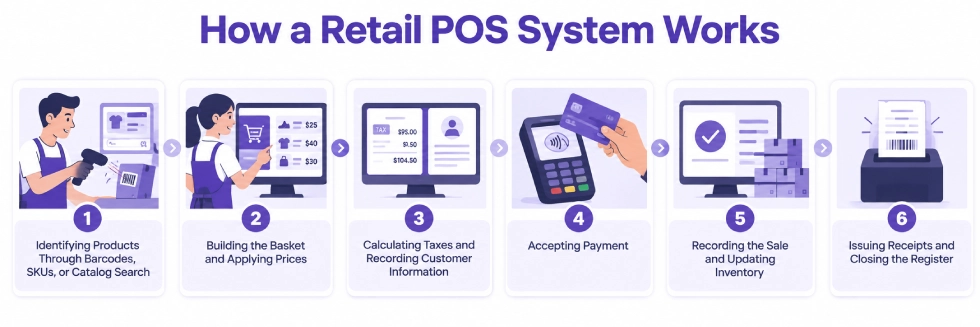
A typical in-store sale follows six stages.
| Stage | What Happens in Retail POS |
| 1. Product identification | The cashier scans a barcode or selects the correct item from the catalog |
| 2. Basket creation | The POS records products, variants, quantities, and prices |
| 3. Pricing and tax calculation | Applicable discounts, promotions, and taxes are calculated |
| 4. Payment processing | The customer pays using a supported payment method |
| 5. Sale and inventory recording | The completed transaction is recorded, along with applicable stock activity |
| 6. Receipt and register records | A receipt is issued, and transaction information becomes available for reporting and reconciliation |
1. Identifying Products Through Barcodes, SKUs, or Catalog Search
Retail checkout begins when the cashier identifies the merchandise being purchased.
The cashier may scan a barcode, enter an internal product reference, or search the POS catalog.
The system retrieves the corresponding product record, which may include the name, price, unit of measure, tax configuration, and inventory-tracking information.
A stock keeping unit (SKU) is an identifier a retailer uses to distinguish a product or product variant within its inventory system.
A barcode represents an identifier in a machine-readable format that a compatible scanner can read.
An SKU and a barcode are not necessarily the same identifier. A retailer may maintain an internal SKU while assigning a different barcode value to the same product variant.
For example, a medium black T-shirt might use TSH-BLK-M as its internal SKU while carrying a separate barcode on the product label.
If the store tracks stock by size and color, scanning the barcode should identify that particular variant rather than the broader T-shirt product.
Retailers selling weighted products may also need compatible scales or barcode configurations that encode weight or price information.
Accurate checkout depends on the product identifiers matching the merchandise being sold.
2. Building the Basket and Applying Prices
As products are scanned or selected, the POS creates a basket containing the items and quantities the customer intends to purchase.
It retrieves configured selling prices and applies eligible discounts or promotions.
Consider a customer buying:
- Two T-shirts at $25 each.
- One jacket at $80.
- One pair of socks at $10.
The basket subtotal is $140 before discounts and taxes.
If an eligible promotion provides 10% off the jacket, the jacket price becomes $72.
The revised basket subtotal is $132 before tax.
Retail pricing may also depend on customer-specific price lists, product variants, quantities, promotional periods, or store-level rules.
For example, a retailer might apply a discount when a customer purchases three qualifying items or offer different prices to approved wholesale customers.
The POS should distinguish the standard selling price from discounts applied during checkout.
Employee permissions may also restrict manual price changes or discounts outside authorized rules.
3. Calculating Taxes and Recording Customer Information
The POS calculates applicable sales taxes using its configured tax rules and transaction information.
Tax treatment may depend on the merchandise, store location, customer exemption status, and applicable regulations.
A retailer selling taxable and exempt products in the same transaction needs the appropriate tax treatment applied to each item.
The cashier may also associate the sale with a customer record.
Customer identification can support purchase history, eligible pricing arrangements, loyalty programs, or future service interactions.
However, retail POS does not need to collect customer information for every walk-in transaction.
Stores should collect, access, and retain customer information according to their business policies and applicable privacy requirements.
4. Accepting Payment
Once the basket is ready, the customer chooses a supported payment method.
Retail POS software may accept cash, card payments through compatible terminals, gift cards, store credit, or other configured methods.
Some systems also support split payments.
For example, a customer buying $100 in merchandise may redeem a $30 gift card and pay the remaining $70 by card.
Both payment amounts need to be associated with the same transaction.
Card payments involve the relevant payment processor and authorization process. The POS and payment terminal must exchange the necessary information for the transaction to proceed.
Card authorization and bank settlement are separate events.
A payment can be authorized at checkout while the corresponding funds reach the retailer’s bank account later.
Payment records need to preserve the information required for register closing and financial reconciliation.
5. Recording the Sale and Updating Inventory
Once the sale is completed according to the configured workflow, the POS records the products, quantities, prices, taxes, discounts, and payments.
For inventory-tracked merchandise, the transaction can also create the relevant stock movements or quantity updates.
Suppose a store has 18 units of a particular blue sweater recorded as on-hand stock.
A customer buys two units.
If the product is tracked and the completed POS sale deducts stock from that location, the recorded on-hand quantity becomes 16, assuming no other stock movements occur.
Some systems update inventory directly within a shared application environment. Others transfer sales information to a separate inventory platform.
The stock-update timing may depend on transaction posting, register sessions, synchronization, or other configuration settings.
A checkout application that records sales does not necessarily manage supplier receipts, warehouse movements, reservations, and physical inventory counts.
6. Issuing Receipts and Closing the Register
After checkout, the customer may receive a printed or electronic receipt.
The receipt can include purchased products, quantities, prices, discounts, taxes, payments, and a transaction reference.
That reference can help employees retrieve the original purchase if the customer later requests a return or exchange.
The POS also maintains transaction records for reporting and register reconciliation.
At shift closing, a cashier or manager may compare expected cash with the actual cash drawer balance and investigate discrepancies.
Card payments, refunds, and other transaction adjustments may require separate review.
Register closing does not necessarily complete accounting reconciliation. The business still needs to match relevant payment settlements, processing fees, and bank transactions.
How Retail POS Handles Product Variants and Barcodes
Retail businesses frequently sell several versions of the same product.
A shoe may be available in different sizes and colors. An electronics store may sell multiple models with serial numbers. A grocery retailer may sell products by weight as well as individual units.
The product catalog must represent the distinctions that affect checkout and inventory.
Product Variants and SKUs
A product variant represents a specific sellable combination of product attributes.
For example, a clothing store might sell one shirt design in small, medium, and large sizes, with black, blue, and white color options.
Each size-and-color combination may have its own SKU, barcode, price adjustment, and inventory quantity.
If a customer buys one medium blue shirt, the system should record that variant.
It should not deduct stock from the large blue shirt simply because both belong to the same parent product.
A parent product can group related merchandise for catalog management, while variant records distinguish the individual items available for sale.
Barcode Scanning
Scanning a barcode allows the POS to retrieve the associated product without manually searching the catalog.
This becomes particularly useful for retailers managing hundreds or thousands of SKUs.
However, scanning accuracy depends on properly maintained product identifiers.
Duplicate barcode assignments, missing variant barcodes, or incorrect mappings may cause employees to select the wrong merchandise.
Stores should verify barcode assignments when creating products, importing catalogs, or introducing new variants.
Serial and Lot Tracking
Some retailers need to identify individual product units or batches.
An electronics store may need a serial number for warranty or traceability purposes.
Other businesses may use lot numbers to track groups of products.
Where supported, serial or lot information can be associated with inventory movements and transactions according to the system’s configuration.
Quantity tracking identifies how many units were sold. Serial or lot tracking provides additional information about which specific unit or batch was involved.
How Does Retail POS Handle Returns and Exchanges?
A retail return can involve a financial refund, an inventory movement, and a decision about whether the returned product can be resold.
Those activities should not be treated as one automatic event.
Processing a Return
Consider a customer returning a jacket purchased for $80.
The cashier retrieves the original sale where available, identifies the returned merchandise, and applies the store’s return policy.
The POS may support a refund through an eligible payment method, store credit, or another configured arrangement.
Original discounts, taxes, and payment methods may affect the amount and method of refund.
The return should remain identifiable in transaction records rather than being treated as an ordinary sale.
Managing Exchanges
Suppose the customer wants the jacket in a different size.
The exchange may require recording the return of the original variant and the sale of the replacement.
If the replacement costs more, the customer may need to pay the difference.
If the replacement costs less, the retailer may need to refund or credit the difference according to its policy.
An exchange can also affect two separate stock records.
Returning a medium jacket and issuing a large jacket should not leave both variants with their original recorded quantities.
Deciding Whether Returned Merchandise Is Sellable
A returned product should not automatically become available for resale.
A jacket returned in good condition may be restocked. A damaged product may need to be placed in a separate stock location, quarantined, or written off.
The customer refund and the stock disposition are separate decisions.
A refund may be completed before the merchandise has been inspected, particularly when the return arrives through another channel.
A completed refund does not necessarily mean inventory should increase in the sellable stock location.
Retailers need appropriate procedures for receiving, inspecting, and recording returned merchandise.
How Retail POS Connects Sales With Inventory
Retail POS sales can affect inventory quantities when the products and stock processes are configured for tracking.
The system records which products were sold, how many units were sold, and which checkout location handled the transaction.
Inventory records also need to account for supplier receipts, transfers, adjustments, reservations, and returns.
On-Hand Stock vs Available-to-Sell Stock
On-hand stock represents the quantity physically recorded at a location.
Available-to-sell stock considers which recorded units remain eligible for new sales after applicable reservations or commitments.
For example, a store may have ten units on hand, but three are reserved for existing online orders.
Under a system that deducts those reservations from availability, only seven units remain available for new orders.
Other stock conditions may also affect availability, including damaged merchandise or products held in a non-sellable location.
An accurate on-hand quantity does not automatically mean the store can promise every recorded unit to another customer.
Inventory Changes Beyond Checkout
POS transactions are only one source of inventory changes.
Stock quantities may also change when:
- New merchandise arrives from suppliers.
- Products are transferred between locations.
- Customer returns are accepted into inventory.
- Damaged items are removed from sellable stock.
- Physical inventory counts identify discrepancies.
- Existing orders reserve merchandise for future fulfillment.
For example, a store may sell five units of an item and receive 20 more units from a supplier during the same day.
Both activities need to be recorded in the appropriate inventory location.
Retailers selling through physical and online channels also need consistent handling of reservations, order fulfillment, and synchronization failures.
A defined retail POS inventory synchronization process helps stores coordinate the stock information used by checkout, ecommerce, and fulfillment systems.
How Is Retail POS Different From Restaurant POS?
Retail and restaurant POS systems both record sales, calculate charges, accept payments, and produce transaction records.
Their main operational workflows differ.
Retail checkout typically involves identifying physical merchandise, completing a sale, and recording the corresponding stock activity.
Restaurant transactions may require kitchen preparation, open checks, course management, and several rounds of ordering before settlement.
| Area | Retail POS | Restaurant POS |
| Main transaction | Physical merchandise sales | Food and beverage orders |
| Product identification | SKUs, variants, barcodes, and product search | Menu items, modifiers, and preparation instructions |
| Fulfillment | Merchandise is often handed to the customer at checkout | Items may require kitchen or bar preparation |
| Inventory relationship | Sellable products and stock movements where configured | Menu sales and potentially recipe-based ingredient consumption |
| Returns and adjustments | Refunds, exchanges, restocking, and damaged goods | Voids, check changes, refunds, and preparation updates |
| Service management | Baskets, registers, product sales, and customer purchases | Tables, open checks, courses, kitchen routing, and tabs |
Retailers may also handle online fulfillment or special orders that continue after payment.
Restaurants may sell packaged merchandise directly from a retail-style checkout counter.
Retail POS primarily needs to identify the correct merchandise and record its financial and inventory effects. Restaurant POS software also coordinates food preparation and service between order entry and payment.
Which Businesses Use Retail POS Software?
Retail POS software serves businesses with different products, transaction patterns, and fulfillment requirements.
Clothing, Footwear, and Fashion Stores
Apparel retailers need to identify products by style, size, and color.
A single product design may have several variants with different stock quantities.
The POS must record the exact item sold and support returns or exchanges involving the appropriate variant.
Seasonal promotions, customer records, and price adjustments may also be relevant.
For example, a shoe store exchanging size 8 footwear for size 9 needs to record the correct inventory movement for each size.
Electronics and Specialty Retailers
Electronics stores may require model-specific product records, serial tracking, warranty references, and customer purchase history.
A returned device may need to be matched against its original transaction and serial number.
Specialty retailers may also manage items with unusual units of measure, separate warranty arrangements, or special pricing rules.
The POS and inventory setup must support the identification and traceability the merchandise requires.
Grocery, Convenience, and General Merchandise Stores
Stores with large product catalogs depend on efficient product lookup and checkout.
Barcode scanning helps employees identify packaged merchandise without manually searching for each item.
Some stores also need weighing equipment, price-embedded barcodes, quantity-based promotions, or product-specific tax treatment.
Accurate stock records require receiving, damaged-goods handling, and physical counts beyond POS sales.
Pop-Up Shops and Mobile Retailers
Temporary stores, events, and market stalls may operate using tablets, handheld devices, or portable payment terminals.
A mobile POS setup allows sales to be recorded without a permanent checkout counter.
The retailer still needs correct product prices, supported payment methods, and a dependable process for recording transactions during connectivity interruptions.
If the pop-up shares inventory with a permanent store, stock transactions also need to reach the appropriate inventory records.
Stores That Sell Online and In Person
Retailers combining physical stores and ecommerce need consistent product and stock information.
For example, a customer may order an item online and choose in-store pickup.
The store needs to know whether that unit has been reserved for the customer rather than remaining available for a walk-in sale.
The business also needs to determine which location fulfills the order and how a subsequent return will be recorded.
Those processes require appropriate order, inventory, and fulfillment configuration.
What Are the Benefits of Retail POS Software?
Retail POS software can reduce manual checkout work and provide more reliable transaction and product information.
1. More Accurate Product Identification
Barcode scanning and product variants help cashiers select the correct merchandise.
Employees do not need to remember every product code or enter prices manually when the catalog is properly configured.
A store selling clothing by size and color can record the exact variant purchased rather than relying on a general product description.
2. More Consistent Pricing and Discounts
Retail POS pricing rules can apply configured prices, eligible promotions, and applicable taxes during checkout.
Employee permissions can restrict unauthorized changes.
A store running a seasonal promotion can apply the intended discount to qualifying merchandise without requiring each cashier to calculate it separately.
Consistent pricing still depends on accurate product records and current promotional settings.
3. Better Visibility Into Merchandise Sales
Retailers can review transactions by product, category, period, or other supported reporting dimensions.
A clothing store may identify which sizes and colors sell most frequently.
An electronics retailer may compare sales of different product models.
These reports support merchandising and replenishment decisions when the underlying transaction and product information is reliable.
4. Clearer Inventory Records
When POS and inventory management are connected, completed sales can contribute to stock updates.
Employees may have better visibility into recorded quantities instead of relying on manual sales summaries.
Supplier receipts, reservations, transfers, returns, and physical inventory counts still need to be maintained.
Checkout records improve stock visibility, but they do not replace all inventory controls.
5. More Traceable Returns and Refunds
Transaction references help employees identify original purchases and apply return policies.
Retailers can distinguish a refund from an ordinary sale and maintain the associated financial record.
Where inventory functionality supports it, the return can also be associated with the relevant restocking, quarantine, or damage procedure.
This helps keep customer-service activity and stock records consistent.
6. Less Duplicate Data Entry
A retail transaction generates information used by cashiers, managers, inventory staff, and accounting teams.
When applications share or exchange the relevant records, employees do not need to re-enter every sale into separate systems.
For example, a recorded product sale may contribute to inventory and accounting activity according to the configured workflow.
Integration accuracy and reconciliation procedures remain important, particularly where separate applications are involved.
What Retail POS Software Does Not Automatically Manage
Retail POS software records transactions and may provide stock visibility, but it does not necessarily manage every process involved in retail operations.
A completed checkout does not automatically create the correct supplier purchase order, receive incoming inventory, transfer merchandise between branches, or reconcile a bank deposit.
These activities may require inventory, purchasing, accounting, or other business applications.
For example, knowing that a store sold 15 jackets does not by itself determine whether more stock should be purchased.
Replenishment may depend on current availability, outstanding orders, supplier lead times, expected demand, and reorder rules.
Similarly, operating several registers does not automatically provide centralized administration across different stores.
Businesses with several branches may need multi-location POS software to manage shared catalogs, location-specific settings, staff access, and consolidated reporting.
How Odoo POS Fits Retail Operations
Odoo POS provides retail checkout functionality within the broader Odoo application environment.
Retailers can use supported Odoo POS functionality for product selection, barcode-based checkout, payments, receipts, refunds, and register operations.
When additional Odoo applications are configured, checkout transactions can contribute to inventory, ecommerce, and accounting workflows.
Product Catalog, Barcodes, and Variants
Odoo POS uses product records containing information such as names, prices, categories, barcodes, and variants.
Retailers can identify products through compatible barcode scanning or the POS catalog.
Odoo supports product variants with attributes such as size and color. Variants can have separate barcodes, internal references, and inventory quantities.
For example, a retailer selling several sizes of the same jacket can configure the individual variants so checkout records identify the correct merchandise.
Odoo also supports lot and serial tracking when the required product and inventory settings are enabled.
The catalog, identifiers, and stock-tracking configuration should be validated before the retailer relies on POS transactions for inventory reporting.
Payments, Returns, and Register Sessions
Odoo POS supports configured payment methods, receipts, employee access, and register-session management.
The system also supports refund workflows, including refunds associated with previous paid orders.
An employee may retrieve the original transaction and select the products being returned, subject to the supported workflow and permissions.
The financial refund and the inventory handling of returned merchandise must be configured and managed appropriately.
Register closing and cash-control processes can help employees review payment records and investigate cash differences.
Payment-terminal compatibility and supported processing methods depend on the chosen integration and configuration.
Connections With Odoo Inventory
Odoo Inventory manages stock locations, movements, receipts, transfers, and inventory adjustments.
Odoo POS can create inventory activity for appropriately configured and tracked products.
For example, selling two jackets can reduce the corresponding recorded stock through the configured POS stock operation.
The relevant product-tracking settings, stock location, and transaction workflow determine how that activity is recorded.
Inventory records must also account for supplier deliveries, returns, transfers, and physical counts.
Retailers managing multiple warehouses or stores need the stock locations and operational rules to reflect where merchandise is held and sold.
Connections With Odoo eCommerce and Accounting
Odoo eCommerce can operate alongside Odoo POS using shared product and business records.
Retailers can configure the relationship between physical-store sales, website orders, product availability, and fulfillment.
Online inventory reservations, pickup, and shipping still need appropriate sales and stock rules.
Odoo Accounting can use POS transaction information through configured accounting journals, payment methods, and closing procedures.
A completed card payment does not automatically reconcile the later bank deposit or associated processing fees.
The accounting process must account for the relevant settlements, refunds, and adjustments.
Configuring Odoo POS Around Retail Workflows
A single-location apparel store may prioritize product variants, barcode scanning, exchanges, and register control.
An electronics retailer may require serial-number tracking and more detailed transaction records.
A retailer selling through physical stores and an online website may need shared product information, stock availability, and coordinated order fulfillment.
Adatasol begins by reviewing the product catalog, checkout process, returns, stock movements, and reporting requirements.
We prioritize standard Odoo functionality and configuration. If a requirement cannot be supported through the standard workflow, a suitable extension, integration, or targeted customization can be assessed alongside its testing, maintenance, and upgrade requirements.
Wrapping Up
Retail POS software manages product identification, pricing, checkout, payments, returns, and sales records.
For retailers, accurate transactions depend on identifying the correct merchandise, including product variants, and recording the associated financial and inventory activity.
Connected inventory, ecommerce, and accounting applications can use POS transaction records for stock movements, online fulfillment, and financial reconciliation. Those connections still require accurate product records, appropriate configuration, and clear operating procedures.
Adatasol can help you assess how Odoo POS fits your retail checkout requirements and which connected Odoo applications are needed for inventory, online sales, and financial operations.
Schedule an Odoo consultation to discuss your retail POS requirements and business workflows.

