
Odoo POS is a strong Harbortouch alternative for restaurants that need ordering, inventory, purchasing, and accounting connected within one ERP system. Harbortouch Hospitality supports table service, bar tabs, reservations, kitchen printing, and payments. Odoo extends restaurant management into supplier purchasing, warehouse inventory, financial accounting, and multi-location operations.
For restaurants replacing Harbortouch, Odoo offers an opportunity to modernize both the POS and the business processes behind it. The transition requires careful handling of Lighthouse records, menu choice sets, Shift4 payment arrangements, existing hardware, and outstanding customer balances.
Harbortouch POS vs Odoo POS: Key Differences
Harbortouch Hospitality is a restaurant POS within Shift4’s legacy product portfolio. Odoo POS operates within Odoo ERP, where restaurant transactions can connect with other business applications through a shared operating environment.
| Capability | Odoo POS | Harbortouch Hospitality |
| Platform | Restaurant POS within Odoo ERP | Restaurant POS with Shift4 services |
| Table service | Floor plans, transfers, split bills, tips | Tables, tickets, transfers, split payments |
| Bar operations | Open orders, tips, configured payments | Bar tabs, preauthorizations, Fast Pay |
| Menus | Products, categories, pricelists, configurable options | Item groups, choice sets, price levels |
| Kitchen | Preparation displays, printers, course management | Kitchen printers, item routing, holds |
| Reservations | Odoo Appointments integration | Reservations and waitlists |
| Inventory | Receipts, stock locations, transfers, replenishment | Fresh Sheet item-quantity tracking |
| Purchasing | Purchase orders, receipts, supplier bills | Additional applications or processes |
| Accounting | General ledger, journals, bills, reconciliation | Financial reports and accounting connections |
| Employee management | Employees, Attendances, Planning | Jobs, shifts, permissions, tip records |
| Loyalty and customers | Customer records, loyalty, gift cards | Loyalty, gift cards, house accounts |
| Multi-location | POS configurations, warehouses, ERP reporting | Supported location management and reporting |
| Payments | Compatible providers and terminals | Shift4 processing and supported devices |
| Pricing | Published Odoo subscription plans | POS fees, processing, equipment, merchant terms |
Odoo’s principal advantage is connected business management. Restaurant orders can operate alongside purchasing, inventory movements, supplier bills, and accounting instead of requiring separate applications to maintain the same operational information.
Is Harbortouch the Same as SkyTab or Shift4 Dine?
Harbortouch Hospitality and Shift4 Dine are separate POS products within Shift4’s portfolio. SkyTab was renamed Shift4 Dine in May 2026, but that rebranding did not convert existing Harbortouch Hospitality installations into the newer platform.
Harbortouch also includes products with different functionality.
| Product | Main Distinction |
| Harbortouch Hospitality | Restaurant tables, tickets, reservations, menus, and reporting |
| Harbortouch Bar & Restaurant | Bar and restaurant-oriented POS product |
| Harbortouch Echo | Smaller POS offering with a different feature set |
| Shift4 Dine, formerly SkyTab | Separate Shift4 restaurant POS platform |
Shift4 maintains Harbortouch Hospitality support documentation covering menu configuration, Lighthouse, payment handling, employee management, and customer programs.
Restaurants migrating from Harbortouch must identify the installed product and version because data access, available exports, equipment, and configuration requirements can differ.
Harbortouch vs Odoo: Restaurant Operations and ERP Management
Restaurant Ordering, Table Service, and Bar Tabs
Harbortouch Hospitality supports table assignments, open tickets, transfers, split payments, discounts, tips, and bar tabs. Its payment functions include card preauthorization and Fast Pay for eligible cash transactions.
Odoo POS supports restaurant floor plans, merged tables, order transfers, open checks, split bills, and tips. Servers can manage active tables, organize orders into courses, and complete payments using configured methods.
Both systems support essential dining-room operations. Their payment and reservation workflows require closer comparison:
- Bar tabs: Harbortouch supports card preauthorization. Equivalent Odoo workflows require suitable payment-provider and terminal functionality.
- Table management: Odoo supports floor plans, transfers, and open orders alongside restaurant preparation processes.
- Reservations: Harbortouch offers reservation and waitlist functionality. Odoo can manage table bookings through a configured Appointments integration.
For a busy bar, the important migration requirements include maintaining open checks, handling authorization adjustments, adding tips, and completing settlement correctly.
Odoo’s restaurant features also connect with the applications managing supplier purchases, stock, and financial transactions, allowing the business to extend operational management beyond front-of-house service.
Menu Choice Sets, Pricing, and Kitchen Preparation
Harbortouch Hospitality organizes menus using items, item groups, choices, and choice sets. Its choice-set configuration supports required selections, optional additions, default choices, quantity restrictions, and price overrides.
For example, a burger may include one free side, optional toppings, and an additional charge for a premium substitution.
Harbortouch can apply specific pricing rules and route menu items to designated kitchen ticket printers. Kitchen holds allow selected items to remain pending until staff release them.
Odoo supports product options, POS categories, pricelists, preparation displays, kitchen printers, and course management. Servers can send appetizers to preparation stations while holding main courses until the guests are ready.
A Harbortouch-to-Odoo migration must preserve three types of menu behavior:
- Selection rules: Required choices, default options, optional modifiers, and quantity restrictions.
- Pricing rules: Item-group prices, individual overrides, discounts, and substitutions.
- Kitchen instructions: Preparation stations, printed modifiers, held items, and course timing.
Standard Odoo configuration can support many restaurant menu requirements. More complex Harbortouch choice-set relationships may need targeted extensions or development.
Lighthouse Reporting and Restaurant Performance
Harbortouch Lighthouse allows managers to maintain menu categories, products, and related settings remotely. Supported changes can synchronize with the restaurant POS.
Harbortouch Hospitality also provides sales, ticket, tender, product-mix, labor, discount, and financial reports.
Odoo combines POS reporting with operational data from its other applications. Managers can connect restaurant sales with product purchases, received quantities, supplier costs, stock transfers, and financial entries.
Consider a restaurant where beverage revenue increases while purchasing costs rise even faster. POS reports identify the items sold. Connected purchasing and inventory records help managers investigate supplier price changes, stock discrepancies, and recorded consumption.
Odoo Accounting adds the financial records needed to examine those costs alongside revenue and other expenses. This supports broader financial analysis without relying entirely on separately maintained reporting systems.
Ingredient Inventory, Purchasing, and Food Costs
Harbortouch Hospitality includes Fresh Sheet functionality for tracking available quantities of configured menu items. Selling an item can reduce its remaining recorded quantity, helping employees manage daily specials and sold-out products.
Fresh Sheet does not automatically track the individual ingredients or modifiers consumed when a dish is prepared. Tracking remaining portions of a daily special is different from managing raw ingredients across purchasing, receiving, storage, and kitchen consumption.
Odoo Inventory supports:
- Supplier receipts and stock adjustments.
- Storage locations and transfers between branches.
- Replenishment rules and recorded stock availability.
- Inventory operations connected with purchasing and accounting.
Odoo Purchase manages supplier records, purchase orders, and vendor pricing.
For example, a restaurant group can purchase 120 pounds of chicken, receive the delivery at a central kitchen, transfer 40 pounds to one branch and 35 pounds to another, and retain 45 pounds centrally. Odoo records these transactions against the appropriate stock locations.
Standard Odoo POS does not automatically deduct every raw ingredient when a prepared meal sells. Accurate ingredient consumption requires a configured production, recipe-consumption, or equivalent workflow, potentially supported by an extension or integration.
That configuration can connect ingredient costs with purchasing and recorded inventory activity, supporting more reliable food-cost analysis.
Accounting, Payments, and Financial Reconciliation
Harbortouch Hospitality provides sales, tenders, cash, gratuity, and transaction reports. Its card-processing operations use supported Shift4 payment arrangements.
Odoo Accounting manages journals, vendor bills, taxes, payments, and reconciliation. When configured with POS, Purchase, and Inventory, the relevant sales, supplier, and stock-related financial records can remain connected.
Suppose a restaurant orders 25 cases of beverages, receives only 22, and gets an invoice for all 25. Odoo can retain the purchase order and actual receipt so the finance team can investigate the difference before completing the applicable billing workflow.
Restaurants moving from Harbortouch must also preserve the correct treatment of:
- Card preauthorizations, final tips, and settlement batches.
- Cash drawers, refunds, and payment clearing accounts.
- Gift-card balances and outstanding house-account charges.
Odoo’s broader accounting capabilities allow restaurants to manage these financial processes alongside supplier purchasing and inventory, with the correct configuration and reconciliation procedures.
Employee Management and Multi-Location Operations
Harbortouch Hospitality supports employee jobs, permissions, shifts, timekeeping, and tip-related reporting. Its customer programs include loyalty, gift cards, and house accounts.
Odoo provides Employees, Attendances, Planning, customer records, loyalty, and related applications. Restaurants can configure these alongside purchasing, inventory, and financial operations.
For restaurant groups, Odoo ERP for restaurants can connect multiple POS configurations with shared purchasing, warehouses, stock transfers, and accounting.
A company operating three restaurants and a catering kitchen can maintain common product and supplier records while tracking stock at each location. Separate legal entities may require Odoo’s multi-company functionality and corresponding financial controls.
U.S. payroll, tip distribution, and employment compliance may require additional configuration or a specialized payroll provider. Those requirements should be included in the implementation scope rather than assumed to be covered by the standard employee applications.
Harbortouch POS vs Odoo POS Pricing
Harbortouch’s commercial arrangements can combine POS software, payment processing, equipment, and support. Odoo uses published software subscriptions with applicable user licensing and separate implementation and payment-related costs.
Harbortouch POS and Processing Fees
Shift4’s published billing matrix places Harbortouch Hospitality under its PO2 POS fee category.
The schedule lists a historical $49.99 base charge and a $20 per-quantity increase for non-Shift4 Dine POS fees effective March 1, 2025.
These figures are components of Shift4’s fee schedule, not a guaranteed current all-inclusive Harbortouch subscription.
| Harbortouch Expense | Pricing Consideration |
| POS software | PO2 billing category and applicable increases |
| Card processing | Merchant-specific rates and transaction fees |
| Equipment | Device ownership, accessories, support |
| Merchant services | Applicable administrative and service charges |
| Integrations | Connected-service and subscription requirements |
| Cancellation | Renewal conditions and outstanding obligations |
The signed merchant agreement and actual billing statement determine the restaurant’s charges.
Odoo POS Subscription Pricing
Odoo publishes the following U.S. subscription options:
| Odoo Plan | Published Price | Main Consideration |
| One App Free | $0 | One eligible application and dependencies |
| Standard | $24.90 promotional; $31.10 regular per user/month | Standard business applications |
| Custom | $49 promotional; $61 regular per user/month | Customization, API access, multi-company options |
| Light User | Advertised from $8.90 | Eligible activities; quotation required |
Standard and Custom prices reflect annual billing, with promotional terms for eligible initial users.
Paid plans include standard applications for POS, Inventory, Purchase, and Accounting under the applicable subscription. One App Free does not provide unrestricted access to all these applications as a complete ERP deployment.
Odoo’s subscription pricing excludes separate implementation, payment processing, hardware, and applicable integration or development costs.
Which POS Offers Better Long-Term Value?
Odoo POS offers broader long-term value for restaurants that need more than ordering and payment processing. Harbortouch focuses on restaurant POS and merchant services, while Odoo’s paid subscriptions provide access to connected applications for purchasing, inventory, accounting, and other business functions.
Instead of managing supplier orders, stock receipts, vendor bills, and restaurant sales across separate applications, businesses can coordinate these workflows in Odoo. This can reduce duplicate records, manual reconciliation, and reliance on disconnected back-office software.
Hardware, payment processing, licensing, and implementation affect the initial investment. Odoo’s commercial advantage is the wider operational scope available within one ERP platform, particularly as restaurants expand into multiple locations, central purchasing, catering, or more complex financial management.
Harbortouch vs Odoo: Hardware, Payments, and Offline Operations
Can Harbortouch Hardware Work With Odoo?
Harbortouch installations may include dedicated POS stations, receipt printers, kitchen printers, card readers, and other peripherals supplied under merchant arrangements.
Odoo operates through supported browser devices and compatible peripherals. Some general-purpose printers may be reusable after verifying their exact model and connection method.
Harbortouch-branded POS and payment terminals should not be assumed compatible with Odoo. Equipment may also be subject to ownership, return, or support conditions.
An Odoo deployment needs compatible payment devices and an appropriate processor arrangement, with equipment selected for the restaurant’s actual workflow.
Offline Payments and Network Interruptions
Harbortouch Hospitality supports voice-authorization workflows for certain offline transactions. Its payment documentation describes manually entering transaction information and an authorization code.
This differs from automatically storing card payments for later authorization.
Odoo can continue certain locally available POS activities and synchronize eligible orders after reconnection. Integrated payment authorization depends on the selected provider and terminal.
Restaurants should separately validate ordering, kitchen printing, payment authorization, and transaction recovery during connectivity interruptions.
Can Harbortouch Integrate With Odoo?
Harbortouch Hospitality supports selected external connections through Shift4’s marketplace and connection infrastructure.
For example, Shift4 documents a DoorDash integration requiring supported Hospitality and Connection Agent versions. That specific integration does not establish unrestricted access to all Harbortouch data.
Where suitable authorized data access exists, restaurants can evaluate connecting selected Harbortouch sales information to Odoo Inventory, Purchase, or Accounting rather than replacing every front-of-house function immediately.
Adatasol’s Odoo integration services can help define the required data mappings, synchronization rules, and accounting controls.
When Should a Restaurant Move From Harbortouch to Odoo?
Odoo becomes particularly valuable when restaurant operations extend beyond the functions managed within Harbortouch.
| Restaurant Requirement | Odoo Workflow |
| Supplier orders and stock are managed separately | Connect Purchase and Inventory |
| Multiple branches share ingredients | Configure stock locations and internal transfers |
| Financial records require manual consolidation | Connect POS, purchasing, and accounting |
| Restaurant and catering operations share suppliers | Common products and purchasing records |
| Several businesses need financial separation | Multi-company accounting and permissions |
| Harbortouch service must remain during ERP modernization | Integrate supported data with Odoo |
Odoo enables a restaurant to modernize more than the register. It can establish connected processes for purchasing, receiving, inventory transfers, supplier accounting, and financial reporting while retaining necessary specialized integrations.
Best Harbortouch POS Alternatives for Restaurants
1. Odoo POS
Odoo POS supports restaurant ordering, tables, kitchen preparation, and payments alongside integrated ERP applications.
Restaurants can connect POS with inventory, purchasing, accounting, and other business workflows. Specialized ingredient consumption and payment requirements may need additional configuration.
2. SkyTab / Shift4 Dine
SkyTab POS, now Shift4 Dine, provides tableside ordering, kitchen displays, integrated payments, online ordering, and customer-management features.
It is a separate platform within Shift4’s ecosystem, so migrating from Harbortouch may still involve data conversion and equipment changes.
3. Clover POS
Clover POS provides restaurant ordering, kitchen displays, payment devices, customer programs, and connected applications.
Its merchant arrangements and proprietary hardware affect the scope of a replacement.
4. CAKE POS
CAKE POS supports restaurant ordering, kitchen displays, handheld payments, kiosks, and online ordering.
Its processing-funded packages require comparison with the restaurant’s existing merchant agreement and operational requirements.
How to Migrate From Harbortouch Hospitality to Odoo POS
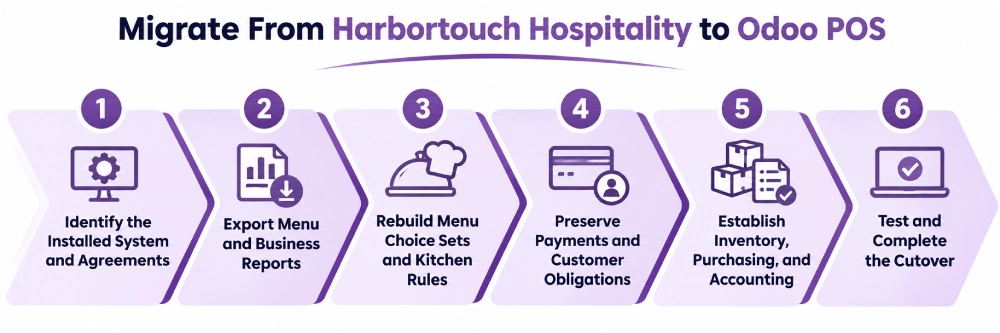
Harbortouch data may be distributed across Hospitality, Lighthouse, Shift4 payment services, and connected applications. Replacing the POS requires both extracting the available information and reconstructing the required restaurant workflows in Odoo.
1. Identify the Installed System and Agreements
Confirm whether the restaurant uses Harbortouch Hospitality, Bar & Restaurant, Echo, or another product.
Record the software version, terminals, printers, payment equipment, Lighthouse account, and active integrations. Review merchant contracts, equipment ownership, renewal terms, and outstanding obligations.
Identify open tabs, unsettled transactions, house-account balances, gift cards, and customer credits before planning the cutover.
2. Export Menu and Business Reports
Harbortouch Hospitality offers menu, ticket, customer, employee, and financial reports through its reporting tools.
| Harbortouch Record | Odoo Migration Use |
| Menu by Name with Screen Categories | Map products, categories, prices, and costs |
| Choices and Choice Sets | Review configured selections |
| Choice Sets with Menu Items | Review recorded choice usage by parent item |
| Tickets Detail | Preserve historical transaction information |
| Restaurant Financial Overview | Reconcile sales and financial totals |
| Customers Detail | Review permitted customer data |
| Employee and Labor Reports | Preserve relevant historical labor information |
| House Account Reports | Reconcile outstanding balances |
Reports do not necessarily reproduce the complete restaurant configuration. Choice-set usage data, for example, cannot be assumed to include every configured item relationship, default selection, pricing override, or kitchen rule.
Those settings must also be reviewed through the installed POS or accessible Lighthouse configuration.
3. Rebuild Menu Choice Sets and Kitchen Rules
A product import can transfer menu names and prices, but it cannot automatically recreate complex ordering behavior.
A sandwich with a required side, optional toppings, and premium substitutions needs the correct choices, charges, and preparation instructions in Odoo.
The migration should map:
- Item groups, screen categories, and individual prices.
- Required and optional choice sets, defaults, and substitutions.
- Kitchen printer assignments and held items.
- Tax rules, discounts, employee permissions, and table settings.
Each relevant ordering combination should be tested before the restaurant begins live service on Odoo.
4. Preserve Payments and Customer Obligations
Open bar tabs, outstanding card preauthorizations, unsettled gratuities, refunds, and payment batches need reconciliation before the original payment environment is retired.
Harbortouch’s house-account workflow adds a closed ticket’s value to the selected customer’s outstanding balance. Transferring a customer name or email address does not automatically transfer that balance.
Gift cards and loyalty obligations also require separate review.
Historical Harbortouch transactions should be preserved through appropriate source reports. They do not automatically become native Odoo POS sessions.
5. Establish Inventory, Purchasing, and Accounting
Restaurants adopting Odoo for connected operations need accurate products, suppliers, purchase units, opening inventory, and financial records.
Harbortouch Fresh Sheet quantities should not be used as a substitute for physical ingredient stock counts.
A structured Odoo implementation can configure stock receipts, internal transfers, purchase orders, vendor bills, payment journals, and reconciliation.
Where ingredient-level tracking is required, the corresponding recipe or production-consumption workflow must also be configured and validated.
6. Test and Complete the Cutover
The final test should follow restaurant orders through preparation, payment, settlement, and accounting.
Include table transfers, bar tabs, modifiers, kitchen holds, split bills, tips, refunds, gift cards, and customer-account procedures.
For connected inventory and purchasing, test stock receipts, transfers, supplier bills, and opening balances.
Multi-location businesses should also validate branch-specific prices, stock locations, employee permissions, and reports. Complete data reconciliation and staff training before deactivating Harbortouch services.
How Adatasol Helps Restaurants Move From Harbortouch to Odoo
Harbortouch migrations involve Lighthouse records, menu choice sets, Shift4 payment arrangements, equipment restrictions, and customer-account balances. Adatasol can assess the installed environment and map restaurant requirements to Odoo POS, Inventory, Purchase, and Accounting.
Our Odoo consulting services help identify standard functionality and necessary integrations. Through Odoo migration services, Adatasol can coordinate data mapping, configuration, testing, employee training, and cutover while establishing the connected business processes the restaurant needs.
Wrapping Up
Harbortouch Hospitality provides restaurant ordering, bar tabs, reservations, kitchen printing, customer programs, and reporting. Odoo POS extends those operations through connected inventory, supplier purchasing, accounting, and multi-location business management.
For restaurants modernizing their software, Odoo offers a path from separate operational records toward a coordinated ERP environment. Adatasol can assess the existing Harbortouch system, define the migration requirements, and implement the appropriate Odoo workflows. Schedule an Odoo consultation to discuss your restaurant’s transition.

