
NetSuite to Odoo migration moves the master data, open transactions, inventory, financial position, manufacturing structures, and selected history required to continue operations in Odoo. NetSuite OneWorld, classifications, item types, custom records, workflows, scripts, and intercompany accounting create relationships that must remain intact after cutover.
Legal subsidiaries, physical locations, reporting segments, currency relationships, and intercompany balances should become Odoo structures only when their purpose continues after migration. The resulting Odoo implementation must support the legal, operational, accounting, inventory, and reporting processes that replace NetSuite.
Why NetSuite Data Cannot Be Copied Straight Into Odoo
A NetSuite transaction can depend on its subsidiary, customer, item, location, department, class, custom segment, currency, and custom fields. Moving the transaction without those relationships can leave Odoo with valid records that no longer produce the correct financial or operational result.
OneWorld Subsidiaries Carry Legal and Consolidation Meaning
NetSuite OneWorld organizes legal entities as subsidiaries within a hierarchy. Each subsidiary can have its own base currency and accounting activity.
Elimination subsidiaries serve a different purpose. They support elimination journal entries that remove qualifying intercompany activity from consolidated results rather than acting as normal operating businesses.
Active legal subsidiaries may become Odoo companies. Elimination activity needs a cutover treatment, not automatically another Odoo company.
Departments, Classes, Locations, and Custom Segments Mean Different Things
NetSuite Departments, Classes, Locations, and Custom Segments can all affect management reporting, but they do not represent the same business entity.
A NetSuite Location may become an Odoo warehouse or internal location when it represents physical operations, or remain a reporting dimension when it primarily classifies transactions. Departments, Classes, and Custom Segments may instead map to analytic or reporting structures.
NetSuite Item Types Need Different Odoo Product Structures
NetSuite can use inventory items, serialized items, lot-numbered items, assemblies, kits, matrix items, non-inventory items, and services.
Those item types should not all become identical Odoo products. Assembly Items may become manufactured products with BOMs. Kit Items may fit an Odoo kit structure. Matrix parent and child combinations can become product templates and variants when the target product model requires the same options.
Custom Records and Automation Affect Daily Operations
NetSuite environments can contain custom fields, custom record types, SuiteScripts, workflows, reports, and saved searches.
Required custom behavior should move according to the business outcome it supports. Standard Odoo configuration, custom Odoo development, reporting, or integration may replace the original NetSuite customization.
What NetSuite Data Can Move to Odoo?
Only records and relationships required for post-cutover operations need to become active Odoo data.
| NetSuite data | Odoo destination | Migration treatment |
| Subsidiaries | Companies | Preserve operating legal entities and accounting boundaries |
| Customers / vendors | Contacts | Preserve identity, subsidiary assignment, terms, addresses, and source IDs |
| Items | Products / variants | Map item type, UoM, tracking, purchasing, sales, and inventory behavior |
| Departments / Classes | Analytic / reporting structures | Retain dimensions still required |
| Locations | Warehouses, locations, or reporting | Map according to physical or reporting purpose |
| Custom Segments | Analytic / reporting structures | Preserve required management dimensions |
| Open sales orders | Sales | Carry remaining quantities, pricing, customer, and references |
| Open purchase orders | Purchase | Carry remaining quantities, vendor, receipts, and references |
| Inventory Detail | Inventory | Preserve location, bin, lot/serial, and quantity where required |
| Open AR / AP and G/L balances | Accounting | Reconcile approved cutover balances |
| Assemblies / BOMs / work orders | Manufacturing | Move active structures and open production work |
| Closed history | Odoo or archive | Select by operational, audit, legal, and reporting need |
Preserve NetSuite Source References
Customers, vendors, items, subsidiaries, transactions, and custom records need stable identifiers throughout repeated migration loads.
Odoo External IDs can preserve those references so later test imports update existing records rather than creating duplicates and dependent transactions continue resolving to the correct customer, item, company, or document.
Keep Subsidiary and Currency Relationships Intact
OneWorld subsidiaries can use different base currencies while customers, vendors, and transactions may use other currencies.
Migration must distinguish transaction currency, subsidiary base currency, open balances, and the approved consolidated position rather than treating currency as one value copied with each transaction.
If Multi-Book Accounting is enabled, primary and secondary books, book-specific journals, account mappings, and required consolidated balances need separate cutover treatment instead of being collapsed into a single opening trial balance.
Preserve Bin, Lot, and Serial Traceability
NetSuite Inventory Detail can connect inventory quantities with locations, bins, lot numbers, serial numbers, or combinations of those attributes.
Products requiring traceability need their identifier, quantity, and location aligned in Odoo Inventory. Total quantity by Item is not enough when warehouse operations depend on bins, lots, or serials.
What Should Stay Out of the New Odoo Database?
Inactive entities, obsolete Items, retired reporting values, unused custom records, and old automation do not need to become permanent Odoo configuration.
Elimination Subsidiaries Are Not Operating Companies
Required elimination entries and the consolidated financial position need to reconcile at cutover, but an elimination subsidiary itself does not automatically become an operating Odoo company.
Retired Classifications Should Stay Behind
Departments, Classes, Locations, and Custom Segment values can accumulate through years of reporting changes.
Retired or duplicate segment values should stay out of Odoo so management reporting starts with dimensions the business still uses.
Unused Scripts, Workflows, and Custom Records Do Not Need Rebuilding
SuiteScripts, workflows, custom records, saved searches, and reports should move only when users still depend on the process, calculation, control, or output after NetSuite is retired.
Required external connections can move through Odoo integration instead of keeping old NetSuite automation alive.
Closed NetSuite History Can Remain Read-Only
Open transactions and frequently used history can move into Odoo while older closed sales, purchases, journals, and inventory activity remain in a controlled archive when users do not need them as live operational records.
How We Migrate NetSuite to Odoo
NetSuite OneWorld structure, item types, classifications, customizations, financial balances, and open transactions have to map into the Odoo workflows that take over at cutover.
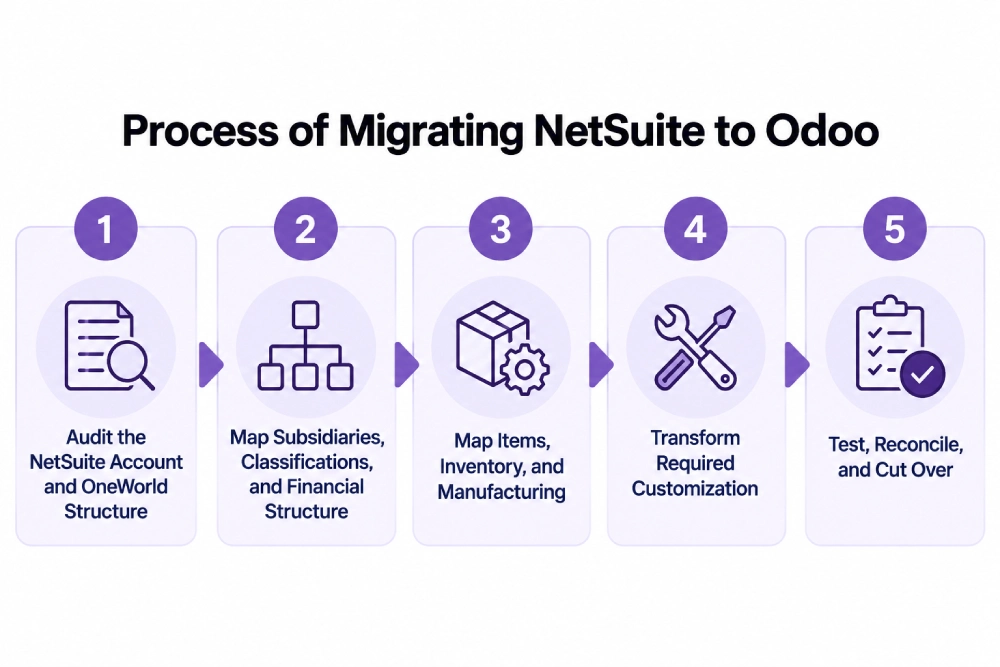
Audit the NetSuite Account and OneWorld Structure
We identify subsidiaries, currencies, customers, vendors, Items, Locations, Departments, Classes, Custom Segments, open transactions, Inventory Detail, custom records, workflows, scripts, integrations, and manufacturing requirements.
Subsidiary, warehouse, reporting, and approval structures can be redesigned through Odoo consulting when existing NetSuite classifications no longer match how the business operates.
Map Subsidiaries, Classifications, and Financial Structure
Operating subsidiaries map separately from elimination structures. Physical Locations map to the required warehouse structure, while reporting-only classifications move into appropriate analytic dimensions.
Open intercompany balances, elimination entries, subsidiary balances, and the consolidated position must reconcile before final NetSuite posting is frozen.
Map Items, Inventory, and Manufacturing
Inventory Items, Matrix Items, assemblies, kits, serialized and lot-numbered Items, services, and other active Item types are mapped according to how they will behave in Odoo.
Assembly Items can move into Odoo Manufacturing with active component relationships and production requirements. Matrix Items can become product templates and variants, while kits need the appropriate Odoo kit structure.
Transform Required Customization
Custom fields and records map to standard or custom Odoo models. SuiteScript and workflow behavior is translated according to the business rule rather than converted code-for-code.
Saved searches and reports should be recreated only when users still depend on their filters, calculations, or outputs after NetSuite is retired.
Test, Reconcile, and Cut Over
Test migrations validate subsidiary assignments, customers, vendors, Items, classifications, inventory, open sales and purchase transactions, AR/AP, G/L balances, currencies, manufacturing data, and required custom records.
A transaction freeze separates final NetSuite activity from production Odoo activity. Remaining approved changes are loaded and reconciled before users move to Odoo. Odoo support can cover post-cutover validation and stabilization.
What We Validate Before NetSuite Is Retired
Financial, inventory, organizational, and open-transaction positions need to agree before Odoo becomes the production ERP.
| Area | What must agree | Cutover check |
| Subsidiaries | Legal entities and opening positions | Odoo companies reconcile |
| Intercompany | Open balances and elimination entries | Consolidated position agrees |
| Customers / vendors | Identity, subsidiary, open balances | AR/AP relationships resolve |
| Items | Item type, UoM, tracking, status | Products are usable |
| Inventory | Location, bin, lot/serial, quantity | Stock agrees |
| General ledger | Approved opening balances | Trial balance agrees |
| Reporting dimensions | Required classifications / segments | Management reporting remains usable |
| Open sales / purchases | Remaining quantities and status | Operations continue |
| Manufacturing | Active assemblies and open work | Production can continue |
Multi-Book environments also need required primary- and secondary-book positions reconciled separately before final cutover.
NetSuite to Odoo Migration Services From Adatasol
Replacing NetSuite affects legal entities, accounting, inventory, sales, purchasing, manufacturing, reporting, custom records, and integrations.
US-Based Odoo Certified Ready Partner
Adatasol is based in Willoughby, Ohio and works with US businesses on ERP migration, implementation, integration, customization, and support.
Our Odoo migration services cover the records, balances, relationships, and workflows that must continue after NetSuite is retired.
We Simplify NetSuite Structures That Odoo Does Not Need
Subsidiaries, Departments, Classes, Locations, Custom Segments, and custom records remain only when their legal, operational, accounting, or reporting purpose continues after cutover.
We Preserve the Relationships Behind the Financials
A customer balance without the correct subsidiary is incomplete. Inventory without the correct location or lot is unreliable. An open order without the correct customer, Item, currency, or remaining quantity cannot continue cleanly.
We reconcile connected records rather than isolated import totals.
More Than 20 Years of ERP Experience
Our ERP experience includes more than 20 years of ERP work across finance, inventory, operations, manufacturing, integration, and software development.
Schedule a free migration assessment to review your NetSuite subsidiaries, classifications, Items, inventory, customizations, integrations, financial position, history, and Odoo cutover requirements.
NetSuite to Odoo Migration FAQs
Can NetSuite data be migrated to Odoo?
Yes. Subsidiaries, customers, vendors, Items, open transactions, inventory, financial balances, manufacturing data, custom records, and selected history can move when their Odoo destinations and relationships are defined.
How do NetSuite OneWorld subsidiaries map to Odoo?
Active legal subsidiaries may become Odoo companies. Elimination subsidiaries are treated separately because they support consolidated intercompany accounting rather than normal operating transactions.
What happens to NetSuite Departments, Classes, Locations, and Custom Segments?
They map by purpose. Physical Locations may become warehouses or internal locations, while Departments, Classes, Custom Segments, and reporting-only Locations can map to analytic or reporting structures.
Can NetSuite Matrix, Assembly, and Kit Items move to Odoo?
Yes. Matrix Items can map to product variants, assemblies to manufactured products and BOMs, and kits to an appropriate kit structure when that matches the required Odoo workflow.
Can NetSuite lot, serial, bin, and location inventory move to Odoo?
Yes. Product, quantity, location, bin, lot, and serial relationships can be transformed into Odoo warehouse, location, lot, and serial structures so required traceability continues.
What happens to SuiteScripts, workflows, and custom records?
Required business logic can move to standard Odoo configuration, integrations, reporting, or custom development. NetSuite customizations without a required post-cutover purpose should not be rebuilt.
Does Multi-Book Accounting affect the migration?
Yes, when enabled. Primary and secondary accounting books, book-specific journals, account mappings, and required balances need separate treatment so financial positions are not collapsed incorrectly.
How long does a NetSuite to Odoo migration take?
Timing depends on subsidiaries, accounting books, currencies, item types, inventory complexity, classifications, custom records, scripts, integrations, financial history, manufacturing scope, and required test migrations.















