
Microsoft Dynamics NAV to Odoo migration moves the master data, open transactions, inventory position, financial balances, manufacturing structures, and required history needed to operate in Odoo. NAV and Navision environments can also contain years of C/AL code, modified application objects, custom tables, ISV add-ons, reports, and legacy integrations that affect daily operations.
Exporting NAV tables does not preserve pricing rules, approvals, posting behavior, calculations, integrations, or workflows embedded in C/AL and modified objects. Those requirements need defined destinations in Odoo before NAV is retired.
Why Dynamics NAV Data and C/AL Customizations Must Be Separated
NAV customizations can change both the data stored in the system and how that data behaves. The migration therefore has to distinguish standard ERP records from modified objects, custom data, and business rules that still matter after cutover.
C/AL Customizations Can Contain Core Business Rules
Depending on the NAV generation, customization can involve Tables, Forms or Pages, Reports, Codeunits, Dataports or XMLports, Queries, MenuSuites, custom fields, and C/AL code.
Those objects can control pricing, approvals, posting, manufacturing, calculations, document handling, imports, exports, and other operational processes.
Required behavior can move to standard Odoo configuration, custom Odoo development, reporting, or integration. Obsolete C/AL logic should stay behind.
Modified Standard Objects Need Business-Level Mapping
NAV implementations often modify standard application objects instead of keeping all customer requirements separate from the base application.
A modified Table, Form, Page, Codeunit, Report, Dataport, or XMLport matters only when customers, vendors, Items, documents, accounting, inventory, manufacturing, or integrations still depend on its data or behavior.
Older Forms and Dataports need the same business-purpose review as later Pages and XMLports rather than being recreated simply because they exist in the source application.
ISV Add-Ons and Partner Modules Need Separate Treatment
Many NAV environments include ISV add-ons or partner-developed modules alongside customer-specific modifications.
An add-on may introduce custom tables, fields, posting rules, reports, integrations, or dependencies outside standard NAV. Each required capability can move to standard Odoo functionality, another connected application, custom development, or retirement.
Legacy Integrations Depend on the NAV Version
NAV integrations can include Dataports or XMLports, SOAP or OData web services, scheduled files, middleware, and SQL-driven exchanges depending on the version and customization.
Required interfaces need new ownership and endpoints after NAV is removed from the architecture.
What Dynamics NAV Data Can Move to Odoo?
| Dynamics NAV data | Odoo destination | Migration treatment |
| Companies | Companies | Preserve required company-level accounting and operational separation |
| Customers / vendors | Contacts | Preserve identity, terms, addresses, and source references |
| Items / variants | Products / variants | Map UoM, costing, tracking, purchasing, sales, and inventory behavior |
| Chart of accounts | Accounting | Map approved G/L structure and balances |
| Dimensions | Analytic / reporting structures | Preserve required management reporting |
| Locations / bins | Warehouses / internal locations | Preserve required physical stock structure |
| Lots / serials | Lots / serials | Preserve item, identifier, location, and quantity |
| Open sales / purchase orders | Sales / Purchase | Carry remaining quantities, parties, pricing, and references |
| Open AR / AP | Accounting | Reconcile approved customer and vendor positions |
| BOMs / production orders | Manufacturing | Move active structures and open production |
| Custom tables / fields | Standard or custom Odoo models | Preserve required custom data |
| Closed history | Odoo or archive | Select by operational, audit, legal, and reporting need |
Preserve NAV Source Identifiers
Customer numbers, vendor numbers, item numbers, document numbers, company identifiers, and custom record keys should remain available during repeated migration loads.
Odoo External IDs can preserve source references so test imports update the intended records rather than create duplicates and dependent records continue resolving correctly.
Reconcile Inventory Quantity and Value
NAV inventory can depend on Item Ledger Entries, Value Entries, locations, costing, applications, lots, and serial numbers.
Item Ledger Entries represent inventory movement and quantity, while Value Entries carry the related cost information. The opening position in Odoo Inventory must reconcile physical quantity with the approved inventory value.
Preserve Open Financial and Operational Positions
Open customer and vendor entries, sales orders, purchase orders, inventory commitments, production activity, and G/L balances need to reflect the approved NAV cutover position.
Completed or settled activity should not reappear as new Odoo work. Required financial balances move into Odoo Accounting according to the approved cutover figures.
What Should Stay Out of the New Odoo Database?
Unused custom objects, obsolete C/AL logic, inactive companies, discontinued Items, retired integrations, unnecessary reports, and closed transactions do not need to become permanent Odoo structures.
Retired C/AL Logic Should Not Become New Custom Code
A NAV customization may exist because an older version lacked a feature or because a temporary workaround became permanent.
Pricing, approvals, posting rules, calculations, and workflows can move to standard configuration where possible. Odoo consulting can address requirements that need process redesign before customization is considered.
Legacy Reports and Screens Need a Current Business Purpose
Reports, document layouts, Forms, Pages, and specialized screens should move only when users still rely on their information or workflow after cutover.
Unused outputs and interface changes should not become Odoo requirements.
Closed NAV History Can Remain Read-Only
Open transactions and regularly used history can move into Odoo while older posted documents, ledger entries, inventory activity, and production history remain in a controlled archive when users do not need them as active records.
How We Migrate Microsoft Dynamics NAV to Odoo
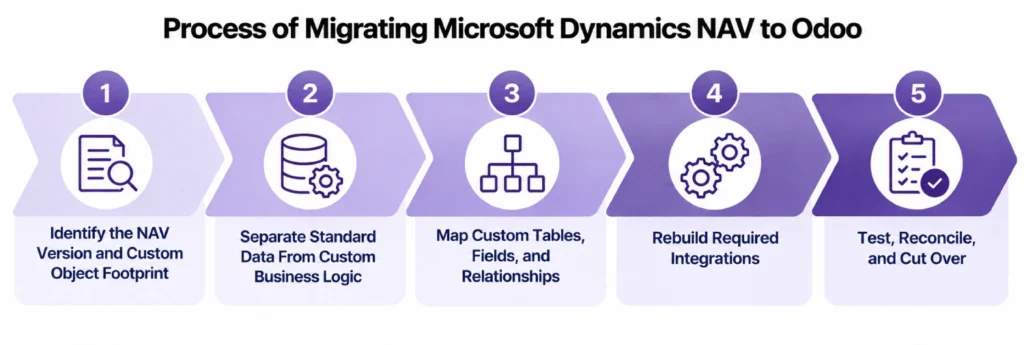
Identify the NAV Version and Custom Object Footprint
We identify the NAV or Navision version, database platform, companies, standard and modified objects, customer object ranges, C/AL code, Forms or Pages, Reports, Codeunits, Dataports or XMLports, ISV add-ons, integrations, and external dependencies.
Later Dynamics NAV environments commonly use Microsoft SQL Server. Older Navision estates require version-specific database and client assessment before the extraction approach is defined.
Separate Standard Data From Custom Business Logic
Customers, vendors, Items, accounts, dimensions, inventory, and open documents are mapped separately from the code and modified objects that change their behavior.
The target Odoo implementation can use standard configuration for requirements already supported by Odoo while retaining custom development only where the business process still requires it.
Map Custom Tables, Fields, and Relationships
Required custom records are assigned to the Odoo entity or process that will use them.
A custom NAV table may become a standard Odoo object, a custom model, part of another master record, or an archive. Custom fields remain only when users, automation, accounting, reporting, or integrations still depend on them.
Rebuild Required Integrations
Dataports, XMLports, SOAP or OData services, scheduled imports, middleware, files, and database-driven integrations are mapped to the applications that remain after NAV is retired.
Required connections can move through Odoo integration rather than keeping NAV operational solely to exchange data.
Test, Reconcile, and Cut Over
Test migrations validate customers, vendors, Items, dimensions, inventory, lots and serials, open documents, AR/AP, G/L balances, manufacturing records, custom data, and required business rules.
A transaction freeze separates final NAV activity from production Odoo activity. Approved changes are loaded and reconciled before users move to Odoo. Odoo support can cover post-cutover validation and stabilization.
What We Validate Before Dynamics NAV Is Retired
| Area | What must agree | Cutover check |
| Companies | Required company balances | Odoo companies reconcile |
| Customers / vendors | Identity and open positions | AR/AP relationships resolve |
| Items | Item, UoM, tracking, status | Products are usable |
| Inventory | Location, lot/serial, quantity | Physical stock agrees |
| Inventory valuation | Approved stock value | Accounting position agrees |
| General ledger | Opening balances | Trial balance reconciles |
| Dimensions | Required reporting values | Reporting remains usable |
| Open documents | Remaining quantities and status | Sales and purchasing continue |
| Manufacturing | Active BOMs and production | Production can continue |
| Custom processes | Required rules and outputs | Critical workflows continue |
| Integrations | Required data exchange | Connected systems continue |
Microsoft Dynamics NAV to Odoo Migration Services From Adatasol
Replacing NAV affects accounting, inventory, sales, purchasing, manufacturing, reporting, custom application logic, and integrations.
US-Based Odoo Certified Ready Partner
Adatasol is based in Willoughby, Ohio and works with US businesses on ERP migration, implementation, integration, customization, and support.
Our Odoo migration services cover the data, financial position, operational relationships, custom requirements, and integrations that must continue after NAV is retired.
We Do Not Convert C/AL Code Line by Line
Pricing rules, approvals, calculations, document logic, imports, reports, and specialized workflows are mapped to the simplest Odoo approach that meets the current requirement.
Custom code is retained only when standard Odoo configuration cannot support the required process.
More Than 20 Years of ERP Experience
Our ERP experience includes more than 20 years of work across finance, inventory, manufacturing, operations, integration, and software development.
Schedule a free migration assessment to review your NAV or Navision version, companies, database platform, custom objects, C/AL code, ISV add-ons, integrations, inventory, financial position, and Odoo cutover requirements.
Microsoft Dynamics NAV to Odoo Migration FAQs
Can Microsoft Dynamics NAV data be migrated to Odoo?
Yes. Companies, customers, vendors, Items, inventory, open transactions, financial balances, manufacturing data, dimensions, custom records, and selected history can move when their Odoo destinations are defined correctly.
What happens to NAV C/AL customizations?
Required business rules can move through standard Odoo configuration, integrations, reporting, or custom development. C/AL code is not converted line by line, and obsolete customizations should stay behind.
Can customized NAV tables and fields move to Odoo?
Yes. Required custom data can map to standard Odoo fields, custom models, related records, or an archive depending on how the business still uses it.
Can NAV Item Ledger Entries and Value Entries move to Odoo?
Required history can move selectively, but cutover should focus on reconciling physical inventory, tracking information, and the approved financial valuation represented by those ledgers.
Can NAV lots, serials, Locations, and bins move to Odoo?
Yes. Required Item, quantity, location, bin, lot, and serial relationships can be transformed into the corresponding Odoo inventory structures.
What happens to NAV reports and integrations?
Required reports and interfaces can be rebuilt for Odoo. Obsolete reports, files, SQL processes, Dataports, XMLports, web services, and integrations should not be recreated automatically.
Does the Dynamics NAV or Navision version affect migration?
Yes. NAV generations differ in database architecture, application objects, development tools, and integration options. Older systems may use Forms and Dataports, while later NAV environments commonly use Pages, XMLports, Queries, and SQL Server.
How long does a Dynamics NAV to Odoo migration take?
Timing depends on NAV version, companies, database platform, custom objects, C/AL code, ISV add-ons, inventory, manufacturing, integrations, data volume, and required test migrations.















