
Microsoft Dynamics Business Central to Odoo migration moves the master data, open transactions, inventory position, financial balances, manufacturing structures, and required history needed to continue operations in Odoo. Posting groups, dimensions, ledger entries, locations, item tracking, and extensions must be translated without losing the accounting and operational relationships they control.
Business Central uses a different architecture from Dynamics 365 Finance and Supply Chain Management. Its migration centers on posting setup, Dimension Sets, Item Ledger Entries, Value Entries, inventory tracking, and AL extensions rather than Dataverse, dual-write, or Finance and Operations data entities.
Why Business Central Data Cannot Be Copied Straight Into Odoo
Customers, vendors, items, and transactions in Business Central depend on posting setup, dimensions, inventory ledgers, locations, and extensions. Moving records without those relationships can produce valid Odoo data with incorrect accounts, inventory values, or management reporting.
Posting Groups Control Where Transactions Reach the General Ledger
Business Central uses several posting structures for different accounting purposes.
Customer and Vendor Posting Groups define receivable and payable accounts. General Business and General Product Posting Groups combine to control sales, purchase, COGS, and related postings. Inventory Posting Groups and Locations determine the inventory accounts used for stock activity.
Those relationships need to become the account, product, tax, and fiscal configuration used by Odoo Accounting rather than being copied as unused Business Central codes.
Dimensions and Dimension Sets Carry Reporting and Posting Rules
Business Central dimensions categorize transactions by values such as department, project, area, branch, or salesperson. Multiple dimension values can be stored together as a Dimension Set and referenced through a Dimension Set ID.
Default dimensions can also require a code, enforce a specific value, prohibit a dimension, or restrict combinations. Required controls need an Odoo accounting, analytic, approval, or validation equivalent rather than being reduced to reporting labels.
Item Ledger Entries Track Quantity While Value Entries Carry Cost
Business Central records inventory quantity changes through Item Ledger Entries while Value Entries carry the related inventory cost.
The physical stock position and financial valuation can therefore disagree even when item quantities appear correct. Cost adjustments and applications between inbound and outbound entries must be reflected in the approved cutover value before Odoo becomes the production inventory and accounting system.
AL Extensions Can Contain Data and Business Logic
Business Central AL extensions can add tables, fields, pages, codeunits, reports, integrations, and application logic.
Required behavior can map to standard Odoo configuration, custom Odoo development, reporting, or integration. Extensions without a required post-cutover purpose should not become new Odoo technical debt.
What Business Central Data Can Move to Odoo?
Only the records, balances, relationships, and history required after cutover need to become active Odoo data.
| Business Central data | Odoo destination | Migration treatment |
| Companies | Companies | Preserve required legal and accounting separation |
| Customers / vendors | Contacts | Preserve identity, terms, addresses, currencies, and source IDs |
| Items / Item Variants | Products / variants | Map UoM, costing, tracking, purchasing, sales, and inventory behavior |
| Posting groups | Accounting configuration | Rebuild the posting outcome Odoo must use |
| Dimensions / Dimension Sets | Analytic / reporting structures | Preserve required management dimensions and controls |
| Locations / bins | Warehouses / internal locations | Preserve required physical stock structure |
| Lot / serial tracking | Lots / serials | Preserve identifier, quantity, product, and location |
| Open sales orders | Sales | Carry remaining quantities, pricing, customers, and references |
| Open purchase orders | Purchase | Carry remaining quantities, vendors, receipts, and references |
| Open AR / AP | Accounting | Reconcile approved customer and vendor positions |
| BOMs / production orders | Manufacturing | Move active structures and open production |
| Closed history | Odoo or archive | Select by operational, audit, legal, and reporting need |
Preserve Business Central Source References
Customer numbers, vendor numbers, item numbers, document numbers, company identifiers, and other stable source references should remain available during repeated migration loads.
Odoo External IDs can preserve source-system identifiers so test imports update the intended records rather than creating duplicates and dependent transactions continue resolving correctly.
Rebuild Posting Groups by Accounting Outcome
A posting-group code does not need an identical Odoo field.
Customer Posting Groups should resolve to the required receivable accounts, Vendor Posting Groups to payable accounts, General Business and Product combinations to the correct revenue, expense, COGS, and related accounts, and Inventory Posting Groups with Locations to the required inventory accounts.
Preserve Item Variants, Quantity, and Value
Business Central Item Variants can map to Odoo product variants when their variant codes represent options the business still sells, buys, manufactures, or stocks separately.
The final Odoo Inventory position must also reconcile physical quantities with the approved inventory valuation represented by Item Ledger Entries and Value Entries.
Business Central Warehouse and Item Tracking Migration
Locations, bins, lots, serial numbers, and item-tracking policies can determine exactly what stock exists and where it can be used.
Locations and Bins Need the Correct Physical Structure
Business Central Locations may represent warehouses or other physical inventory facilities, while bins provide more detailed storage positions.
Required physical structures can become Odoo warehouses and internal locations. Reporting labels or obsolete Locations should not become warehouse records when they no longer represent a real operating site.
Lots, Serials, and Packages Need Separate Treatment
Tracked stock needs its product, quantity, location, lot or serial identifier, and required expiration information aligned at cutover.
Business Central package numbers need separate mapping when package or container identity remains operationally important. They should not automatically be treated as Odoo lot or serial numbers.
What Should Stay Out of the New Odoo Database?
Inactive companies, retired posting groups, discontinued items, obsolete dimensions, unused extensions, and old closed transactions do not need to become permanent Odoo structures.
Retired Posting Groups and Dimensions
Posting groups or Dimension Values created for products, departments, markets, projects, or accounting practices that no longer exist should remain behind.
Required dimensions can map to Odoo analytic plans, analytic accounts, reporting structures, approval rules, or other controls according to how each dimension is used.
Unused Extensions and Apps
Installed extensions may contain fields, reports, integrations, calculations, or automation that users no longer depend on.
Required external connections can move through Odoo integration, while active business rules can move to standard configuration or custom development.
Closed Business Central History Can Remain Read-Only
Open transactions and regularly used history can move into Odoo while older posted documents and ledger history remain in a controlled archive when users do not require them as live operational records.
How We Migrate Business Central to Odoo
Business Central can spread accounting and operational behavior across company setup, posting groups, dimensions, ledger entries, inventory configuration, extensions, and connected applications.
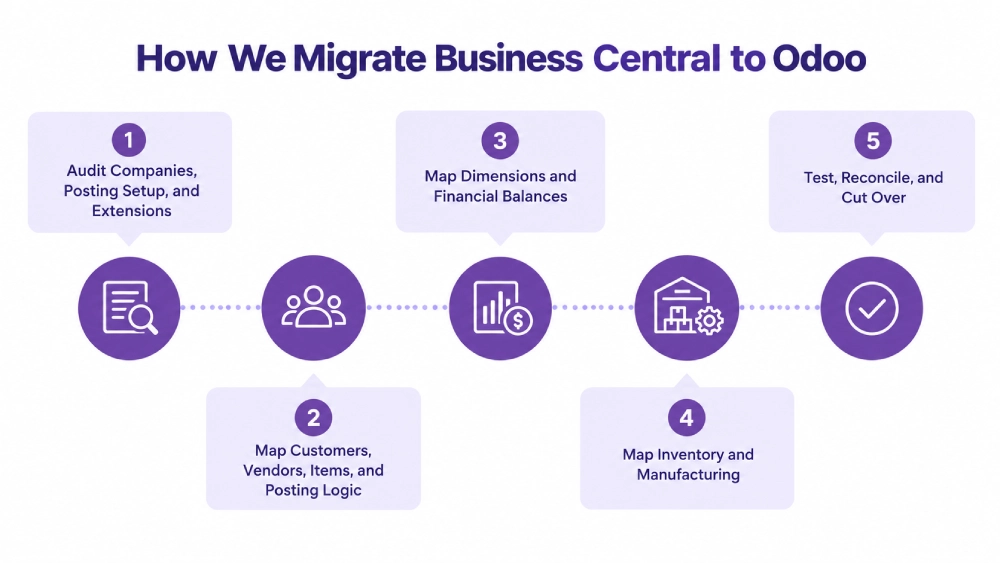
Audit Companies, Posting Setup, and Extensions
We identify each company and its customers, vendors, Items, chart of accounts, posting groups, dimensions, Locations, tracked inventory, open documents, financial balances, manufacturing structures, extensions, custom fields, integrations, and reporting requirements.
We also confirm whether Business Central is online or on-premises and which APIs, exports, extensions, or approved source access are available for the migration.
Map Customers, Vendors, Items, and Posting Logic
Customers and vendors become the required Odoo contacts. Items and Item Variants map to products with the units, costing, sales, purchasing, tracking, and inventory behavior required after cutover.
Posting groups are translated into the accounting configuration established during the Odoo implementation rather than retained as legacy classification codes.
Map Dimensions and Financial Balances
The chart of accounts, open receivables, open payables, taxes, currencies, bank positions, opening G/L balances, and required dimensions are mapped separately.
Dimension values that remain useful can become Odoo analytic structures. Odoo consulting can define how posting, approval, and reporting rules should operate when Business Central structures do not have a direct Odoo equivalent.
Map Inventory and Manufacturing
Items, variants, Locations, bins, tracked inventory, stock quantities, and approved valuation are reconciled before production use.
Active BOMs and production requirements can move into Odoo Manufacturing when manufacturing continues after Business Central is retired.
Test, Reconcile, and Cut Over
Test migrations validate customers, vendors, items, posting logic, dimensions, stock, inventory valuation, lots and serials, open documents, AR/AP, G/L balances, manufacturing data, and required extensions.
A transaction freeze separates final Business Central activity from production Odoo activity. Approved changes are loaded and reconciled before users move to Odoo. Odoo support can cover post-cutover validation and stabilization.
What We Validate Before Business Central Is Retired
Financial and operational positions need to agree before Odoo becomes the production ERP.
| Area | What must agree | Cutover check |
| Companies | Required entities and balances | Odoo companies reconcile |
| Customers / vendors | Identity and open positions | AR/AP relationships resolve |
| Items | Item, variant, UoM, tracking | Products are usable |
| Inventory | Location, bin, lot/serial, quantity | Physical stock agrees |
| Inventory valuation | Approved inventory value | Accounting position agrees |
| General ledger | Opening balances | Trial balance reconciles |
| Dimensions | Required values and controls | Reporting remains usable |
| Open documents | Remaining quantities and status | Sales and purchasing continue |
| Manufacturing | Active BOMs and open production | Production can continue |
Microsoft Dynamics Business Central to Odoo Migration Services From Adatasol
Replacing Business Central affects accounting, customers, vendors, inventory, purchasing, sales, manufacturing, reporting, extensions, and integrations.
US-Based Odoo Certified Ready Partner
Adatasol is based in Willoughby, Ohio and works with US businesses on ERP migration, implementation, integration, customization, and support.
Our Odoo migration services cover the data, posting relationships, inventory position, financial balances, and operating processes that must continue after Business Central is retired.
We Preserve Posting and Ledger Relationships
A customer is incomplete if its receivable position is wrong. An Item is not ready if quantity agrees but valuation does not. A dimension is not useful if the reporting or posting control attached to it disappears.
We reconcile connected accounting and operational positions before cutover.
More Than 20 Years of ERP Experience
Our ERP experience includes more than 20 years of ERP work across finance, inventory, manufacturing, operations, integration, and software development.
Schedule a free migration assessment to review your Business Central companies, posting groups, dimensions, Items, inventory, extensions, open transactions, financial position, history, and Odoo cutover requirements.
Microsoft Dynamics Business Central to Odoo Migration FAQs
Can Microsoft Dynamics Business Central data be migrated to Odoo?
Yes. Companies, customers, vendors, Items, open transactions, inventory, financial balances, dimensions, manufacturing data, and selected history can move when their Odoo relationships are defined correctly.
How are Business Central posting groups migrated to Odoo?
Posting groups are translated by accounting purpose. Customer, vendor, business, product, inventory, and tax-related posting rules map to the accounts and configuration Odoo must use after cutover.
Can Business Central dimensions move to Odoo?
Yes. Required dimensions and values can map to Odoo analytic or reporting structures. Default-dimension requirements, blocked combinations, and other posting controls need separate Odoo validation or accounting rules.
Can Item Ledger Entries and Value Entries move to Odoo?
Required history can move selectively, but the critical cutover requirement is reconciling the physical inventory quantity and approved financial valuation represented by those ledgers.
Can Business Central lots, serials, bins, and package data move to Odoo?
Yes. Lots, serials, bins, quantities, and Locations can be mapped directly where appropriate. Package identifiers need separate treatment when container identity remains operationally important.
What happens to Business Central AL extensions?
Required extension data and business logic can map to standard Odoo functionality, integrations, reporting, or custom development. Extensions without a required post-cutover purpose should not be rebuilt.
Should all Business Central history move to Odoo?
No. Open transactions and regularly used history can move while older posted documents and ledger records remain in a controlled archive when live Odoo records are unnecessary.
How long does a Business Central to Odoo migration take?
Timing depends on companies, posting groups, dimensions, inventory, manufacturing, extensions, integrations, financial history, data volume, and the test migrations required before cutover.















