
Microsoft Dynamics 365 to Odoo migration moves the master data, open transactions, inventory position, financial balances, manufacturing structures, and required history from Dynamics 365 Finance and Supply Chain Management into Odoo. Legal entities, party relationships, released products, financial dimensions, warehouse structures, and synchronized Dataverse data must remain consistent after cutover.
Dynamics 365 Finance and Supply Chain Management can also exchange data with Dataverse, Sales, Customer Service, Field Service, and other Power Platform applications. Business Central, NAV, and Dynamics GP use different accounting, data, and customization architectures.
Why Dynamics 365 Finance and Supply Chain Data Cannot Be Copied Straight Into Odoo
Dynamics 365 distributes business meaning across legal entities, parties, released products, account structures, financial dimensions, sites, warehouses, inventory dimensions, data entities, and Dataverse tables. Odoo organizes many of those relationships differently.
Legal Entities Are Financial and Data Boundaries
A Dynamics 365 legal entity represents a registered organization and separates company-specific financial and operational data.
Active operating legal entities may become Odoo companies when their legal and accounting separation remains required. Consolidation, elimination, inactive, or Dynamics-specific companies need separate treatment based on whether their accounting purpose continues after cutover.
Parties Can Carry Customer and Vendor Roles
Dynamics 365 uses a party model to represent people and organizations. The same party can act as a customer, vendor, contact, worker, or another business role while sharing addresses and contact information.
Odoo contacts should preserve those commercial relationships without creating unnecessary duplicates when one organization performs several roles.
Released Products Combine Shared and Company-Specific Data
Dynamics 365 distinguishes shared products and product masters from products released into individual legal entities. Released products can carry company-specific sales, purchasing, inventory, costing, and planning settings.
Product masters can also use configuration, color, size, style, and version dimensions to create variants. Those combinations need to map to the product templates and variants used by Odoo Sales, Odoo Purchase, inventory, and Odoo Manufacturing.
Financial Dimensions Control Posting and Reporting
Dynamics 365 Finance combines main accounts with financial dimensions through account structures and advanced rules. Dimensions may include department, business unit, cost center, location, customer, or other values used to validate and analyze postings.
Main accounts should map separately from the analytic or reporting dimensions required in Odoo Accounting.
Where Dynamics account structures make dimensions mandatory or restrict valid combinations, equivalent Odoo accounting, analytic, approval, or validation controls must be defined before cutover.
Dataverse and Dual-Write Need Clear System Ownership
Finance and Supply Chain Management can synchronize business objects with Microsoft Dataverse through dual-write. Customers, vendors, products, sites, warehouses, orders, invoices, and other records may have synchronized representations in both environments.
Each required business object needs one authoritative post-cutover owner, even when synchronized representations remain in Dataverse or other connected applications.
What Dynamics 365 Data Can Move to Odoo?
Only records, relationships, balances, and history required after cutover need to become active Odoo data.
| Dynamics 365 data | Odoo destination | Migration treatment |
| Legal entities | Companies | Preserve required legal and accounting boundaries |
| Parties / customers / vendors | Contacts | Preserve roles, addresses, terms, and source references |
| Shared / released products | Products and variants | Map dimensions, UoM, tracking, and company-specific settings |
| Sites / warehouses / locations | Warehouses / internal locations | Preserve required physical stock structure |
| Batch / serial inventory | Lots / serials | Preserve product, identifier, location, and quantity |
| Open sales orders | Sales | Carry remaining quantities, pricing, customers, and references |
| Open purchase orders | Purchase | Carry remaining quantities, vendors, receipts, and references |
| Main accounts | Accounting | Map the approved chart of accounts |
| Financial dimensions | Analytic / reporting structures | Preserve required management dimensions |
| Open AR / AP | Accounting | Preserve unsettled customer and vendor positions |
| BOMs / production | Manufacturing | Move active structures and open work |
| Selected history | Odoo or archive | Retain according to operational, audit, and reporting need |
Preserve Dynamics 365 Source References
Customer accounts, vendor accounts, item numbers, legal entities, orders, invoices, and other stable identifiers should remain available during repeated migration loads.
Odoo External IDs can preserve source references so later test imports update the same records rather than creating duplicates and dependent transactions continue resolving correctly.
Preserve Inventory Dimensions That Affect Operations
Dynamics 365 inventory can depend on site, warehouse, location, batch, serial, product dimensions, inventory status, and license-plate relationships where advanced warehouse processes use them.
Opening inventory in Odoo Inventory therefore needs more than item-level quantity. Product, warehouse, location, batch or serial identifier, and quantity must remain aligned.
Preserve Open Customer and Vendor Positions
Open customer and vendor transactions can carry remaining amounts, due dates, transaction currencies, accounting currencies, and settlement status.
Those positions should move according to approved cutover balances so collections, payments, and reconciliation continue without recreating settled activity.
What Should Stay Out of the New Odoo Database?
Inactive companies, obsolete dimensions, retired products, unused extensions, obsolete synchronization mappings, and closed transactions do not need to become permanent Odoo structures.
Obsolete Financial Dimensions and Account Rules
Old departments, cost centers, business units, dimension combinations, and account rules should stay behind when they no longer support management reporting, statutory accounting, approvals, or operational controls.
Extensions and Custom Fields Need a Current Business Requirement
Dynamics 365 Finance and Operations environments can contain custom fields, metadata extensions, X++ extensions, event handlers, and other custom logic.
Required behavior can map to standard Odoo configuration or custom Odoo development. Extensions without a required post-cutover purpose should not be rebuilt.
Synchronized Dataverse Records Need Clear Post-Cutover Ownership
Customers, vendors, products, sites, warehouses, orders, and other business objects may remain represented in Dataverse after Dynamics 365 Finance or Supply Chain Management is retired.
Odoo or another connected application must become the authoritative owner for each required business object, with synchronization direction defined accordingly.
Closed Dynamics 365 History Can Remain Read-Only
Open transactions and frequently used history can move into Odoo while older settled invoices, completed orders, journals, warehouse activity, and production records remain in a controlled archive when users do not need them as live Odoo documents.
How We Migrate Microsoft Dynamics 365 to Odoo
Finance and Supply Chain Management data can span company-specific records, shared master data, Dataverse synchronization, custom extensions, warehouse dimensions, and external integrations.
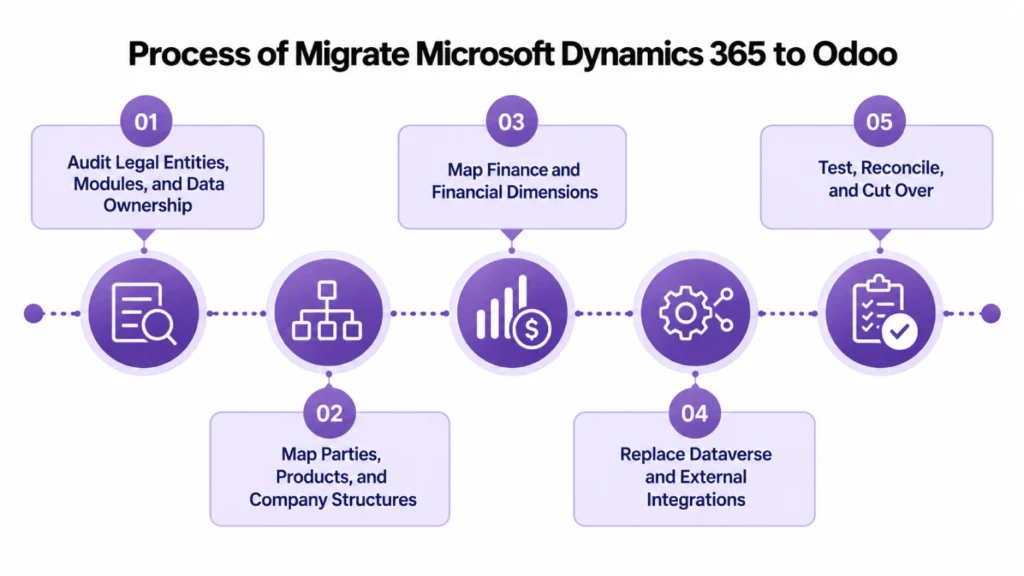
Audit Legal Entities, Modules, and Data Ownership
We identify legal entities, charts of accounts, financial dimensions, parties, customers, vendors, products, sites, warehouses, manufacturing, open transactions, extensions, integrations, and Dataverse synchronization.
Finance and Operations data entities and Data Management Framework exports can provide structured source datasets for customers, vendors, released products, transactions, and other application data.
Map Parties, Products, and Company Structures
Party relationships become the required Odoo contacts and commercial roles. Legal entities map to Odoo companies where separation remains necessary.
Shared products, released products, and variants map to the product structure configured during the Odoo implementation, including sales, purchasing, inventory, and manufacturing behavior.
Map Finance and Financial Dimensions
Main accounts, currencies, taxes, open AR/AP, company balances, and required financial dimensions are mapped separately.
Departments, cost centers, business units, and similar dimensions can map to Odoo analytic structures when their reporting purpose remains. Odoo consulting can address approval and operating rules currently tied to those dimensions.
Replace Dataverse and External Integrations
Dual-write mappings, APIs, data entities, middleware, Power Platform dependencies, and external connections need defined ownership after cutover.
Required applications can connect through Odoo integration while obsolete synchronization paths are retired.
Test, Reconcile, and Cut Over
Test migrations validate legal-entity assignments, party relationships, products, financial dimensions, open transactions, inventory, AR/AP, G/L balances, manufacturing records, and integrations.
A controlled transaction freeze separates final Dynamics 365 activity from production Odoo activity. Approved changes are loaded and reconciled before users move to Odoo. Odoo support can cover post-cutover validation and stabilization.
What We Validate Before Dynamics 365 Is Retired
Financial, operational, inventory, and integration positions need to agree before Odoo becomes the production ERP.
| Area | What must agree | Cutover check |
| Legal entities | Required companies and balances | Company positions reconcile |
| Parties | Customer/vendor identities and roles | Contacts resolve correctly |
| Products | Item, variant, UoM, tracking | Products are usable |
| Inventory | Site, warehouse, location, tracking | Stock position agrees |
| Accounts receivable | Open customer transactions | AR reconciles |
| Accounts payable | Open vendor transactions | AP reconciles |
| General ledger | Approved opening balances | Trial balance agrees |
| Financial dimensions | Required reporting and controls | Analytics remain usable |
| Open orders | Remaining quantities and references | Sales and purchasing continue |
| Manufacturing | BOMs and open production | Production can continue |
| Integrations | Ownership and data flow | Required systems continue operating |
Microsoft Dynamics 365 to Odoo Migration Services From Adatasol
Replacing Dynamics 365 Finance and Supply Chain Management affects legal entities, accounting, products, warehouses, manufacturing, reporting, integrations, and connected Dataverse applications.
US-Based Odoo Certified Ready Partner
Adatasol is based in Willoughby, Ohio and works with US businesses on ERP migration, implementation, integration, customization, and support.
Our Odoo migration services cover the records, financial position, operational relationships, and integrations that must continue after Dynamics 365 is retired.
We Preserve the Relationships Behind the Data
A customer is incomplete if its vendor role or open balance disappears. A released product is not usable if its warehouse, tracking, variant, or company-specific requirements are wrong.
We reconcile connected financial and operational records before cutover.
More Than 20 Years of ERP Experience
Our ERP experience includes more than 20 years of ERP work across finance, inventory, manufacturing, operations, integration, and software development.
Schedule a free migration assessment to review your Dynamics 365 legal entities, financial dimensions, products, warehouses, Dataverse dependencies, extensions, open transactions, history, and Odoo cutover requirements.
Microsoft Dynamics 365 to Odoo Migration FAQs
Does this include Dynamics 365 Business Central?
No. This scope is for Dynamics 365 Finance and Supply Chain Management. Business Central uses different posting, ledger, dimension, extension, and data structures and requires separate migration treatment.
How do Dynamics 365 legal entities map to Odoo?
Active operating legal entities can become Odoo companies when their legal and accounting separation remains required. Consolidation, elimination, inactive, or Dynamics-specific companies are treated according to their post-cutover accounting purpose.
Can Dynamics 365 financial dimensions move to Odoo?
Yes. Required departments, cost centers, business units, and similar dimensions can map to Odoo analytic or reporting structures while main G/L accounts and required posting controls remain separate.
How are Dynamics 365 parties migrated to Odoo?
Party, customer, vendor, address, and contact relationships are mapped together so one organization can retain multiple commercial roles without unnecessary duplicate contacts.
Can released products and variants move to Odoo?
Yes. Shared products, released products, configuration, color, size, style, version, units, tracking, and required company-specific settings can be transformed into Odoo product templates and variants.
What happens to Dataverse integrations and dual-write mappings?
Each synchronized business object needs an authoritative post-cutover owner. Required Dataverse applications can remain connected to Odoo while obsolete synchronization mappings are retired.
Can Dynamics 365 warehouse, batch, and serial inventory move to Odoo?
Yes. Required product, site, warehouse, location, batch, serial, and quantity relationships can be transformed into the appropriate Odoo inventory structure.
How long does a Dynamics 365 to Odoo migration take?
Timing depends on legal entities, modules, financial dimensions, products, warehouses, manufacturing, custom extensions, Dataverse dependencies, integrations, historical scope, and required test migrations.















