
Odoo Xero integration connects Xero Accounting with Odoo ERP so contacts, invoices, bills, credit notes, payments, accounts, tax data, and selected reporting dimensions move between the systems automatically. Each shared accounting object needs one agreed source so the same invoice, payment, contact, or account is not controlled independently in both systems.
Xero may remain the accounting system while Odoo controls sales, purchasing, inventory, projects, or other operational workflows. We define where each financial transaction starts, which system owns it, and which status returns to the other side as a US-based Odoo integration partner.
Why Your Business Needs Odoo Xero Integration
Odoo and Xero can both hold invoices, bills, contacts, payments, accounts, and tax information. When both systems remain active, each shared object needs one source of truth and a defined correction path.
The Same Invoice Exists in Both Accounting Systems
An invoice can originate from an Odoo sales order while finance also creates or edits the same transaction in Xero. If both systems can change amount, due date, tax treatment, or status, corrections can leave the two ledgers at different states.
The invoice needs one accounting master, with selected status or payment data returning to the other system.
Contacts Match by Name Until Two Names Collide
Xero assigns a unique ContactID to each Contact. Names alone are not reliable because names can change, duplicates can exist, and the same business may be formatted differently in Odoo and Xero.
A stable cross-system identifier should connect the Xero Contact to the correct Odoo customer or supplier before invoices and bills begin synchronizing.
Odoo Analytic Dimensions Do Not Fit Unlimited Xero Categories
Xero supports two active Tracking Categories per organisation. Odoo can carry more operational dimensions across projects, departments, locations, analytic accounts, or other reporting structures.
Those dimensions need prioritization. The ones required for statutory or management reporting can move into Xero while the remaining operational detail stays in Odoo.
A Payment Correction Is Not a Normal Record Update
Xero payments are created against approved invoices, credit notes, prepayments, or overpayments, but an existing payment is not edited in place.
If a payment was applied incorrectly, the correction path must reverse the Xero payment and create the correct transaction rather than overwrite the original record.
Key Benefits of Odoo Xero Integration
Invoices, payments, contacts, account codes, tax treatments, and reporting dimensions need explicit ownership. The connection should move the transaction once, preserve both system identifiers, and return only the financial status required by the other team.
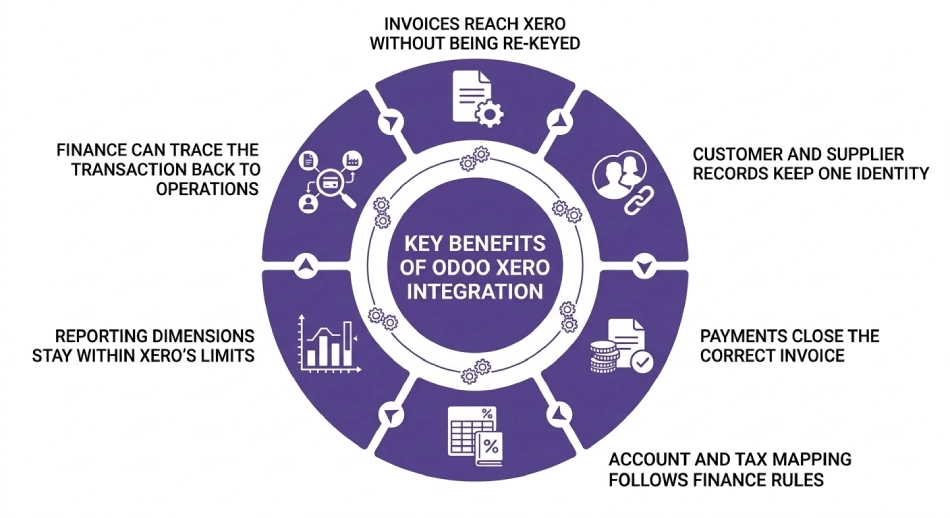
Invoices Reach Xero Without Being Re-Keyed
An approved Odoo transaction can create the corresponding customer invoice or supplier bill in Xero with the agreed contact, line values, taxes, dates, references, and account coding.
Orders created through Odoo Sales no longer need to be rebuilt manually before finance can continue the receivables process.
Customer and Supplier Records Keep One Identity
Xero ContactIDs are stored against their Odoo counterparts so later invoices, bills, and updates resolve to the existing Contact.
Contact number, account number, tax identifier, email, and other approved fields can support the initial match before the permanent cross-system identifier takes over.
Payments Close the Correct Invoice
Payments move according to the agreed accounting master and retain the invoice relationship that explains what was settled.
The correction logic also stays explicit. A payment applied to the wrong invoice, date, bank account, or amount follows a reversal-and-repost path rather than becoming a conflicting edit in the second ledger.
Account and Tax Mapping Follows Finance Rules
Xero accounts and tax rates do not need a one-for-one copy of every Odoo account or configuration field.
We map the account codes and tax treatments required for the transactions crossing between systems. Odoo Accounting can retain operational accounting detail while Xero receives the posting structure required by finance.
Reporting Dimensions Stay Within Xero’s Limits
Odoo analytic plans, departments, projects, locations, or other operational dimensions can exceed what Xero Tracking Categories are designed to hold.
We select the dimensions that belong in Xero and preserve the remaining operational detail in Odoo instead of compressing several reporting concepts into two tracking fields.
Finance Can Trace the Transaction Back to Operations
Cross-system IDs and source references connect the Xero invoice, payment, credit note, or bill to the Odoo transaction that produced it.
Finance can trace a number back to the customer order, purchase, project, or operational record instead of working from a disconnected accounting entry.
What Odoo Xero Integration Automates
Each invoice, bill, payment, account, tax code, and reporting dimension needs one agreed source system. Selected status fields can return without giving both systems control over the same accounting transaction.
| Data object | Direction | Trigger |
| Customers and suppliers | Agreed master to receiving system | On approved creation or change |
| Xero Contact IDs | Stored across systems | On first successful match |
| Products / Xero Items | Agreed master to receiving system | On approved item change |
| Customer invoices | Accounting master to receiving system | On posting or approval |
| Supplier bills | Accounting master to receiving system | On posting or approval |
| Credit notes | Accounting master to receiving system | On approval |
| Payments | Payment master to receiving system | On successful posting |
| Chart of accounts | Accounting master to receiving system | On approved account change |
| Tax rates and codes | Accounting master to receiving system | On approved tax change |
| Tracking or analytic dimensions | Mapped between systems | On transaction synchronization |
Multiple Xero organisations, complex tax mapping, prepayments, overpayments, bank transactions, historical migrations, and Odoo dimensions that do not fit Xero’s accounting model may require middleware or custom Odoo development.
How We Integrate Xero With Odoo
Connector choice depends on the accounting objects involved, transaction volume, number of Xero organisations, Odoo companies, and the transformations required between them.
We Audit Your Xero and Odoo Setup
We use Odoo consulting to identify your Xero organisations, Contacts, chart of accounts, taxes, invoices, bills, credit notes, payments, Tracking Categories, and the Odoo workflows producing those transactions.
We also identify duplicate Contacts, conflicting account codes, analytic mappings, payment ownership, and any financial records already being entered twice.
We Recommend a Route
| Route | Suits | Timeline |
| Compatible Odoo-Xero connector | Standard Contacts, invoices, bills, payments, and mappings supported by your Odoo version | Confirmed after connector and accounting audit |
| Workflow middleware | A small number of defined financial handoffs | Confirmed after transaction mapping |
| Integration platform | Multiple companies or systems requiring transformations, retries, queues, and monitoring | Confirmed after architecture review |
| Direct Xero API build | Complex accounting ownership, dimensions, custom mappings, or transaction logic | Confirmed after API and scope review |
Xero uses OAuth 2.0 for API access. Access tokens expire after 30 minutes, and unused refresh tokens expire after 60 days. The integration must replace the stored refresh token after each successful refresh and reauthorize the connection if an unused refresh token reaches its expiry.
We Map Contacts, Accounts, Taxes, and Dimensions
Xero ContactIDs are mapped to Odoo partners, while account codes, taxes, products, currencies, and reporting dimensions are mapped separately.
The same Xero Contact can participate in receivables and payables, so customer and supplier behavior follows the accounting transactions rather than requiring two duplicate contact records.
We Test Complete Accounting Transactions
We test an existing Contact match, a new customer, customer invoice, supplier bill, credit note, payment, payment reversal, account mapping, tax treatment, and Tracking Category assignment.
Amount, account, tax treatment, Contact, status, and cross-system reference must agree on both sides before the transaction moves into production.
We Cut Over and Monitor
Production synchronization starts with Contact and account mappings reviewed and failed financial records visible.
Xero applies API limits per connected organisation, so higher-volume integrations need batching, retries, and efficient change retrieval. After launch, ongoing Odoo support can cover authentication, new tax rates, mapping failures, API limits, and accounting workflow changes.
Odoo Xero Integration Services From Adatasol
A financial integration can move every invoice successfully and still produce bad books if Contact matching is wrong, account codes disagree, tax treatment changes, payments close the wrong invoice, or both systems can edit the same transaction.
You Get a US-Based Odoo Certified Ready Partner
Adatasol works from Willoughby, Ohio on US business hours. We treat Xero integration as part of sales, purchasing, accounting, and operational reporting rather than a file transfer between two finance applications.
If the approved scope requires custom technical capacity, we can provide an Odoo developer alongside the project.
We Have Been Doing ERP for 20+ Years
Accounting integration depends on more than moving invoice fields. The transaction has to retain its customer, tax, account, payment, and operational context after it crosses into the second system.
Our ERP delivery experience includes more than 20 years of ERP work and a longer software-development history.
We Tell You Which System Should Own the Transaction
An invoice should not be freely editable in both Odoo and Xero. The same rule applies to bills, payments, accounts, and tax data.
We define the source system, return fields, correction path, and exception rules before synchronization starts, then keep unnecessary two-way flows out of the integration.
We Fix Xero Syncs That Are Already Broken
If Contacts duplicate, invoices appear twice, payments stop applying correctly, account mappings drift, or token refresh failures stop synchronization, the engagement may begin as integration rescue.
We trace IDs, mappings, authentication, financial ownership, and failed transactions before recommending a repair or replacement.
Book a free integration assessment and we will review your Xero organisations, accounting ownership, Contact mappings, and Odoo finance workflow, then tell you which integration route fits.
Odoo Xero Integration FAQs
Does Odoo integrate with Xero?
Yes. Odoo can exchange Contacts, invoices, bills, credit notes, payments, accounts, tax data, and selected reporting dimensions with Xero through a compatible connector, middleware, or direct API integration.
Which system should own invoices, Odoo or Xero?
One system should create and control each accounting transaction. Odoo can originate invoices from operational workflows, or Xero can remain the invoice master when that better matches your finance process.
How do you prevent duplicate Xero Contacts?
Store the Xero ContactID against the matching Odoo partner and use defined matching rules during the initial connection. Contact Name alone should not be treated as the permanent cross-system identifier.
Can Odoo synchronize Xero payments?
Yes. Payments can move between the systems when ownership is defined. Incorrect Xero payments should follow a reversal-and-repost process because existing payments are not edited in place.
How do Odoo analytics map to Xero Tracking Categories?
Selectively. Xero permits two active Tracking Categories per organisation, so Odoo projects, departments, locations, or other analytic dimensions need prioritization rather than a one-for-one copy.
Can multiple Xero organisations connect to one Odoo database?
Multiple Xero organisations can connect through separate integrations when authentication, Contact IDs, accounts, taxes, Odoo companies, and transaction mappings remain isolated. Connector support for that topology must be verified before selection.
What authentication does Xero integration use?
Xero uses OAuth 2.0. Access tokens expire after 30 minutes and are renewed through refresh tokens, so reliable token storage and refresh handling are required for unattended synchronization.
Which Odoo hosting options support Xero integration?
External middleware can connect through supported APIs without a custom Odoo module. Python-based connectors require Odoo.sh or self-hosting because Odoo Online does not support custom modules. Odoo implementation should account for that hosting requirement.















