
Odoo POS is a strong Rezku alternative for restaurants that want ordering, purchasing, inventory, and accounting connected within one ERP system. Rezku offers table service, advanced modifiers, ingredient tracking, delivery management, and offline processing. Odoo extends restaurant operations into supplier bills, warehouse transfers, financial reporting, and other business activities.
Replacing Rezku requires careful treatment of nested modifiers, recipe ingredients, payment-processing agreements, kitchen routing, and customer balances. These operating requirements matter as much as the data exported from the existing POS.
Odoo POS vs Rezku: Key Differences
| Capability | Odoo POS | Rezku POS |
| Platform | Restaurant POS within Odoo ERP | iPad-based restaurant POS and management |
| Table service | Floor plans, transfers, open orders, split bills | Tables, seat-level splitting, coursing |
| Menu configuration | Products, variants, pricelists, options | Required modifiers, branching sub-modifiers |
| Pizza and bar | Configured options and compatible payments | Half-and-half pizzas, bar tabs, preauthorizations |
| Kitchen | Preparation displays, printers, course firing | Smart KDS, expo and printer routing |
| Online ordering | Website, self-ordering, UrbanPiper integration | Branded online ordering and QR menus |
| Delivery | Marketplace integration; dispatch needs configuration | Delivery zones, dispatch, DoorDash Drive |
| Ingredient inventory | Receipts, locations; consumption needs configuration | Ingredient tracking and automatic 86-ing |
| Purchasing | Supplier orders, receipts, vendor bills | Inventory and cost tracking; purchasing scope varies |
| Accounting | General ledger, payables, reconciliation | Financial reports and accounting integrations |
| Multi-location | POS configurations, warehouses, companies | Central menus, reporting, access controls |
| Labor and loyalty | Employees, Planning, CRM, loyalty | Timecards, tip pooling, loyalty, gift cards |
| Offline payments | Cached orders; integrated terminals need connectivity | Advertised 24-hour offline operations |
| Pricing | Published subscriptions and deployment costs | $99/month for up to three stations; hardware extra |
Odoo’s principal advantage is coordinating restaurant sales with supplier purchases, stock movements, vendor bills, and accounting records. Rezku provides sophisticated restaurant functions, but Odoo can support the operational and financial processes extending beyond the POS.
Does Rezku Support Ingredient Inventory and Offline Payments?
Yes. Rezku provides ingredient-level inventory, menu availability controls, and eligible offline card-processing workflows. Its restaurant feature list advertises 24-hour offline continuity, while its restaurant POS overview describes offline ordering and payments that synchronize after reconnection.
That advertised continuity should not be confused with guaranteed approval of every card payment throughout an outage. Actual behavior depends on the installed devices, processing arrangements, and later settlement.
Rezku also supports advanced bar tabs, nested menu options, and delivery services. An Odoo replacement should preserve those restaurant processes while establishing the wider ERP functions the business needs.
Rezku vs Odoo: Restaurant and Business Operations
Table Service, Nested Modifiers, and Bar Tabs
Rezku supports table plans, open checks, splits by seat or item, courses, and configurable menus. Its feature list includes required choices, branching sub-modifiers, and incremental card preauthorization for bar tabs.
A customer ordering a burger with a side salad may be prompted to choose a dressing only after selecting the salad. A bar may authorize a customer’s card when a tab is opened, increase the authorization, and settle the final amount with tips.
Odoo POS supports floor plans, order transfers, split bills, tips, courses, and configurable product options. The business can apply pricelists and distinct POS configurations by outlet.
The migration must preserve:
- Modifier dependencies: Required selections, defaults, nested questions, and quantity limits.
- Price rules: Paid substitutions, product sizes, promotions, and location pricing.
- Payment behavior: Open tabs, authorization changes, tips, and final settlement.
Odoo’s standard menu options can meet many needs, but complex conditional questions may require an extension. Bar preauthorization must also be validated against the selected payment terminal and processor rather than treated as equivalent to an unpaid order.
Pizza Ordering, Kitchen Displays, and Preparation Timing
Rezku supports half-and-half pizza toppings, size-specific prices, kitchen displays, and expo workflows. Its Smart KDS can route items to preparation stations and display the status of active orders.
Odoo provides preparation displays, printers, and course firing. Product categories determine which stations receive an order, while configured dine-in and takeaway workflows determine how it is handled.
For a pizza with pepperoni on the left, mushrooms on the right, and extra cheese on the entire pie, the system needs to calculate each portion correctly and communicate it unambiguously to the kitchen. Standard Odoo POS should not be assumed to reproduce every half-and-half pricing rule automatically.
A migration should test modifiers, item substitutions, order amendments, kitchen-routing rules, and preparation-stage changes using real menu combinations. A restaurant with unusually complex pizza logic may need tailored configuration or development.
Ingredients, Auto-86, and Food Costs
Rezku’s inventory features cover ingredient quantities, stock alerts, food costs, and automatic 86-ing when configured products become unavailable. Managers can use physical counts and variance reports to investigate waste or portion discrepancies.
Odoo Inventory manages supplier receipts, warehouses, internal transfers, stock adjustments, and replenishment. This supports a group receiving ingredients at one central location and distributing them to several restaurants.
Standard Odoo POS does not deduct every raw ingredient automatically when a dish sells. Recipe-level depletion needs a configured production, consumption, or equivalent workflow, potentially involving an extension or integration.
A restaurant switching from Rezku must map each recipe’s ingredient quantity, unit of measure, yield, and stock-location rules. If one dish can use two alternative sauces, the configured consumption process must reflect the selected option rather than deduct both.
Accurate restaurant menu costing also requires up-to-date supplier costs and a consistent method for recording waste.
Purchasing, Receiving, and Stock Transfers
Rezku provides inventory monitoring and ingredient-cost information. Its public documentation does not establish the same end-to-end supplier-order, receipt, and vendor-bill process available through Odoo Purchase and Accounting.
Odoo Purchase manages suppliers, purchase orders, vendor pricing, and replenishment. Inventory tracks quantities received, while Accounting records and reconciles the related supplier bills.
Suppose a central kitchen orders 60 cases of vegetables, receives 55, and is invoiced for all 60. Odoo can preserve the purchase order and actual receipt so the accounting team can investigate the difference. The received stock can then be transferred to restaurant branches.
For businesses that operate restaurants alongside catering or packaged-food production, shared purchasing and warehouse records can support all these activities without re-entering supplier data in each department.
Online Ordering, Marketplaces, and Delivery Management
Rezku offers branded online ordering, QR-code menus, delivery-zone controls, and integrations for marketplaces including DoorDash, Uber Eats, and Grubhub. Its delivery integration platform routes supported marketplace orders into Rezku and its kitchen workflows.
Rezku also supports DoorDash Drive dispatch for eligible direct orders. Its current offering includes pay-at-door hardware for accepting card-present payments at delivery. That is different from collecting payment at the restaurant before dispatch.
Odoo offers website ordering and self-ordering. Its documented UrbanPiper integration connects supported U.S. marketplaces, including DoorDash, Uber Eats, and Grubhub, to Odoo POS.
Live UrbanPiper use requires Odoo Enterprise 18.0 or later, an active UrbanPiper subscription, and an eligible account with each marketplace. UrbanPiper does not directly support combo products; Odoo documents attributes and variants as a workaround.
The connector handles marketplace order intake, not every Rezku delivery-zone, courier-dispatch, or pay-at-door process. Those functions need appropriate integrations or separately configured workflows.
Rezku also promotes AI phone ordering through its VoiceBit integration. VoiceBit can answer calls and send orders to Rezku; it is not a standard Odoo phone-ordering feature. Equivalent automation requires a compatible integration.
General Ledger, Reports, and Payment Reconciliation
Rezku provides sales, tender, tip, tax, and operational reporting. Its QuickBooks connection uses Shogo to pass relevant POS data into an external accounting environment.
Odoo Accounting manages journals, payables, taxes, bank reconciliation, and financial reports. Configured POS, purchasing, and inventory workflows can contribute related entries.
A restaurant may record $3,000 in card transactions but receive a smaller processor deposit after fees, refunds, adjustments, or delayed settlement. Accounting needs to distinguish sales, tax liabilities, tips, payment clearing, and bank deposits.
An Odoo deployment can maintain these records alongside supplier invoices and stock-related transactions. Existing Rezku reports remain essential for establishing opening balances and reconciling historical financial activity.
Multiple Locations, Employees, and Customer Programs
Rezku supports central reporting, menu controls, employee permissions, timecards, tip pooling, loyalty, and gift cards. Its multi-location offering allows managers to compare sales and operations across restaurants.
Odoo supports separate POS configurations, warehouses, stock locations, and accounting structures. Groups with separate legal entities can use the applicable multi-company functionality and permissions.
An operator with four restaurants, a commissary, and a catering business can use Odoo ERP for restaurants to connect purchasing and stock distribution with POS sales and financial records.
Employee timekeeping and tip distribution should not automatically be treated as complete U.S. payroll compliance. Customer lists also need separate treatment from loyalty balances, gift-card liabilities, and marketing consent during migration.
Rezku POS vs Odoo POS Pricing
How Much Does Rezku Cost in 2026?
Rezku’s official pricing page advertises Basic at $99 per month for up to three POS stations, with promotional hardware at $19 per station per month under specified conditions.
| Rezku cost | Published or quoted terms |
| Basic POS subscription | $99/month for up to three stations |
| Promotional hardware | $19/month per eligible station |
| Hardware package | Advertised iPad, stand, printer, and card reader |
| Included features | Inventory, online ordering, KDS, loyalty, delivery, support |
| Card processing | Merchant-specific quotation through Rezku’s arrangement |
| Implementation | Billed separately |
| Other services | Based on selected products and contract terms |
At the advertised figures, a three-station setup totals $156 per month for software and eligible promotional hardware, before processing, setup, and other applicable charges. This is illustrative, not a guaranteed merchant price.
Rezku’s pricing page says it works with a third-party processing provider while remaining the merchant’s primary contact. Its restaurant POS FAQ states that independently selected third-party credit-card processors are not supported. Restaurants should therefore review their processing agreement and terminal requirements when considering a switch.
Odoo POS Subscription Pricing
| Odoo plan | Published U.S. price | Main condition |
| One App Free | $0 | One eligible app and dependencies |
| Standard | $24.90 promotional; $31.10 regular per user/month | Standard business applications |
| Custom | $49 promotional; $61 regular per user/month | Customization, API and multi-company options |
| Light User | Advertised from $8.90 | Eligibility and quotation required |
Standard and Custom figures reflect annual billing. Promotional rates apply for 12 months to eligible initial users. Paid plans include standard applications such as POS, Inventory, Purchase, and Accounting. One App Free does not provide unrestricted access to the complete ERP.
Odoo pricing excludes separate implementation, payment processing, hardware, and applicable integration or development expenses.
Which Offers Better Long-Term Value?
Odoo offers broader long-term value for restaurants that need connected purchasing, warehouse inventory, accounting, and POS operations. Its paid plans provide standard ERP applications that can share product, supplier, stock, and financial records.
A restaurant group can coordinate central purchases, branch transfers, vendor bills, and sales within one configured environment. This can reduce duplicate entry and reconciliation work, particularly when restaurants share resources with catering, production, or wholesale operations. The deployment budget must still include equipment, processing, licensing, and implementation.
Rezku vs Odoo: Hardware, Payment Processing, and Offline Operations
Rezku uses compatible iPads, printers, kitchen screens, and payment equipment. Its published hardware offer also lists pay-at-door terminals among available devices.
Rezku allows certain merchant-owned iPads, Epson or Star printers, and cash drawers to be reused after compatibility checks. Those devices may also be candidates for Odoo, but Rezku’s integrated payment terminals should not be presumed usable with a new payment processor.
Rezku advertises 24-hour offline continuity, including supported ordering and payment workflows. Its advertised duration and offline card handling depend on the installed system; a transaction accepted without a live authorization may still be declined later.
Odoo’s POS offline documentation confirms that cached orders synchronize when the connection returns. Integrated payment terminals do not work offline in the documented standard workflow. Locally connected printers may continue operating if the local network remains available.
Test order persistence, kitchen printing, terminal authorization, refunds, and settlement separately. Switching processor arrangements should include a plan for unresolved authorizations, tips, and deposits.
When Should a Restaurant Move From Rezku to Odoo?
| Business requirement | Odoo workflow |
| Supplier orders and bills are managed separately | Purchase, receipts, Accounting |
| A central kitchen supplies several restaurants | Warehouses and internal transfers |
| Catering uses the same ingredients as restaurant service | Shared products and inventory processes |
| Several legal entities need separate financial records | Multi-company accounting |
| Payment reconciliation requires manual re-entry | POS journals and payment clearing |
| Rezku service must continue during an ERP rollout | Evaluate authorized integration with Odoo |
Odoo supports a phased transition in which procurement and financial workflows can be established before a complete POS replacement, while menu, payment, and kitchen requirements are validated.
Best Rezku POS Alternatives for Restaurants
1. Odoo POS
Odoo POS connects restaurant orders with purchasing, inventory, accounting, and related business applications. Ingredient consumption and specialist delivery functions need suitable configuration.
2. TouchBistro
TouchBistro provides iPad-based restaurant ordering, tables, payments, and kitchen-management features.
3. Toast POS
Toast POS supports restaurant ordering, kitchen operations, online channels, payments, and available back-office products.
4. Square for Restaurants
Square for Restaurants provides restaurant checkout, kitchen displays, online ordering, and integrated payment services.
How to Migrate From Rezku POS to Odoo
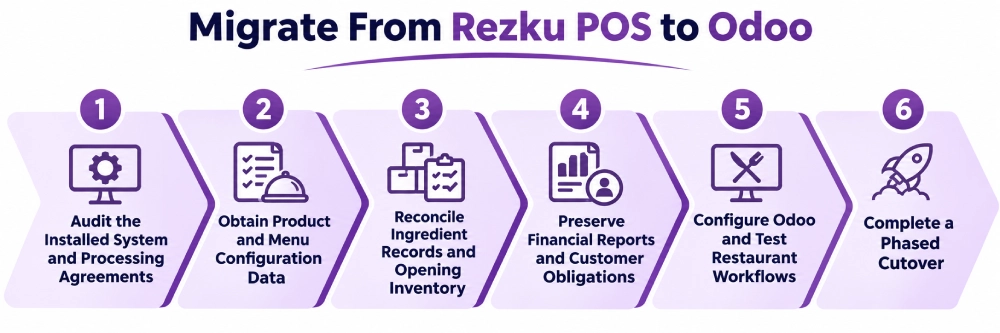
Rezku information can reside in its management tools, financial reports, menu configuration, ingredient records, online-ordering channels, payment systems, and customer programs. A report file is not a complete export of the POS database or business configuration.
1. Audit the Installed System and Processing Agreements
Record locations, stations, devices, KDS screens, payment terminals, online ordering, delivery services, and integrations.
Document nested modifiers, pizza-pricing rules, kitchen stations, bar-tab preauthorizations, loyalty programs, and stored customer balances. Review the processor agreement, device ownership, settlement obligations, and cancellation terms.
2. Obtain Product and Menu Configuration Data
Rezku’s administration functions manage products, modifiers, sub-modifiers, pricing, and location rules. Public documentation does not establish a complete self-service export containing every relationship.
Request available exports through authorized tools or Rezku support and inspect their actual columns.
| Rezku source | Odoo configuration needed |
| Products and categories | POS products and categories |
| Required and optional modifiers | Choice rules, limits, and defaults |
| Branching sub-modifiers | Conditional questions and dependencies |
| Pizza size and half-topping rules | Portion pricing and kitchen instructions |
| Happy hours and coupons | Pricelists and promotions |
| Kitchen devices and KDS routing | Preparation stations and routing rules |
| Online menu and delivery settings | Channel availability and integration mapping |
Sales-based modifier reports do not necessarily reconstruct the underlying selection rules. Compare the available exports with the existing Rezku register and kitchen configuration before accepting the Odoo menu.
3. Reconcile Ingredient Records and Opening Inventory
Identify Rezku ingredients, recipe links, units of measure, item costs, low-stock thresholds, and auto-86 settings. Confirm which of these records are available in structured exports and which require configuration review.
Take physical counts by storage location rather than using theoretical stock totals as unquestioned opening balances. Recreate recipe quantities and ingredient substitutions in the Odoo consumption process where required.
Test orders with modifiers to confirm that the correct items become unavailable and the intended ingredient quantities are recorded.
4. Preserve Financial Reports and Customer Obligations
Rezku offers financial reporting and daily transaction summaries. A Daily Report PDF, where available, is suitable as a reference for reconciliation, not as a structured database of menu items, recipes, customer records, and historical orders.
Obtain the available sales, tender, tax, tip, refund, and settlement records in their actual supported formats. Verify whether structured customer, product, recipe, and gift-card exports are available and permitted. If detailed data is not exportable, preserve source reports and establish a documented opening-balance process.
Open tabs, gift cards, loyalty balances, prepaid orders, and outstanding refunds require separate reconciliation. Do not assume historical Rezku tickets will become native Odoo POS sessions.
5. Configure Odoo and Test Restaurant Workflows
Configure products, modifier behavior, tables, kitchen preparation, taxes, payment methods, employees, stock locations, supplier purchasing, and accounting journals.
An Odoo implementation should also address UrbanPiper where appropriate, approved delivery dispatch, payment-terminal changes, and configured ingredient consumption.
Test nested choices, half-and-half pizzas, split payments, refunds, online orders, and kitchen routing. Validate purchase receipts, supplier bills, stock transfers, and processor reconciliation using representative transactions.
6. Complete a Phased Cutover
Before each location goes live, reconcile final Rezku sales, card settlements, customer liabilities, inventory, and outstanding delivery orders. Identify the authoritative system during any period when Rezku and Odoo operate together.
Train staff, confirm payment devices, test offline recovery and day-end reporting, and retain historical data as required. Expand the rollout only after the representative restaurant workflows and financial balances are validated.
How Adatasol Helps Restaurants Move From Rezku to Odoo
Rezku migrations require detailed mapping of branching modifiers, ingredient records, kitchen routing, online ordering, and card-processing obligations. Adatasol can review the installed system, identify available exports, and define which restaurant workflows can be configured in standard Odoo or need an approved integration. Payment changes, guest liabilities, and physical inventory counts are part of that assessment.
Through Odoo consulting and Odoo migration services, Adatasol can coordinate data mapping, ERP configuration, reconciliation, transaction testing, staff training, and phased location cutovers. The objective is to preserve service continuity while connecting restaurant activity with purchasing and accounting.
Wrapping Up
Rezku offers restaurant ordering, nested modifiers, ingredient inventory, kitchen displays, delivery tools, and eligible offline payments. Odoo POS adds a broader ERP foundation for restaurants coordinating supplier purchasing, warehouses, accounting, and additional business operations.
Adatasol can assess Rezku menu and payment requirements and implement the corresponding Odoo workflows. Schedule an Odoo consultation to plan the transition.

