
Odoo POS is a strong Oracle Simphony alternative for restaurant groups that need POS, purchasing, inventory, accounting, and wider business operations connected within one ERP system. Oracle Simphony already provides enterprise menus, kitchen management, recipe inventory, and extensive integrations. Odoo’s advantage is coordinating restaurant sales with company-wide procurement, financial records, warehouses, and other business divisions.
For multi-location operators, the decision involves more than replacing checkout terminals. Enterprise menu inheritance, revenue centers, recipe links, payment integrations, and reporting access must be evaluated before changing how restaurants operate.
Odoo POS vs Oracle Simphony: Key Differences
Oracle MICROS Simphony is a cloud restaurant POS platform for independent businesses, franchises, hotels, and large restaurant groups. Odoo POS is part of Odoo ERP and can connect restaurant orders with inventory, purchasing, accounting, and other configured business processes.
| Capability | Odoo POS | Oracle Simphony |
| Platform | Restaurant POS within Odoo ERP | Cloud restaurant POS and enterprise hospitality applications |
| Restaurant ordering | Tables, open orders, transfers, courses, tips | Table service, quick service, menu levels, complex modifiers |
| Enterprise menus | Products, price lists, multiple POS configurations | Enterprise, zones, properties, revenue centers, inherited settings |
| Kitchen | Preparation displays, printers, course management | Oracle KDS, multi-channel routing and preparation monitoring |
| Self-service and delivery | Self-ordering and supported online integrations | Kiosks, online ordering, drive-thru and delivery integrations |
| Ingredient inventory | Stock locations; consumption requires configuration | Recipe-linked depletion through Oracle Inventory Management |
| Purchasing | Odoo Purchase, receipts, vendor bills | Oracle inventory ordering, receiving, invoicing and supplier tools |
| Accounting | General ledger, vendor bills, taxes, reconciliation | Restaurant reporting and financial integrations, including Oracle products |
| Labor | Employees, Attendances, Planning | Restaurant labor management and forecasting |
| Multi-location | Warehouses, POS configurations, multi-company options | Enterprise hierarchy, property overrides, consolidated reporting |
| Hotel integration | Requires a compatible PMS integration | OPERA guest lookup and room-charge posting |
| Reporting and APIs | Reports across configured ERP applications | Reporting and Analytics, business intelligence and configuration APIs |
| Payments and hardware | Supported processors, browser devices and terminals | Oracle Payments and supported MICROS hardware |
| Pricing | Public subscription plans and implementation costs | Essentials, Plus and negotiated enterprise arrangements |
Odoo’s advantage is a shared ERP structure for restaurant sales, central procurement, warehouse distribution, general accounting, and nonrestaurant business activity. These applications can use consistent products, suppliers, stock locations, and financial records.
How Does Simphony Manage Enterprise Restaurant Locations?
Simphony’s Enterprise Management Console (EMC) organizes configurations into an enterprise, properties, revenue centers, and optional zones. A hotel can be one property with separate restaurant, bar, and room-service revenue centers; a chain can organize multiple restaurant properties under one enterprise.
Its configuration inheritance and overrides allow centrally defined menus and settings to be inherited by locations while permitting authorized local differences. Taxes, item prices, employee roles, and kitchen devices may be configured at different levels.
Odoo organizes operations using companies, POS configurations, products, pricelists, warehouses, stock locations, and access rights. It does not reproduce Simphony’s EMC hierarchy automatically. A chain replacing Simphony must map each level to the appropriate Odoo company, branch, POS, and accounting structure.
Oracle Simphony vs Odoo: Restaurant and ERP Operations
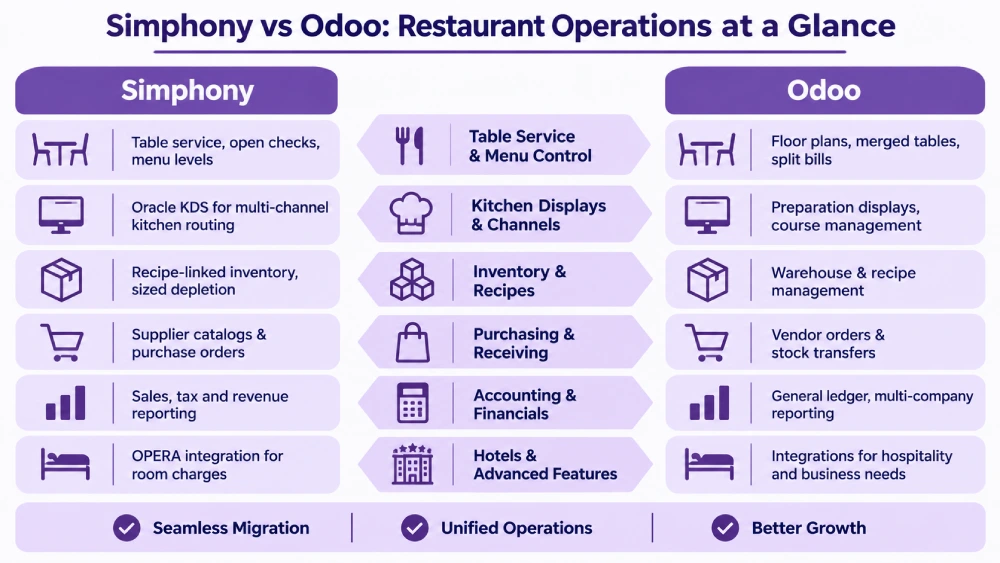
Table Service, Menu Levels, and Central Menu Control
Simphony supports table service, open checks, quick-service ordering, modifiers, menu levels, and centrally managed pricing. Its menu-level configuration can switch product availability or prices by time and serving period.
Odoo POS supports floor plans, merged tables, transfers, split bills, tips, and courses. Restaurants can configure products, categories, pricelists, and separate POS settings for individual locations.
For example, a group might offer a lower afternoon price at its airport outlet while keeping the standard dinner price at downtown restaurants. Simphony can manage this through menu levels and location controls. Odoo can configure location-specific pricelists and product availability, but inherited Simphony rules need explicit mapping.
For migration, the critical elements are menu item master records, definitions, price sequences, condiment groups, tax treatments, and property overrides. Importing only names and prices can change what customers are allowed to order or what kitchen staff receive.
Kitchen Displays, Kiosks, and Omnichannel Ordering
Oracle KDS routes orders from supported dine-in, online, kiosk, drive-thru, and third-party channels to preparation stations. Simphony also provides service timing, kitchen production monitoring, and channel-based fulfillment capabilities.
Odoo’s preparation displays direct orders to configured stations by POS category and record stages such as preparing, ready, and completed. Its restaurant features support course firing; self-ordering and supported online workflows can serve additional ordering channels.
A restaurant group with a bar, hot kitchen, pickup counter, and delivery couriers needs consistent item routing regardless of the source of the order. Complex drive-thru timing, specialized dispatch, or certain delivery integrations may require additional Odoo components.
An Odoo rollout can link the restaurant’s sales records with supplier purchasing, warehouse receipts, and financial transactions. High-volume kitchen throughput and specialist drive-thru controls still require testing against the group’s actual service conditions.
Recipe Inventory and Ingredient Consumption
Oracle’s restaurant inventory offering is not limited to finished-item counts. Its menu-item linking connects POS sales to inventory items and recipes, allowing configured stock depletion by product size and order type.
For example, selling large fries can consume twice the recipe quantity used for small fries. A takeaway coffee can account for a disposable cup and lid that a dine-in coffee does not require. Oracle Inventory Management also supports recipes, waste, stock on hand, production, and inventory counts.
Odoo Inventory handles supplier receipts, locations, internal transfers, adjustments, and replenishment. A group can manage a central commissary and several restaurant branches under a shared stock structure.
Standard Odoo POS does not automatically deduct every raw ingredient when a dish is sold. Recipe-based consumption needs a configured production or equivalent process, potentially involving an extension or integration. A functioning Oracle recipe-depletion process must be mapped and tested rather than assumed to transfer.
Odoo becomes particularly valuable where the same ingredients also move through central production, catering, wholesale, or other company operations.
Supplier Purchasing, Receiving, and Warehouse Operations
Oracle Inventory Management already supports supplier catalogs, purchase orders, delivery receiving, invoices, and transfers. Its receiving workflow can reference the original purchase order and record actual received quantities.
Odoo Purchase manages vendor terms, purchase orders, and replenishment. Odoo Inventory manages receipts and transfers, and Odoo Accounting manages vendor bills under configured billing controls.
Suppose a commissary orders 80 cases of produce but receives 74. Odoo can keep the ordered and received quantities connected to the supplier invoice and follow-up actions. The same records can support subsequent transfers to restaurants and other company divisions.
For a company operating restaurants, a catering division, and wholesale distribution, Odoo can maintain supplier orders, receipts, warehouse transfers, and accounting across all three activities. The required production, company, and inventory settings must be configured for each operation.
Accounting, Business Entities, and Financial Reporting
Simphony provides sales, payment, tax, discount, and revenue-center reporting. Its Business Intelligence API and integrations can transmit operational data to external finance and analytics environments. Oracle also provides documented Fusion integrations for restaurant applications, including financial, inventory, and employee-related workflows.
Odoo Accounting manages the general ledger, vendor bills, journals, taxes, and reconciliation. Configured POS, Inventory, and Purchase processes can feed related financial transactions into the ERP.
A restaurant group operating central kitchens, several legal entities, and wholesale sales can use Odoo ERP for restaurants to connect POS transactions with shared purchasing, warehouse movements, and financial reporting. Separate companies require the relevant intercompany rules, access rights, and accounting configuration.
Oracle can also connect financial and operational systems, including through Fusion integrations. With Odoo, POS, Purchase, Inventory, and Accounting are applications within the same ERP environment; accounting policies, multi-company boundaries, and data permissions still require configuration.
Hotel Room Charges and Oracle OPERA Integration
Hotels using Oracle OPERA Cloud can connect Simphony through OPERA Connection. Supported workflows include guest lookup, associating guests with checks, posting full or partial room charges, and selected city-ledger transactions.
A hotel restaurant might charge breakfast to a guest’s room while sending a separate bar purchase to a company account. The interface must apply the correct guest, revenue center, tax treatment, and posting rules.
Odoo can manage restaurant sales, financial records, and other business processes, but standard Odoo POS does not automatically reproduce OPERA guest lookup or room-charge posting. A hotel replacing Simphony must retain an appropriate PMS integration or establish an equivalent approved workflow. This requirement is separate from Odoo’s multi-company accounting capability.
Labor, Guest Engagement, and Enterprise Analytics
Simphony supports restaurant labor management, forecasting, reporting, and guest-engagement integrations such as CrowdTwist. Its restaurant POS platform promotes an extensive integration ecosystem, including more than 200 partners and APIs.
Odoo offers Employees, Attendances, Planning, CRM, loyalty, and reporting alongside its POS and financial applications. U.S. payroll, tip distribution, specialized restaurant forecasting, and advanced enterprise loyalty may need additional products or integrations.
Simphony’s restaurant reports can analyze service periods, sales, and outlet activity. Odoo extends analysis to related vendor bills, stock transfers, purchasing, and financial records, provided the corresponding transactions are captured consistently.
Odoo POS vs Oracle Simphony Pricing
Oracle Simphony pricing depends on edition, revenue centers, hardware, transaction volume, payment processing, and contracted services. Odoo publishes software subscriptions, with implementation and equipment priced separately.
Oracle Simphony Essentials, Plus, and Enterprise Costs
A 2026 G2 pricing listing reports the following starting software prices, subject to Oracle quotation:
| Oracle offering | Published starting price | Scope |
| Simphony Essentials | From $55/month | Basic restaurant POS offering |
| Simphony Plus | From $75/month | Broader multi-location and management requirements |
| Simphony Single Tenant | Contact sales | Dedicated enterprise arrangement |
These amounts are listing-level entry prices, not a complete price for a restaurant group. Oracle’s commercial terms can also involve revenue-center and transaction-based charges, payment processing, reporting services, installation, and hardware arrangements. The required configuration and quote determine which fees apply.
Oracle advertises eligible $1 POS hardware options, but these are conditional offers rather than unrestricted ownership of supported terminals.
Odoo POS Subscription Pricing
| Odoo plan | Published U.S. price | Main condition |
| One App Free | $0 | One eligible application and dependencies |
| Standard | $24.90 promotional; $31.10 regular per user/month | Standard business applications |
| Custom | $49 promotional; $61 regular per user/month | Customization, external API, multi-company options |
| Light User | Advertised from $8.90 | Eligibility and quotation required |
Standard and Custom prices reflect annual billing, with promotional conditions for eligible initial users. Paid plans include standard POS, Purchase, Inventory, and Accounting applications. One App Free does not grant unrestricted use of all those applications as one ERP deployment.
Implementation, devices, payment processing, integrations, and custom-code maintenance remain separate costs under Odoo’s pricing terms.
Which Offers Better Long-Term Value for Restaurant Groups?
Odoo POS offers broader long-term value for restaurant groups seeking to connect restaurant sales with purchasing, warehouse inventory, accounting, and other business operations. Its paid subscriptions provide access to standard ERP applications that can share product, supplier, stock, and financial records.
Oracle Simphony provides enterprise restaurant management and can integrate with Oracle Fusion and other systems. Odoo offers a different approach by bringing the required general business applications into one configurable ERP environment. For groups managing commissaries, several companies, catering, or wholesale operations, this can reduce duplicate records and simplify purchasing, inventory, and financial coordination.
Subscription costs, payment processing, hardware, integration, and implementation affect the initial investment. The financial advantage comes from the specific processes and software arrangements a group can consolidate in Odoo, not an assumed lower POS license fee.
Oracle Simphony vs Odoo: Hardware, Payments, and Offline Operations
Oracle supports dedicated MICROS workstations, tablets, payment equipment, and kitchen displays. Odoo runs on supported browser devices with compatible printers, preparation screens, and selected payment terminals. Existing Oracle MICROS hardware is not automatically reusable with Odoo; each device needs a model-level compatibility check.
Oracle Payments supports offline store-and-forward for Simphony in eligible configurations. When an authorization connection fails, supported devices can store transactions and submit them after reconnection. A subsequently declined payment remains a merchant risk. Odoo can continue supported locally available POS operations, but offline card acceptance depends on the payment provider and terminal.
- Payments: Compare merchant contracts, terminal requirements, refunds, tips, and payment reconciliation.
- Offline resilience: Test local kitchen communication, order persistence, later card authorization, and settlement after recovery.
- Integrations: Verify API credentials, contract permissions, field mappings, synchronization intervals, and duplicate prevention.
Odoo can also be deployed alongside Simphony. A group can retain Simphony’s restaurant service and integrate approved sales information with Odoo purchasing, inventory, or accounting. That arrangement still needs a defined system of record for products, taxes, tenders, and financial transactions.
When Should a Restaurant Group Move From Simphony to Odoo?
| Business requirement | Odoo opportunity |
| Restaurants and catering share warehouse stock | Inventory locations, production, internal transfers |
| Supplier bills and purchasing require separate reconciliations | Purchase, Inventory, Accounting |
| Multiple legal entities require coordinated books | Multi-company accounting and access controls |
| Restaurant group also sells wholesale or online | Connected products, orders, inventory, and financial records |
| Existing Simphony service should remain | Integrate approved POS data with Odoo ERP |
| Enterprise menu or KDS requirements exceed standard Odoo | Evaluate configuration, extension, or retained integrations |
Odoo supports enterprise restaurant modernization through a full POS replacement or an integration with existing Simphony outlets. The appropriate scope depends on the group’s menu, kitchen, financial, and warehouse requirements.
Best Oracle Simphony Alternatives for Restaurant Groups
1. Odoo POS
Odoo POS combines restaurant ordering with purchasing, inventory, accounting, and other ERP applications. Enterprise menus, recipe consumption, and specialist payments need an appropriate configuration.
2. Toast POS
Toast POS provides restaurant ordering, kitchen management, payments, online ordering, and back-office products such as xtraCHEF. Product availability and contracts vary by deployment.
3. Lightspeed Restaurant
Lightspeed Restaurant offers tableside service, ingredient inventory, recipe costing, purchasing, location transfers, and restaurant analytics through eligible products.
4. SpotOn Restaurant POS
SpotOn Restaurant POS supports restaurant ordering, payments, staffing, online orders, and reporting, with connected operational tools and integrations.
How to Migrate From Oracle Simphony to Odoo POS
Simphony installations may contain enterprise-wide settings, property overrides, multiple revenue centers, recipes, payment integrations, customer programs, and years of sales history. A configuration export does not automatically recreate the operating environment in Odoo.
1. Audit Simphony Products, Locations, and Interfaces
Inventory the Simphony edition and version, enterprise and property hierarchy, revenue centers, zones, installed MICROS devices, payment processors, and kitchen systems.
Record Oracle Inventory Management, Labor Management, Reporting and Analytics, loyalty, ordering, accounting, and Fusion integrations where used. For hotel outlets, include OPERA guest lookup, room-charge tenders, and PMS posting rules. Confirm contracts, API permissions, and data-access responsibilities.
2. Export Configuration With the Correct Hierarchy
Simphony’s Import/Export Service supports CSV-based application configuration exports, provided users have the required privileges.
Standard Simphony file-export guidance permits integrated menu-item exports at Enterprise or zone level, with individual menu-item objects available at other supported hierarchy levels. Simphony Essentials restricts integrated menu-item exports to the Enterprise level, as specified in its export procedure.
Export settings also distinguish the selected hierarchy, ancestors, and inherited descendants. A property override can be absent from a file containing only Enterprise defaults. Each exported file should be identified by hierarchy and object type before mapping it to Odoo.
| Simphony data | Odoo migration action |
| Enterprise, property, revenue center, zone | Map companies, POS configurations, locations, reporting |
| Menu item master, class, definition, price | Rebuild products, categories, prices, taxes |
| Condiments, menu levels, inherited settings | Recreate choices, time pricing, location overrides |
| Kitchen devices and order types | Configure preparation routing and channel behavior |
| Recipes, vendors, stock, invoices | Map inventory, purchasing, consumption, finance |
| Tenders, sales and tax reports | Retain history and reconcile opening financial balances |
| Loyalty, gift cards, guest accounts | Reconcile liabilities and permitted customer data |
| OPERA room-charge and guest references | Plan approved PMS interface and outstanding postings |
3. Rebuild Enterprise Menus and Kitchen Workflows
Preserve corporate menu rules, property exceptions, daypart pricing, modifiers, tax treatment, kitchen stations, drive-thru or kiosk orders, and location permissions. For hotel venues, verify room-charge and guest lookup behavior against the intended PMS integration.
A hamburger with two required selections and a location-specific lunch price should produce the right total and kitchen ticket at every relevant outlet. Test the full combination, not merely the product import.
4. Reconcile Inventory, Finance, and Customer Obligations
Verify actual opening stock and supplier balances. Oracle Inventory Management may contain separate recipes, item links, waste, cost centers, and receiving records that are not present in a POS configuration export.
Preserve historical sales and payment reports. Open checks, stored value, gift cards, customer credits, refunds, and unsettled payments need documented settlement or transfer arrangements. Historical Simphony transactions should not be assumed to import as native Odoo sessions.
5. Configure Odoo and Validate Location Rollout
Configure POS, inventory, purchasing, accounting, payment terminals, employees, and any necessary extensions or integrations.
A phased Odoo implementation should test menu pricing, kitchen routing, refunds, tip settlement, stock transfers, vendor bills, financial reconciliation, and connectivity recovery. Use representative locations and revenue centers before expanding the rollout across the group.
How Adatasol Helps Restaurant Groups Move From Oracle Simphony to Odoo
Simphony migrations involve enterprise menu inheritance, revenue-center structures, kitchen integrations, recipe records, payment devices, and financial history. Adatasol can assess these dependencies and map the restaurant group’s requirements to Odoo POS, Inventory, Purchase, and Accounting.
Through Odoo consulting and Odoo migration services, Adatasol can coordinate the fit-gap assessment, data mapping, configuration, integrations, testing, employee training, and phased cutover. Existing Simphony functions can remain connected when that meets the group’s business requirements.
Wrapping Up
Oracle Simphony handles complex menus, kitchens, recipe inventory, hotel interfaces, and enterprise reporting. Odoo POS extends restaurant management into a connected ERP environment for purchasing, warehouses, company accounting, and other business operations.
Adatasol can map Simphony’s enterprise data and service requirements to a phased Odoo replacement or a controlled integration with existing outlets. Schedule an Odoo consultation to define the appropriate ERP scope for your restaurant group.

