
Odoo POS is a strong choice for retailers that need checkout connected with inventory, purchasing, accounting, and wider business operations. Shopify POS is often better suited to merchants already using Shopify for ecommerce who want integrated online and in-store selling. The right choice depends on required workflows, payment processing, implementation scope, and total ownership costs.
Both platforms support product catalogs, barcode scanning, retail payments, refunds, and sales reporting. Their differences become more significant when retailers manage supplier purchasing, several stock locations, financial reconciliation, and integrations with other business applications.
Odoo POS vs Shopify POS: Key Differences
| Comparison Factor | Odoo POS | Shopify POS |
| Primary focus | Retail checkout within a broader business application platform | In-person and online retail commerce |
| Product catalog | Products, variants, barcodes, categories, and pricing rules | Products, variants, barcodes, collections, and discounts |
| Retail checkout | Configurable baskets, payments, receipts, and refunds | Retail checkout, payments, receipts, and returns |
| Ecommerce | Odoo eCommerce or an integrated external storefront | Native integration with Shopify Online Store |
| Inventory management | Odoo Inventory for warehouses, transfers, adjustments, and replenishment | Shopify inventory management and advanced in-store tools through POS Pro |
| Supplier purchasing | Odoo Purchase for procurement and supplier management | Purchase-order and receiving capabilities through Shopify’s retail tools |
| Accounting | Odoo Accounting within the same application environment | Financial reporting and connections to accounting applications |
| Payment processing | Supported payment providers and configured terminal integrations | Shopify Payments or an external payment workflow |
| Staff permissions | POS employee controls and broader Odoo access rights | Advanced retail roles and permissions through eligible plans and POS Pro |
| Multiple locations | Multiple POS configurations with connected inventory and reporting processes | Shopify locations and centralized retail management |
| Offline checkout | Locally cached POS transactions; connected payment terminals require connectivity | Offline checkout and eligible offline card payments on supported devices |
| Customization | Odoo configuration, supported extensions, external APIs, and custom development | Shopify applications, supported APIs, and commerce extensions |
| Subscription model | Odoo plan, eligible user licenses, and deployment requirements | Shopify plan plus any POS Pro location charges |
| Implementation scope | POS setup plus relevant business applications and integrations | Store, payment, device, and commerce configuration |
Shopify already provides inventory management. Odoo POS already provides retail checkout. The main distinction is how each platform supports the additional processes a retailer needs beyond the sale.
Retail Checkout and Product Management
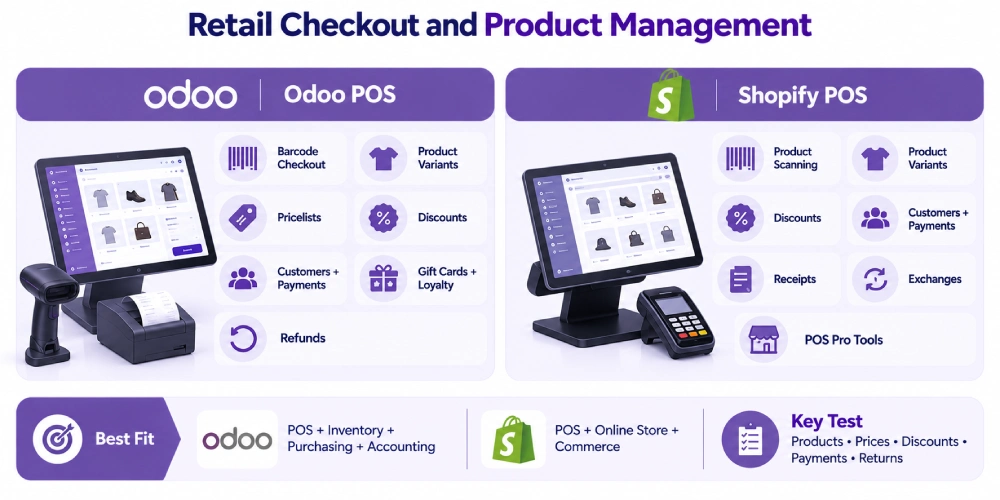
Retailers need the correct product, price, discount, payment, and transaction record at checkout.
Both systems support these activities, but their configuration and surrounding applications differ.
Odoo POS Checkout Capabilities
Odoo POS supports product selection, barcode-based checkout, product variants, discounts, pricelists, customer records, payments, and receipts.
A clothing retailer can configure size-and-color variants so that selling a medium black jacket records the appropriate product rather than a generic jacket entry.
Odoo also supports gift cards, loyalty programs, and refund workflows.
Pricing can be configured through product prices and pricelists, including rules based on products, customers, quantities, or other supported conditions.
For example, a retailer may use a standard pricelist at one store and a promotional pricelist at another.
The business needs to configure which prices and discounts apply to each POS.
Shopify POS Checkout Capabilities
Shopify POS supports product scanning, variants, basket adjustments, discounts, customer selection, payments, and receipts.
It uses product and customer information managed through Shopify.
A merchant already operating a Shopify website can introduce in-person checkout using the same commerce environment.
For example, a footwear retailer may sell the same shoe variants through its website and physical store, with transactions associated with Shopify’s relevant product and inventory records.
Advanced in-store capabilities depend on the Shopify subscription and POS tier.
Shopify POS Pro adds functions such as more extensive staff permissions, in-store inventory tools, and the supported combined exchange workflow.
Which Checkout Is Better?
For straightforward retail transactions, both are capable options.
A Shopify merchant can benefit from retaining an established product catalog, customer information, and online order environment.
Odoo becomes more relevant when checkout records need to connect with additional purchasing, inventory, accounting, or other business processes.
Retailers should test their required retail POS features using actual products, discounts, payment arrangements, and return scenarios.
Odoo POS vs Shopify POS for Inventory Management
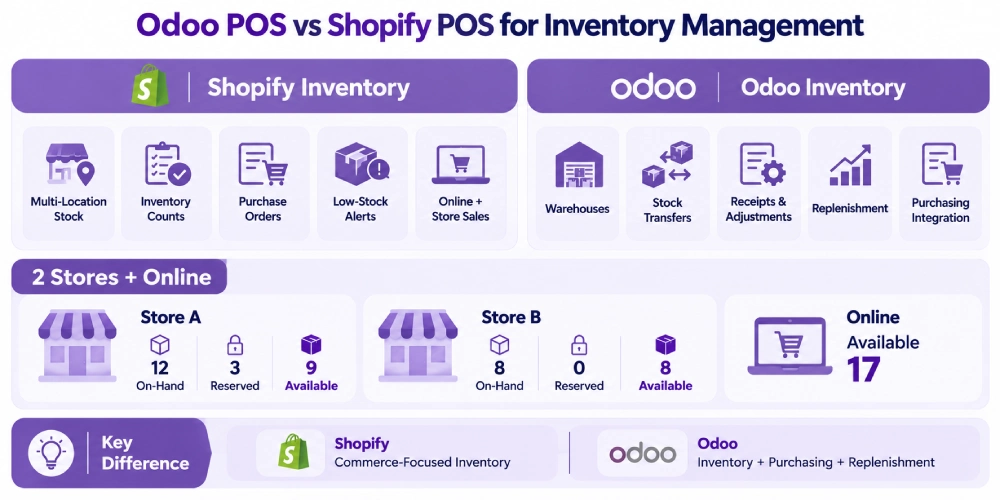
Both platforms support inventory records and location-based stock management.
The difference is the scope of the surrounding inventory and purchasing functions and how they connect with other operations.
Shopify Inventory Management
Shopify supports inventory tracking across configured locations.
Retailers can manage product quantities, online orders, stock availability, and related commerce activity through Shopify.
Shopify POS Pro adds advanced in-store inventory capabilities advertised by Shopify, including:
- Inventory counts.
- Purchase orders.
- Low-stock alerts.
- Additional retail inventory tools.
A retailer selling through Shopify and a physical store can manage product quantities across those selling operations.
The retailer still needs to establish how products are received, reserved, fulfilled, returned, and adjusted.
For example, an online order awaiting pickup may reserve a product that remains physically inside the store.
The available-to-sell quantity needs to reflect that commitment.
Odoo Inventory Management
Odoo Inventory supports stock locations, warehouses, receipts, transfers, inventory adjustments, tracking, and replenishment processes.
Appropriately configured POS transactions can create stock activity for tracked merchandise.
Odoo Inventory also works with Odoo Purchase for supplier purchasing and receiving.
Consider a retailer selling ten jackets.
The POS records the sales. Inventory manages the corresponding stock movements. Purchase can manage a supplier order if replenishment is required.
The purchasing decision may depend on:
- Current stock availability.
- Existing customer reservations.
- Incoming supplier deliveries.
- Reorder thresholds.
- Supplier lead times.
- Expected demand.
The sale of ten jackets does not automatically justify ordering ten replacements.
Inventory Example: Two Stores and One Online Channel
Suppose a retailer holds the same product at two locations.
| Location | On-Hand Stock | Reserved Stock | Available Before Any Buffer |
| Store A | 12 | 3 | 9 |
| Store B | 8 | 0 | 8 |
| Total | 20 | 3 | 17 |
An online customer requesting pickup at Store A should not be promised 20 units simply because the company holds 20 overall.
The selected fulfillment location and existing reservations matter.
Both Shopify and Odoo can participate in location-based stock management, but the actual reservation, synchronization, and fulfillment rules must be configured correctly.
A retailer needs a defined POS inventory synchronization process when several channels or applications use the same merchandise.
When Odoo’s Inventory Scope Becomes Relevant
A retailer handling supplier procurement, several warehouses, stock transfers, purchase receipts, and accounting may benefit from keeping those processes within one Odoo environment.
A business whose inventory needs are already satisfied by Shopify may have little reason to change platforms solely for stock tracking.
The decision depends on whether the existing inventory process supports the required operations and produces reliable records.
Ecommerce and Omnichannel Selling
Shopify’s relationship between its online store and POS is a significant consideration for existing Shopify merchants.
Odoo offers a different option through its connected business applications.
Shopify Online Store and Shopify POS
Shopify POS works within Shopify’s commerce platform.
Merchants can manage relevant products, customers, online orders, inventory locations, and store transactions through Shopify.
For example, a customer may buy an item online and choose in-store pickup.
The store needs to identify the order, verify the selected location, and complete fulfillment using the configured process.
Shopify supports these omnichannel workflows, although particular advanced in-store functions may depend on POS Pro or other plan conditions.
For a merchant already using Shopify successfully, retaining its storefront and connected POS can avoid unnecessary migration of customer-facing processes.
Odoo eCommerce and Odoo POS
Odoo eCommerce can operate alongside Odoo POS, Inventory, Sales, and Accounting.
The applications can use shared product and business records according to their configuration.
For example, a retailer may sell products through an Odoo website while processing walk-in purchases through Odoo POS.
Inventory operations can be maintained through Odoo Inventory, with the appropriate warehouse, reservation, and fulfillment rules.
Using Odoo for both online and physical sales reduces the need for a separate Shopify-to-Odoo connector.
It does not eliminate inventory allocation, order-status, payment, or fulfillment requirements.
Does a Shopify Merchant Need to Replace Its Website to Use Odoo?
No.
A retailer can keep Shopify as its online storefront while introducing Odoo for selected back-office functions.
For example, Shopify may continue to manage online checkout and customer-facing orders while Odoo manages supplier purchasing, inventory operations, and accounting.
That arrangement requires an integration with defined responsibilities for each system.
Replacing a working Shopify storefront solely to gain access to Odoo Inventory or Accounting may introduce unnecessary migration work.
Returns, Exchanges, and Customer Records
A retail return may involve the original transaction, customer refund, replacement product, and inventory disposition.
Both platforms support refunds. More advanced exchange behavior depends on the chosen setup.
Shopify POS Returns and Exchanges
Shopify POS supports refunds.
Shopify’s documented combined return-and-exchange workflow requires POS Pro.
For example, a customer returns a medium jacket and purchases a large one.
The POS Pro exchange workflow can record the returned item, replacement item, and applicable price difference within the supported process.
Staff permissions and return eligibility still apply.
Cross-store returns also depend on plan capabilities, original transaction details, and payment arrangements.
Odoo POS Returns
Odoo POS supports refund workflows associated with POS transactions.
Customer records and relevant transaction details can be used according to the configuration.
Inventory handling remains a separate consideration.
A retailer may refund a returned electronic device without making it available for immediate resale.
If the product is damaged, its stock disposition may require a quarantine, scrap, or other inventory operation.
Cross-Store Return Test
A retailer operating several stores should test this sequence:
- Sell a jacket at Store A.
- Retrieve the transaction at Store B.
- Process a permitted refund or exchange.
- Confirm how the original payment is handled.
- Record the returned merchandise at its actual receiving location.
A shared customer record does not automatically guarantee cross-store refunds or inventory handling in either platform.
Payment Processing and Hardware Compatibility
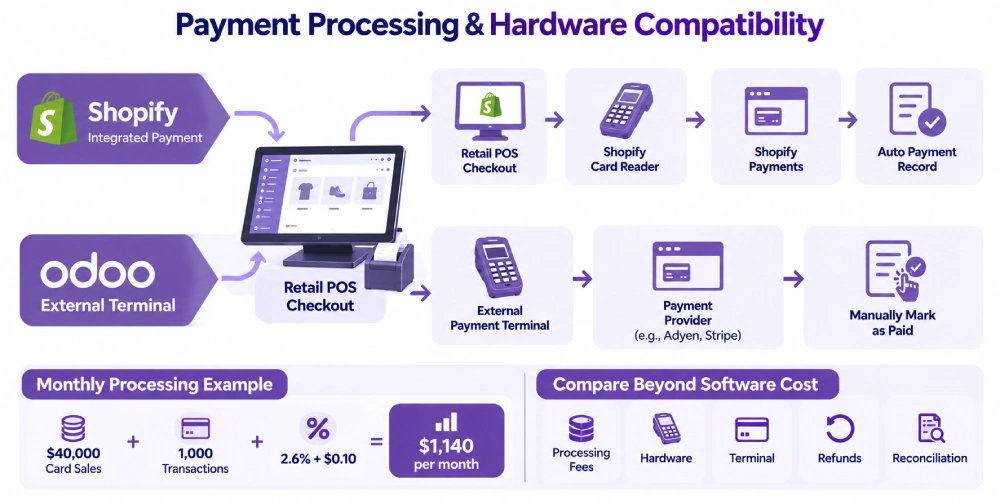
Payment costs and terminal compatibility can affect the economics of the POS decision.
Shopify Payments
Shopify POS integrates with Shopify Payments and supported card readers in eligible markets.
Shopify’s published U.S. Basic plan lists in-person card processing starting at 2.6% + $0.10 per transaction.
The actual processing arrangements depend on the plan, transaction type, and applicable terms.
A retailer also needs to confirm whether its existing payment hardware is compatible.
Shopify-supported card readers integrated with Shopify Payments offer a different operating process from external payment terminals.
External Payment Terminals With Shopify POS
Shopify documents support for accepting a payment processed through an external card terminal.
In that arrangement, the retailer creates a custom payment method in Shopify POS.
The external provider processes the card transaction independently.
After successful processing, the cashier manually marks the order as paid in Shopify POS.
Manually recording an externally processed payment is not equivalent to using an integrated Shopify Payments reader.
The retailer needs to account for the additional checkout step and verify reconciliation between the external processor and Shopify transaction records.
Shopify’s payment documentation explains this distinction.
Odoo POS Payment Terminals
Odoo POS supports configured payment methods and integrations with supported terminals.
Odoo 20 documentation includes providers such as Adyen and Stripe, along with other listed terminal integrations.
The actual provider, terminal model, geographic availability, and configuration must be confirmed.
For example, an Odoo retailer considering Stripe Terminal should verify that the intended reader is supported in its country and that the required network configuration is available.
Odoo’s payment-terminal documentation provides the supported integration options.
Payment Costs Beyond Subscriptions
A retailer should compare payment costs using its expected card volume and transaction mix.
For example, at $40,000 in monthly card sales and 1,000 transactions, a hypothetical processing rate of 2.6% + $0.10 produces:
($40,000 × 2.6%) + (1,000 × $0.10) = $1,140 per month
This calculation illustrates the published Shopify Basic U.S. in-person rate. It is not an Odoo processing quote.
Odoo processing costs depend on the selected payment provider and applicable terms.
Hardware purchases, terminal subscriptions, processing fees, refunds, and payment-related support should be included in the comparison.
Odoo POS vs Shopify POS: Offline Checkout
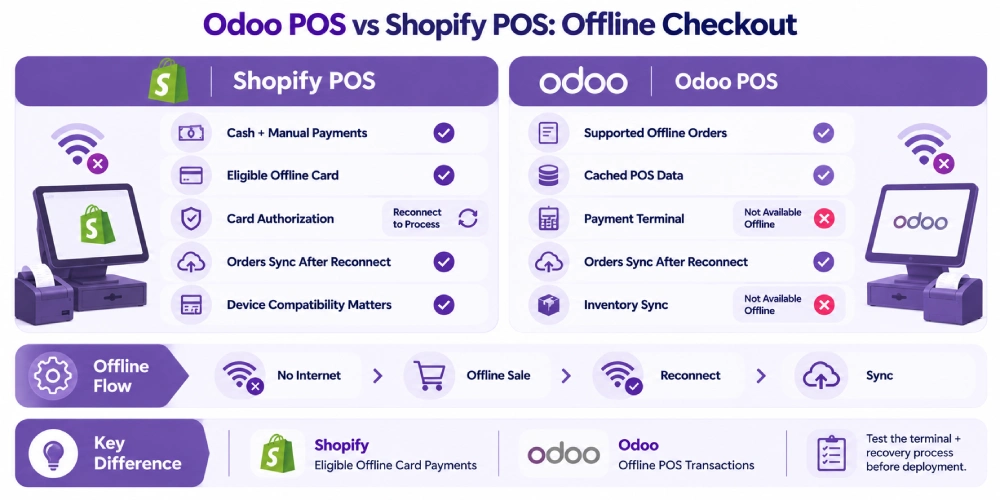
Both systems support selected POS activities during internet interruptions.
The most important distinction concerns payment authorization and how offline transactions are recovered.
Shopify POS Offline Functionality
Shopify supports offline checkout for cash and configured manual payment methods.
It also offers eligible offline card payments when the merchant enables the feature and uses compatible hardware with the required permissions.
Supported readers and settings matter.
Shopify’s documentation explains that offline card payments may be processed only after the device reconnects.
A transaction can subsequently be declined because authorization was not completed while the connection was unavailable.
Shopify also documents specific conditions for card authorization using supported POS Terminal arrangements.
The retailer should confirm the exact device behavior rather than assume every card reader operates identically offline.
Odoo POS Offline Functionality
Odoo POS can continue supported transaction activities using locally cached information.
Orders created during an outage can synchronize after connectivity returns.
However, Odoo 20’s documented offline workflow excludes connected payment-terminal processing and real-time inventory synchronization.
Certain backend-dependent functions are also unavailable while the POS is disconnected.
Odoo advises users not to close or reload the browser or clear its cache before locally stored transactions have synchronized.
Offline Comparison
| Offline Requirement | Shopify POS | Odoo POS |
| Cash or supported manual checkout | Supported under documented conditions | Supported in the configured offline workflow |
| Offline card acceptance | Available with eligible devices, permissions, and settings; later decline risk may apply | Connected terminal processing is unavailable in the documented offline mode |
| Real-time shared inventory | Unavailable while disconnected | Unavailable while disconnected |
| Transaction recovery | Offline transactions synchronize after reconnection | Locally stored transactions synchronize after reconnection |
| Recovery precautions | Protect offline orders and follow Shopify’s device and reconnection instructions | Keep the browser session and cached data intact until synchronization completes |
Shopify has a documented advantage where eligible offline card acceptance is a critical requirement.
A retailer should still test the exact terminal and recovery process. The ability to take a card offline does not guarantee the payment will ultimately be approved.
Multi-Location Retail and Staff Management
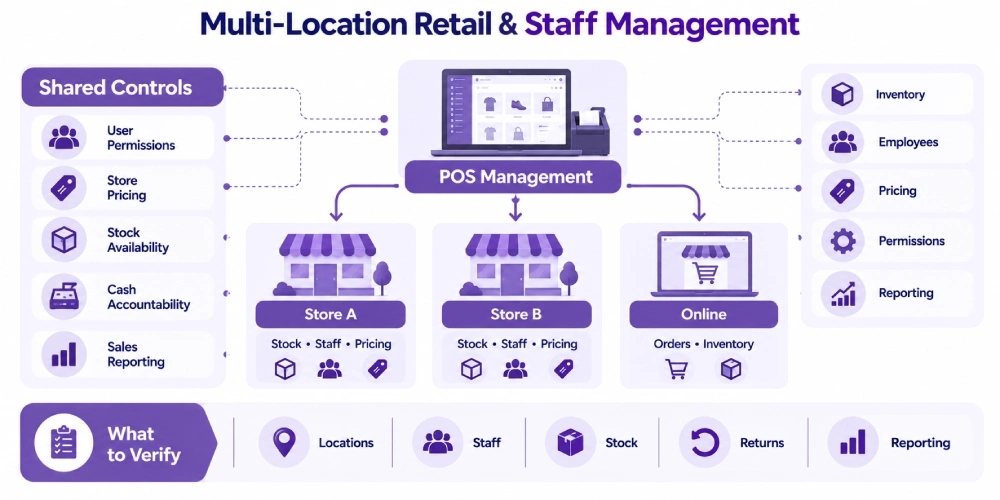
Both Shopify and Odoo support retail operations involving several stores.
Their plan structures and configuration models differ.
Shopify POS for Multiple Locations
Shopify supports multiple inventory and retail locations.
Merchants can manage relevant product, stock, order, and reporting information through Shopify’s commerce environment.
POS Pro provides additional retail staff permissions, advanced inventory functions, and other in-store capabilities.
The applicable location charges depend on the Shopify subscription.
Shopify Plus includes a published POS Pro allowance, which changes the pricing comparison for eligible larger merchants.
Odoo POS for Multiple Stores
Odoo can use multiple POS configurations within its business environment.
A retailer may establish separate configurations for individual stores or checkout operations.
Odoo Inventory can maintain stock by warehouse or location.
Employee access, POS sessions, pricing arrangements, and payment methods require the appropriate configuration.
A physical store, POS configuration, inventory warehouse, branch, and legal company are not automatically the same record.
Creating separate Odoo companies or branches may introduce multi-company licensing and accounting requirements.
What to Verify Across Stores
A retailer should establish whether each platform can support:
- Shared product identities with location-specific assortments.
- Store-specific prices and promotions.
- Employee permissions by responsibility and location.
- Register-level cash accountability.
- Cross-store returns where required.
- Company-wide sales reporting.
- Location-specific stock availability.
The broader operating requirements for multi-location POS software should be tested using at least two stores and their intended user roles.
Odoo POS vs Shopify POS Pricing in 2026
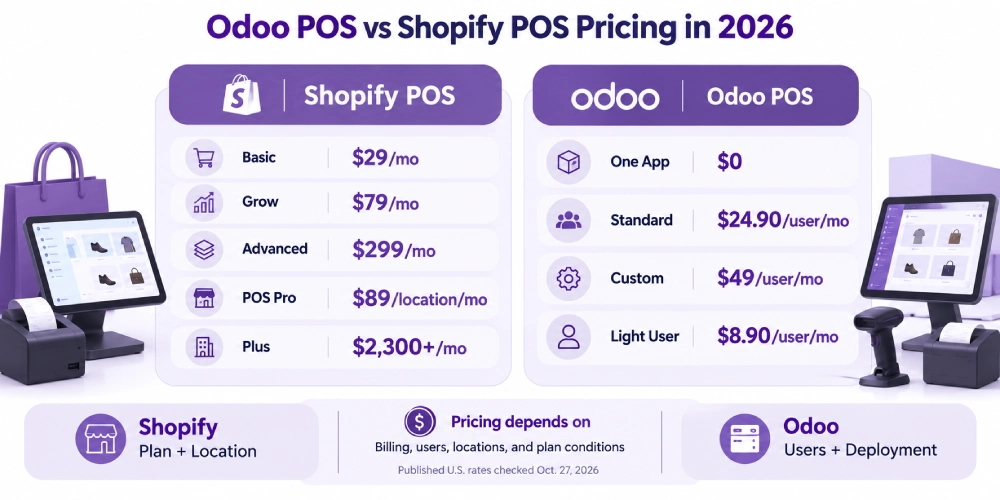
Shopify and Odoo use different subscription models.
Shopify charges for its commerce plan and, where applicable, POS Pro locations.
Odoo’s paid plans primarily depend on subscribed users and the selected deployment capabilities.
The U.S. prices below reflect the vendors’ published rates checked on October 27, 2026. Promotional prices, annual billing, and individual contract terms may affect the amount charged.
Shopify POS Pricing
| Shopify Plan | Annual-Billing Monthly Equivalent | Monthly Billing |
| Basic | $29/month | $39/month |
| Grow | $79/month | $105/month |
| Advanced | $299/month | $399/month |
| POS Pro add-on | $89/month per location, billed annually | Confirm applicable billing terms |
| Shopify Plus | Contract-based pricing, starting at $2,300/month on a published three-year term | Confirm contract |
Shopify includes casual in-person selling capabilities with its paid plans.
POS Pro adds advanced retail features for the locations where it is enabled.
Shopify’s published pricing includes 20 POS Pro locations with Shopify Plus, subject to the plan’s applicable terms.
Consequently, an additional $89-per-location calculation does not apply uniformly across all Shopify plans.
For businesses evaluating Shopify Plus, both the included location allowance and the overall contract cost need to be considered.
Current source: Shopify pricing and Shopify POS pricing.
Odoo POS Pricing
| Odoo Plan | Published U.S. Price | Main Conditions |
| One App Free | $0 | One application, unlimited users, Odoo Online, subject to plan conditions |
| Standard | $24.90 per full user/month | Promotional annual-billing rate; all standard apps; Odoo Online |
| Standard regular rate | $31.10 per full user/month | Displayed regular subscription rate |
| Custom | $49 per full user/month | Promotional annual-billing rate; additional technical and deployment capabilities |
| Custom regular rate | $61 per full user/month | Displayed regular subscription rate |
| Light User | Advertised at $8.90 per light user/month | Limited eligible activities; availability and access require confirmation with Odoo |
Odoo states that its introductory discount is valid for 12 months for the initial users ordered.
The Standard and Custom plans include access to Odoo’s broader application suite under their respective conditions.
The Custom plan supports capabilities including external API access, Odoo Studio, multi-company functionality, and supported deployment choices.
Odoo.sh hosting is charged separately.
Implementation services, custom-code maintenance, and other excluded services are not included merely because a business purchases a software subscription.
Current source: Odoo pricing.
Do All Odoo POS Cashiers Need Full User Licenses?
Not necessarily.
Odoo’s published Light User category includes Point of Sale use as an eligible employee activity.
The advertised rate is $8.90 per light user/month.
However, Light User accounts have restricted capabilities compared with full users.
For example, a cashier who only operates POS may have different access requirements from an employee who manages purchasing, inventory configuration, or financial reporting.
Odoo directs businesses to an Odoo Advisor to confirm eligibility and obtain an appropriate quote.
A retail licensing estimate should therefore distinguish full users from employees eligible for limited POS access.
The One App Free plan also has specific limitations. It should not be interpreted as a free deployment of POS, Inventory, Purchase, Accounting, and eCommerce together.
First-Year Subscription Comparison
The following examples use the advertised annual-billing rates and exclude processing, hardware, implementation, integration, and other operational costs.
| Illustrative Configuration | Monthly Equivalent | First-Year Subscription |
| Shopify Basic | $29.00 | $348.00 |
| Shopify Basic + POS Pro at one location | $118.00 | $1,416.00 |
| Shopify Basic + POS Pro at two locations | $207.00 | $2,484.00 |
| Odoo Standard, three full users at introductory rate | $74.70 | $896.40 |
| Odoo Custom, three full users at introductory rate | $147.00 | $1,764.00 |
For example:
Shopify Basic with one POS Pro location:
($29 + $89) × 12 = $1,416
Odoo Standard with three full users at the promotional rate:
$24.90 × 3 × 12 = $896.40
These configurations are not functionally or commercially equivalent.
One Shopify POS Pro location is not the same as one Odoo user.
A retailer may need several full users, eligible Light Users, multiple POS configurations, and other Odoo applications.
Shopify may require additional POS Pro locations, applications, or hardware depending on its operating model.
The examples also do not reflect Shopify Plus’s included POS Pro location allowance.
What Does a Complete Cost Comparison Include?
The first-year cost should account for:
- Software subscriptions.
- Full and limited-access users.
- POS Pro location charges where applicable.
- Payment-processing fees.
- Payment terminals and other hardware.
- Product and transaction data migration.
- Inventory, purchasing, and accounting setup.
- Store or warehouse configuration.
- Third-party applications and connectors.
- Implementation and employee training.
- Additional hosting where required.
- Ongoing integration maintenance and support.
A retailer with high card-payment volume may spend more on processing than on the difference between the two software subscriptions.
A business introducing purchasing, inventory, and accounting processes may incur a larger implementation cost than one adding Shopify POS to an existing Shopify store.
Subscription prices should not be used as substitutes for a complete operating-cost estimate.
Can Shopify and Odoo Work Together?
Yes. A retailer can retain Shopify for customer-facing ecommerce while using Odoo for selected business operations.
The setup depends on which applications manage transactions, inventory, fulfillment, and financial records.
Three Retail Operating Models
| Operating Model | Customer-Facing Commerce | Inventory and Business Operations | Main Consideration |
| Shopify + Shopify POS | Shopify online and in-store | Shopify and any connected applications | Strong native commerce relationship |
| Odoo eCommerce + Odoo POS | Odoo online and in-store | Relevant Odoo applications | Broader business-process configuration |
| Shopify + Odoo | Shopify storefront and possibly Shopify POS | Odoo for selected inventory, purchasing, accounting, or other processes | Connector behavior and data ownership |
Shopify Storefront With Odoo for Back-Office Operations
Consider a retailer using Shopify for online sales and Shopify POS in two physical stores.
Its commerce operations work, but purchasing and accounting remain disconnected.
The retailer could retain Shopify as the source of online and in-store transactions while evaluating Odoo for purchasing, inventory, and accounting.
The integration would need to define how Shopify transactions become the appropriate Odoo sales, stock, and financial records.
That arrangement does not require replacing Shopify POS simply because Odoo POS exists.
Shopify Storefront With Odoo POS
A different arrangement keeps Shopify for ecommerce but uses Odoo POS for physical retail transactions.
In this setup, online orders originate in Shopify while in-store sales originate in Odoo.
The business needs an authoritative product and inventory structure and clear rules for both order sources.
For example, if the final jacket is sold through Odoo POS, the Shopify storefront must receive the relevant availability update before accepting another incompatible order.
The timing and reliability of that update depend on the connector and reservation rules.
Odoo for Ecommerce and Retail POS
A business may also choose Odoo for both online and in-person transactions.
This arrangement removes the requirement to synchronize an external Shopify storefront, although the retailer may still use other third-party applications.
The implementation must configure products, inventory locations, payments, reservations, delivery methods, customer records, and financial processes.
Migrating from Shopify requires additional consideration of the existing website, product URLs, customers, historical orders, and integrations.
How the Odoo Shopify Connector Works
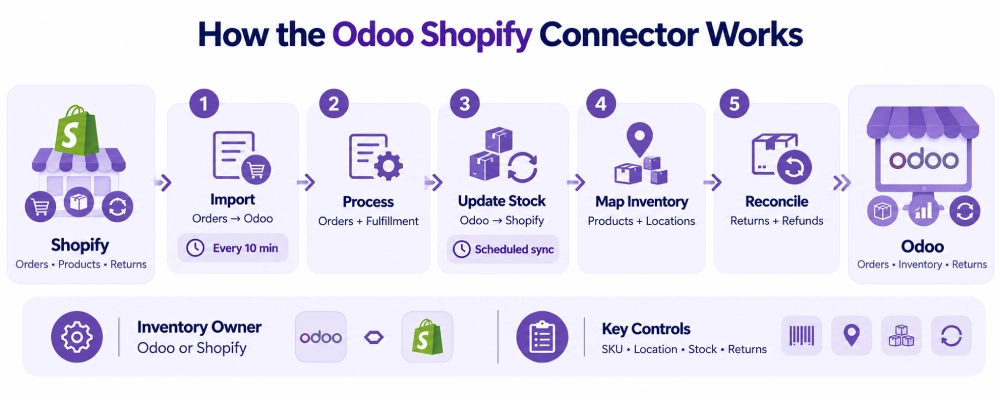
Odoo’s documented Shopify Connector for Odoo 19 synchronizes relevant products, orders, inventory, fulfillment, returns, and refund information between Shopify and Odoo.
It uses scheduled actions rather than real-time webhooks.
Synchronization Timing
The official Odoo 19 documentation specifies these default behaviors:
| Process | Documented Connector Behavior |
| Shopify order import | Every 10 minutes by default |
| Inventory updates from Odoo to Shopify | Pushed after the scheduled order synchronization |
| Deliveries handled in Odoo | Synchronized every 10 minutes by default |
| Returns handled in Shopify | Can synchronize into Odoo under the documented fulfillment arrangement |
| Returns when deliveries are handled in Odoo | Shopify-initiated returns require the documented manual Odoo process |
The schedule creates a possible delay between a completed transaction and the corresponding record in the other platform.
A product sold in an Odoo-managed retail location may therefore remain available on Shopify until the next successful stock update.
For products with very limited stock, that interval may matter.
Odoo’s connector documentation describes the supported synchronization behavior.
Connector Deployment Requirements
The officially documented Shopify Connector for Odoo 19 requires:
- Odoo version 19.0.
- An Odoo.sh deployment.
- A Shopify account.
- The required connector and Odoo applications.
- Configured accounts, products, inventory locations, and synchronization settings.
This has a direct pricing implication.
A retailer planning to use this specific connector should budget for the applicable Odoo Custom subscription, separate Odoo.sh hosting, and integration setup.
The Odoo Standard subscription example is not a complete budget for this deployment.
These requirements apply to the documented Odoo 19 connector. They should not be assumed to describe every third-party connector or integration built for another Odoo version.
Source: Odoo Shopify Connector configuration.
Product and Inventory Mapping
The connector uses product and location relationships to associate Shopify transactions with Odoo records.
Odoo’s documentation describes SKU-based product matching and stock-location mapping.
For example, a Shopify jacket variant must map to the corresponding Odoo product.
An inventory quantity associated with Store A should be linked to the appropriate Odoo stock location rather than another store’s stock record.
Incorrect mappings can create stock discrepancies even when the synchronization itself completes.
Which System Should Control Inventory?
A Shopify-Odoo implementation needs an authoritative inventory record.
If Odoo Inventory controls stock quantities, Shopify transactions must be reflected in the corresponding Odoo orders and inventory processes.
The appropriate availability can then be published back to Shopify according to the integration settings.
If both platforms independently overwrite quantities, a legitimate stock change may be lost.
For example, Shopify may record a sale while Odoo records a supplier receipt.
A synchronization process that merely copies the latest quantity from one platform over the other can erase one of those events.
The integration needs clear transaction ownership, location mapping, and reconciliation procedures.
Returns and Refunds
Returns are more complex than a simple stock increase.
The retailer may need to record:
- The original sale.
- The refund.
- Receipt of the returned item.
- Inspection and restocking.
- The appropriate stock location.
- Relevant financial adjustments.
The official Odoo 19 connector distinguishes returns based on whether fulfillment is handled through Shopify or Odoo.
Retailers should test the intended process before assuming a return created in one platform will automatically produce every required record in the other.
Third-Party Shopify-Odoo Connectors
Other connectors may provide different features, including webhook-based updates or different synchronization intervals.
These capabilities depend on the particular product and its supported Odoo and Shopify versions.
A claim of real-time synchronization should be tested with actual transactions, including failure and recovery scenarios.
The same applies to refund processing, stock-location mapping, and product variants.
When to Choose Shopify POS, Odoo POS, or a Hybrid Setup
The decision depends on the operational change the retailer needs to make.
| Retail Situation | More Suitable Direction to Evaluate | Reason |
| Shopify website already works well and a physical store is opening | Shopify POS | Uses the existing Shopify commerce environment |
| The retailer needs advanced in-store Shopify functions | Shopify POS Pro | Adds eligible advanced retail controls |
| Online and in-store selling are working, but supplier purchasing is disconnected | Shopify with Odoo integration | Preserves checkout while connecting back-office processes |
| POS transactions must connect with purchasing, accounting, and several internal workflows | Odoo POS and relevant Odoo apps | Broader business-process integration |
| The company operates retail alongside wholesale or distribution | Odoo | Can connect retail transactions with wider operational applications |
| Shopify must remain the storefront, but Odoo will manage inventory | Hybrid architecture | Requires authoritative stock records and verified synchronization |
| The retailer needs eligible offline card acceptance | Shopify POS deserves specific evaluation | Supported offline card workflows are documented for eligible hardware |
| The business only needs straightforward checkout with limited configuration | Compare the smallest suitable setup from both vendors | Avoid unnecessary subscriptions and implementation scope |
Shopify POS for an Existing Shopify Retailer
An apparel retailer already operating Shopify ecommerce may want to open its first physical store.
If its product catalog, inventory processes, customer records, and accounting connections are working, Shopify POS can be introduced without replacing that environment.
The retailer should evaluate whether the included POS capabilities are sufficient or whether POS Pro is required.
Odoo POS for Connected Business Operations
A retail distributor may manage physical stores, wholesale customers, several warehouses, supplier purchasing, and accounting.
If these activities rely on disconnected systems, a broader Odoo setup may be appropriate.
The business should establish which processes can be supported by standard applications and which require additional configuration or integration.
The presence of more Odoo applications does not by itself justify a larger implementation.
Shopify With Odoo for Back-Office Management
A retailer may have strong Shopify ecommerce operations but struggle to reconcile online orders, purchasing, inventory, and accounting.
Keeping Shopify while introducing Odoo for the relevant back-office processes can preserve customer-facing operations.
The integration must define who owns stock quantities, orders, refunds, and financial data.
The documented connector’s deployment costs and synchronization behavior should be included in the decision.
How to Test Odoo POS Against Shopify POS
A vendor demonstration should use the retailer’s actual product structure, payment methods, locations, and transaction exceptions.
| Test Scenario | Expected Result |
| Product variant sale | Correct SKU, price, and stock record |
| Location-specific promotion | Correct discount at the intended store |
| Split payment | Accurate recording of every payment method |
| Return with replacement item | Correct refund, exchange, and price difference |
| Damaged merchandise return | Refund recorded without incorrectly increasing sellable stock |
| Online pickup | Merchandise committed to the correct fulfillment location |
| Supplier short delivery | Inventory reflects the quantity actually received |
| Cash register closing | Expected and counted cash remain distinguishable |
| Offline checkout | Supported transactions are preserved and recovered |
| Shopify-Odoo stock update | Correct variant and location updated within the configured interval |
| Duplicate integration event | One sale does not reduce stock twice |
| Concurrent last-unit orders | Reservation rules prevent incompatible commitments or handle the exception |
| Payment settlement | Processor payments and accounting records can be reconciled |
Test a Last-Unit Sale
Suppose one jacket remains available.
One customer attempts to purchase it online while another purchases it at the physical register.
The chosen architecture needs to determine which order receives the stock and what happens to the other transaction.
Scheduled synchronization alone cannot guarantee that simultaneous sales will never conflict.
Test a Failed Integration
Disconnect the Shopify-Odoo integration in a controlled environment.
Complete a representative transaction and restore the connection.
Verify that the order is imported once, the appropriate stock record changes, and any failure is identifiable.
The system should not deduct the product twice when an event is retried.
Test a Cross-Channel Return
Purchase a product online and return it at a physical location.
The process should preserve the original transaction, the permitted refund, and the appropriate inventory receipt or adjustment.
If Shopify and Odoo share responsibility for those records, both sides of the workflow need to be verified.
How Adatasol Supports Odoo POS and Shopify Integration
Retailers considering Odoo may be replacing an existing POS, connecting Shopify with Odoo Inventory, introducing purchasing and accounting processes, or consolidating several disconnected applications.
The appropriate approach depends on which systems already support the business effectively and which operational requirements remain unmet.
Adatasol’s Odoo consulting process begins with the current workflows and business records.
For a Shopify retailer, that may involve determining:
- Whether Shopify should remain the customer-facing storefront.
- Whether Shopify POS should continue handling in-store sales.
- Which stock records Odoo Inventory will manage.
- How Shopify orders should enter Odoo.
- Whether purchasing and accounting should operate within Odoo.
- What connector and hosting requirements apply.
- How failed synchronization, cancellations, and refunds will be handled.
If Odoo POS is required, the configuration also needs to address product variants, payment terminals, store locations, employee permissions, and register closing.
Adatasol prioritizes standard Odoo functionality and configuration before recommending additional extensions or custom development.
Where the business needs a Shopify integration, the implementation should include product mapping, transaction testing, stock reconciliation, error monitoring, and maintainable support arrangements.
Wrapping Up
Shopify POS is well suited to retailers whose online and physical commerce operations are centered on Shopify.
Odoo POS is a strong option when retail transactions need to connect with purchasing, inventory, accounting, and other business processes.
A retailer already using Shopify may benefit from keeping its storefront or existing POS while introducing Odoo for selected back-office functions. That arrangement needs a verified connector, clear record ownership, and appropriate deployment costs.
Before changing platforms, compare actual transaction workflows, staff access, inventory requirements, payment hardware, subscription costs, and integration responsibilities.
Adatasol can help assess whether Odoo POS, a Shopify-Odoo integration, or a broader Odoo configuration fits your retail operations.
Schedule an Odoo consultation to discuss your Shopify setup, retail processes, and Odoo requirements.

