
Odoo POS is a strong NCR Aloha alternative when restaurants need ordering, inventory, purchasing, and accounting connected within one ERP. Aloha provides established restaurant menus, kitchen systems, ingredient controls, and multi-location management. Odoo becomes more relevant when those workflows must also support central warehouses, catering, financial accounting, and other business operations.
Aloha’s capabilities depend on the installed product and subscriptions. Replacing an existing Aloha setup therefore requires more than comparing checkout screens: the restaurant must account for menu logic, management applications, contracts, equipment, and data access.
Odoo POS vs NCR Aloha: Key Differences
| Capability | Odoo POS | NCR Voyix Aloha |
| Platform | POS within Odoo ERP | Restaurant POS and hospitality applications |
| Restaurant service | Tables, open orders, transfers, courses, tips | Counter/table service, tabs, advanced modifiers |
| Kitchen | Preparation displays and printers | Aloha Kitchen and multi-channel routing |
| Menus | Products, categories, price lists, configured rules | Central menus, nested modifiers, location/channel controls |
| Ingredient stock | Receipts, locations, transfers; configured consumption | Recipes, theoretical usage, waste, inventory via eligible tools |
| Purchasing | Purchase orders, receipts, vendor bills across Odoo apps | Vendor catalogs, purchase orders, invoice workflows via Smart Manager |
| Accounting | Integrated journals, bills, taxes, reconciliation | Restaurant reporting and accounting integrations |
| Locations | Multiple POS, warehouses, multi-company options | Enterprise menus, site controls and reporting |
| Payments | Compatible providers and payment terminals | NCR Voyix payment arrangements and supported devices |
| Pricing | Published Odoo plans plus setup and processing | Product- and merchant-specific quotations |
Aloha has considerable native and connected back-office functionality. Odoo adds a common ERP environment for procurement, company accounting, warehouse stock, and activities outside the dining room.
For a single-location full-service restaurant, Aloha may already handle ordering, kitchen production, staff management, and ingredient control. For a restaurant group that purchases centrally, transfers stock between kitchens, sells catering services, and consolidates its books, Odoo can maintain those additional operational records within the same configured environment.
Aloha POS, Aloha Cloud, and Aloha Next: What’s Different?
NCR Voyix offers several Aloha products. An existing Aloha POS installation, Aloha Cloud account, and proposed Aloha Next deployment should not be treated as identical systems.
| Product | Practical distinction |
| Aloha POS | Established restaurant POS with configuration tools, table-service and quick-service workflows |
| Aloha Cloud | Cloud-connected restaurant POS and back-office environment with its own reporting and administration |
| Aloha Essentials | Subscription-based Aloha solution whose included services depend on the agreement |
| Aloha Next | Newer NCR Voyix commerce and restaurant platform with centralized management and cloud-managed edge operations |
NCR Voyix’s Aloha Next restaurant platform emphasizes centrally managed ordering, operational insights, and service continuity. Existing customers may still use older Aloha products and separate management applications. The exact edition, version, integrations, and permissions determine what can be exported or replaced.
Aloha vs Odoo: Restaurant Operations and ERP Capabilities
Restaurant Orders, Tables, and Menu Modifiers
Aloha supports counter orders, table service, open checks, tips, transfers, and detailed modifier rules. Its modifier groups can enforce selection minimums and maximums, include free choices, apply prices, or open further modifier groups.
Odoo POS supports floor plans, merged tables, order transfers, open tabs, split bills, and tips. It also offers reservations through a configured Appointments workflow. Standard product options and restaurant configurations should not be assumed to reproduce every complex Aloha modifier sequence.
An entrée requiring a cooking temperature, side dish, and nested salad toppings needs three things to survive migration: the correct choices on screen, the correct charges, and the correct kitchen instructions. A simple product CSV cannot recreate those relationships.
Aloha menus may also change by job role, service period, location, or ordering channel. In Odoo, product availability, pricelists, employee permissions, and separate POS configurations must reproduce the relevant behavior. A late-night bar menu and a delivery menu may require different selection rules even when they share base products.
Kitchen Preparation and Ordering Channels
Aloha Kitchen coordinates preparation and routing across supported service channels. Its restaurant offering also supports takeout, digital ordering, and advanced kitchen fulfillment, depending on the products installed.
Odoo provides preparation displays and printers that route products to configured kitchen or bar stations. Its course management lets servers send appetizers while keeping main courses pending until the table is ready. Self-ordering and website workflows are available, while external delivery and specialist dispatch may require integrations.
High-volume chains must validate the actual kitchen flow, including:
- Order routing: Which screen or printer receives each item and modifier.
- Service timing: When courses, pickup orders, and cancellations reach preparation stations.
- Channel behavior: Whether dine-in, online, delivery, and kiosk orders retain the required prices and instructions.
Aloha may offer a better match for demanding existing kitchen and enterprise menu workflows. Odoo provides a way to connect the resulting restaurant sales with broader operational records.
A restaurant that already uses Aloha Takeout or delivery integrations should also identify where third-party order identifiers, refunds, delivery fees, and tips are recorded. Replacing the POS should not create duplicate orders or misstate the revenue attributable to dine-in, pickup, and delivery channels.
Ingredient Inventory, Recipes, and Waste
Aloha Smart Manager supports raw items, recipes, supplier information, inventory counts, food costs, and waste in eligible configurations. Its recipe management accounts for ingredient quantities and yields; its 2026 inventory updates include a perpetual on-hand report based on purchasing, sales, recipe usage, transfers, and adjustments.
Odoo Inventory manages receipts, storage locations, transfers, stock counts, and replenishment. A restaurant group can receive ingredients at a commissary and distribute them to separate branches or a catering kitchen without maintaining unrelated location records.
Standard Odoo POS does not automatically deduct every raw ingredient when a prepared dish sells. Recipe-based consumption needs a configured manufacturing, production, or equivalent inventory process, sometimes with an extension. Restaurants already using Aloha’s theoretical food-cost reports must account for the work required to reproduce them.
Both platforms rely on valid quantities, purchase costs, yields, and waste records for accurate restaurant menu costing.
Recipe costing and physical stock are different measurements. A recipe may predict that ten servings use five pounds of chicken, but actual usage also reflects trims, spoilage, substitutions, and portioning. Stock counts and recorded waste remain necessary even when theoretical ingredient consumption is available.
Supplier Purchasing and Receiving
Aloha Smart Manager supports vendor catalogs, purchase orders, and invoice capture and approval. Its February 2026 updates added demand-informed purchasing suggestions and purchase-order transmission improvements, so Aloha should not be portrayed as lacking supplier management.
Odoo Purchase can link vendor orders to receipts in Inventory and vendor bills in Accounting. For example, if a restaurant orders 40 cases and receives 36, the actual receipt and supplier invoice can be compared under configured billing controls.
Odoo offers additional scope when the same purchasing records must support warehouse transfers, intercompany arrangements, other sales channels, and company-wide accounting. A restaurant already satisfied with Aloha Smart Manager purchasing may not gain enough from switching that function alone.
Accounting and Financial Reporting
Aloha provides POS sales, labor, inventory, invoice, and cash-management reporting through its relevant products. Financial data can also move to supported accounting systems through integrations.
Odoo Accounting manages general-ledger transactions, vendor bills, journals, taxes, and reconciliation. Configured POS, Purchase, and Inventory workflows can create linked business and financial records.
A restaurant that buys produce centrally, transfers it to branches, records sales, and pays the supplier can manage those transactions within Odoo’s accounting and inventory structure. Accurate results still require correct taxes, account mappings, valuation rules, and settlement reconciliation.
A location’s daily sales total also differs from the amount deposited by its processor. Card fees, tips, chargebacks, delayed settlements, and refunds must be accounted for using the selected payment method and financial journals. A move to Odoo must preserve those reconciliation rules, even when historical Aloha reporting stays in a separate archive.
Multi-Location and Labor Operations
NCR Voyix provides centralized enterprise menus, location-specific pricing, labor tools, and restaurant reporting. Its newer platform also supports cloud-managed edge operations intended to keep service functioning through certain connectivity problems.
Odoo can connect several POS configurations with warehouses, stock transfers, accounting, and other business activities. Odoo ERP for restaurants can support restaurant groups operating central kitchens, catering, food production, or wholesale channels when the required workflows are configured.
Odoo Employees, Attendances, and Planning cover records, time, and schedules. They should not automatically be treated as complete replacements for Aloha-related payroll processes, U.S. payroll taxes, or tip compliance. Separate legal entities may also require Odoo’s multi-company configuration and licensing.
Odoo POS vs Aloha Pricing and Total Cost
NCR Voyix does not publish one universal U.S. Aloha price covering software, hardware, services, and payment processing. Aloha POS, Cloud, Essentials, and Next may have different quotations and contract arrangements.
| Aloha cost component | What to confirm |
| Software and management apps | Product, locations, included modules, renewals |
| Hardware | Terminal and kitchen-device ownership, support, replacement |
| Payments | Processing rates, transaction charges, settlement terms |
| Services and integrations | Support, installation, interfaces, data access |
Odoo has public subscription prices:
| Odoo plan | Published U.S. price | Scope |
| One App Free | $0 | One eligible app and dependencies |
| Standard | $24.90 promotional; $31.10 regular per user/month | Standard business applications |
| Custom | $49 promotional; $61 regular per user/month | Customization, external API, multi-company, deployment options |
| Light User | Advertised from $8.90 | Eligible roles; quotation required |
Standard and Custom amounts use annual billing, with promotional terms for eligible initial users. Paid plans include standard POS, Inventory, Purchase, and Accounting applications. One App Free does not grant unrestricted use of all four as a complete ERP deployment. Odoo subscription terms also distinguish software licensing from implementation, payment processing, hardware, and additional development.
Which is cheaper? No reliable winner can be established without an Aloha merchant quotation and a scoped Odoo deployment. A single restaurant may find its established Aloha arrangement sufficient. A group paying separately for warehousing, financial accounting, purchasing integrations, and other business tools may have a stronger case for Odoo consolidation.
Aloha vs Odoo: Hardware, Payments, and Integration
Aloha environments can include NCR Voyix terminals, handhelds, kitchen devices, and merchant-processing arrangements. Their suitability for Odoo depends on exact models and connection methods.
Odoo runs on compatible browser devices with supported printers and terminals. Its payment-terminal integrations include providers such as Stripe and Adyen, subject to region and device support. NCR Voyix payment terminals are not automatically reusable with Odoo.
A migration assessment should confirm:
- Equipment: Which printers, tablets, terminals, and displays are owned, reusable, or replaceable.
- Payments: Merchant contracts, refunds, stored credentials, unsettled transactions, and reconciliation.
- Connectivity: Order and kitchen behavior during outages, plus separate card-authorization requirements.
Aloha can also remain the POS. If the installed product and integrations permit suitable access, restaurants may connect sales and other agreed data to Odoo purchasing, inventory, or accounting instead of replacing the service system. Each data flow requires defined item identifiers, locations, taxes, payment mappings, and duplicate-prevention rules.
For example, a chain may keep Aloha’s kitchen routing and centralized menu publishing while sending approved sales totals to Odoo Accounting and managing commissary purchases in Odoo Purchase. The integration scope must specify whether data moves per ticket, per item, or as summarized end-of-day totals. Those choices affect refund handling, inventory reporting, reconciliation, and the system designated as the authoritative record.
When Does Moving From Aloha to Odoo Make Sense?
| Restaurant requirement | Odoo approach to evaluate |
| Central kitchen supplies restaurants and catering | Inventory locations, transfers, production |
| Purchasing and finance use separate records | Purchase, Inventory, Accounting |
| Wholesale or online sales share restaurant products | Connected product, stock, and sales workflows |
| Multiple entities require separate ledgers | Multi-company accounting and permissions |
| Aloha service functions work but ERP processes do not | Retain Aloha and integrate selected data |
| Complex modifiers or high-volume kitchen rules are critical | Test standard Odoo fit before replacing Aloha |
A restaurant should replace Aloha only when validated operational benefits justify reconstructing its existing menus, service processes, hardware, and financial arrangements.
Best NCR Aloha POS Alternatives
1. Odoo POS
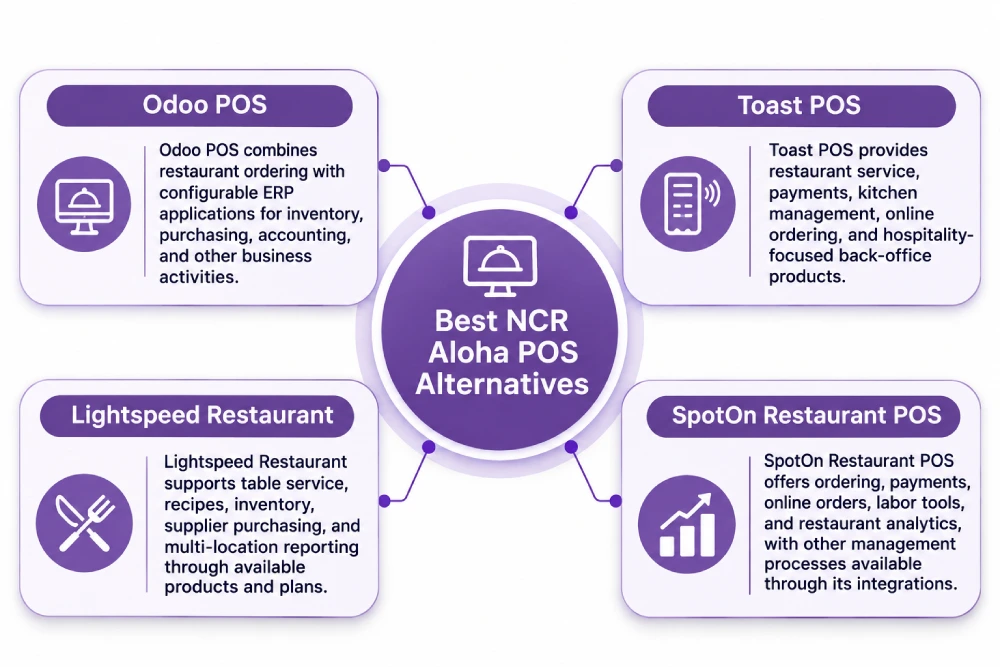
Odoo POS combines restaurant ordering with configurable ERP applications for inventory, purchasing, accounting, and other business activities. Complex Aloha menu behavior and recipe depletion may require additional configuration.
2. Toast POS
Toast POS provides restaurant service, payments, kitchen management, online ordering, and hospitality-focused back-office products. Its equipment and processing arrangements require review.
3. Lightspeed Restaurant
Lightspeed Restaurant supports table service, recipes, inventory, supplier purchasing, and multi-location reporting through available products and plans.
4. SpotOn Restaurant POS
SpotOn Restaurant POS offers ordering, payments, online orders, labor tools, and restaurant analytics, with other management processes available through its integrations.
How to Migrate From NCR Aloha to Odoo POS
Aloha migrations depend on the installed product, available administrative access, contracts, and data relationships. A report export is not a complete POS configuration export.
1. Identify Products, Locations, and Dependencies
Record the Aloha edition and version, administrative systems, menu owners, restaurant locations, payment processors, terminals, and active integrations. Include Aloha Kitchen, Smart Manager, online ordering, loyalty, and accounting connections where used.
2. Obtain Reports and Map Restaurant Data
Traditional Aloha Table Service reporting supports selected CSV, text, and other report exports. Aloha Cloud’s POS Transactions report can export transaction and ticket-detail CSV files; its documented transaction view is limited to a rolling 13 months. Confirm what older records can be retrieved before access ends.
The available file formats and fields vary across Aloha products. A sales-report export may support tax or financial reconciliation without containing modifier assignments, site configuration, item recipes, or employee permissions. An authorized export of configuration data, where available, requires a separate mapping exercise from the historical transaction reports.
| Aloha record | Odoo destination or action |
| Items, categories, submenus | Products and POS categories |
| Nested modifiers, inclusions, substitutions | Rebuild ordering options and pricing rules |
| Location prices, menu hours, revenue centers | Configure POS locations, pricelists, tax/reporting settings |
| Kitchen routes and courses | Configure preparation stations and service stages |
| Ingredients, recipes, suppliers | Validate products, units, purchasing and consumption |
| Historical checks and payments | Archive source reports and establish agreed opening entries |
| Gift cards, customer credits, loyalty | Reconcile outstanding liabilities and permitted customer data |
3. Reconstruct and Test Complex Menus
A steak with a required temperature, side choice, and nested salad topping cannot be recreated from its item name and price. Preserve required/optional choices, modifier minimums and maximums, taxes, kitchen instructions, and channel availability. Test actual combinations before staff begin live service.
4. Establish Inventory and Financial Balances
Verify physical stock, units of measure, supplier orders, vendor balances, and gift-card liabilities. Recipe or theoretical-use data in Aloha Smart Manager may require separate extraction. Odoo’s ingredient consumption and account mapping must be configured and tested, not inferred from imported POS sales.
5. Reconcile Payments, Hardware, and Cutover
Historical Aloha payments are not native Odoo POS sessions. Retain suitable financial and transaction records, resolve pending settlements, and confirm that stored card credentials and proprietary devices are not presumed portable.
For multi-location groups, trial the complete order-to-payment and purchase-to-bill process at selected locations. Prevent duplicate transactions during any parallel period, and train staff before retiring the original system.
A cutover checklist should include final menu approval, opening stock counts, outstanding order closure, gift-card redemption procedures, cash float, terminal certification, kitchen routing, employee logins, and access to archived Aloha reports. Confirm who will resolve failed settlements or incorrect tickets during the first services after launch.
How Adatasol Helps Restaurants Move From Aloha to Odoo
An Aloha migration can involve nested menu modifiers, centralized price rules, kitchen routing, legacy reports, and payment equipment. Adatasol can assess the installed products and determine which functions belong in Odoo, which require an extension, and which should remain connected through an integration.
Our Odoo consulting services support the functional assessment. Odoo implementation and migration planning can then address source-data mapping, inventory and accounting configuration, testing, training, and phased cutover. Aloha may remain in place where its service functions work well and an ERP integration better meets the wider business requirement.
Wrapping Up
NCR Voyix Aloha offers mature restaurant ordering, kitchen, enterprise menu, labor, and inventory capabilities. Odoo POS is more compelling when restaurant operations also need connected purchasing, warehouses, financial accounting, and activities outside hospitality.
A complete replacement is not always necessary. Adatasol can assess the business case for an Odoo rollout or an integration that retains existing Aloha service workflows. Schedule an Odoo consultation to review your restaurant’s requirements.

